BenchmarkXPRT Blog banner

Tag Archives: cross-platform

WebXPRT 5 GA is almost here!

Exciting news: We’re currently in the final stages of preparing for the WebXPRT 5 GA release and expect to take it live very soon!

The WebXPRT 5 Preview period has been very successful, and we appreciate the interest and engagement that we’ve seen from around the world. When we released the Preview and encouraged testers to submit and publish results, we said we’d try to limit any changes in the GA release to areas that would not affect test scores, such as the UI and non-workload features. We’re pleased to report that we’ve achieved that goal. WebXPRT 5 Preview testing results will be comparable with GA build results, so there will be no need to retest with the GA if you’ve already recorded Preview build scores.

If you haven’t yet used the WebXPRT 5 Preview, we encourage you to check out this blog post about the workload lineup. As we implied above, the seven core workloads in the Preview build will remain unchanged in the GA release. Additionally, while we are including a placeholder section for future experimental workloads, we’re not yet ready to include one in the GA release. We are actively working on candidate workloads for that section, but some of the underlying web technologies are not yet ready for widespread use. Taking the time to get these experimental workloads right means that there are really cool and all-new WebXPRT 5 capabilities that are still on the way!

Keep an eye on this space and WebXPRT.com for the GA announcement. This new chapter in the WebXPRT story will be the best one yet!

Justin

WebXPRT appearances in recent articles, reviews, and more!

Over the last few weeks, we’ve been excited to see steady growth in the number of people running the WebXPRT 5 Preview—as well as how widely distributed those runs are around the world. To get a picture of WebXPRT’s approximate global reach, we run the IP address data from our database through a program that provides general city- and country-level location information. By tallying that location data, we can better understand where people are running WebXPRT. By the way, this is the most detailed information we have, and all test data will remain completely anonymous unless you submit it for publication.

Based on that info—along with direct feedback from users—we’ve determined that OEM labs, tech press journalists, and individual consumers have already run the WebXPRT 5 Preview in more than 125 cities across 35 countries!

Test run data is just one of the ways that we track the progress we’re making toward our goal of providing all interested parties with benchmark tools that are reliable, relevant, and free to use. Another important way we track progress toward that goal is by paying attention to how much people use and discuss the XPRTs. When the name of one of our apps appears in an ad, article, or tech review, we call it a “mention.” Tracking those kinds of mentions helps us gauge our reach.

From time to time, we like to share a sample of recent XPRT mentions here in the blog. If you just started following the XPRTs, it may be surprising to see our global reach. Whether you’re a new visitor to the XPRT blog or a longtime reader, we hope you’ll enjoy exploring the links below!

Recent mentions include:

If you’d like to receive monthly updates on XPRT-related news and activity, we encourage you to sign up for our XPRT newsletter. It’s completely free, and all you need to do to join the newsletter mailing list is let us know! We won’t publish, share, or sell any of the contact information you provide, and we’ll only send you the monthly newsletter and occasional benchmark-related announcements, such as important news about patches or releases.

If you have any questions about the WebXPRT 5 Preview or the XPRTs in general, please feel free to contact us.

Justin

WebXPRT 5: Starting to assemble the pieces

In our last blog post, we shared the exciting news that we’re currently working on WebXPRT 5. In that post, we described some of the ways that WebXPRT may evolve with the release of WebXPRT 5. In today’s post, we’ll revisit some of the points of emphasis from the last post and focus on potential workload changes in a bit more detail.

With any benchmark development project, there are always technical challenges you need to iron out. That is especially true with a cross-platform, browser-based benchmark like WebXPRT. Because we’re in the middle of exploring the technical feasibility of a few of the options we’ll mention, we’re not yet ready to say for certain that all these features will be available in the initial WebXPRT 5 release. We can, however, now paint a clearer picture of the overall direction we’re headed.

In the section below, you’ll find updated info on where we stand with respect to some of the key development focal points we discussed in our last post. If there’s an item from that post or previous posts that we didn’t mention below—such as updating the test harness—it doesn’t mean that we’re dropping that goal. We’re just focusing on workloads today.

One of our key goals with WebXPRT 5 is providing more AI-related workloads. In past blog posts, we’ve discussed the growing importance of local, browser-side AI. With WebXPRT 5, we’re investigating two ways that we can expand WebXPRT’s AI portfolio: 1) updating existing WebXPRT 4 AI-oriented workloads, and 2) adding all-new AI workloads.

Here are some possible ways those AI-related changes may play out in both categories:

Updating existing WebXPRT 4 AI-oriented workloads

  • Splitting the existing Organize Album using AI workload’s timed tasks—face detection and image classification—into two independent workloads.
  • Updating the face detection and image classification tasks with the latest versions of the OpenCV.js computer vision and machine learning libraries.
  • Updating the Caffe deep learning framework for the face detection task.
  • Updating the ONNX-based SqueezeNet machine learning model for the image classification tasks.
  • Updating the version of the Tesseract.js OCR engine that WebXPRT uses in the Encrypt Notes and OCR Scan workload. 

Potentially adding all-new AI workloads (either core or experimental workloads)

  • We’re exploring the idea of including a workload that uses an AI-powered segmentation model to blur the background of a video call.
  • We’re exploring the feasibility of including a local LLM chat workload.
  • We would eventually like to include a WebGPU-based web AI framework for a computer vision workload.

In addition to the goal of adding more AI, we previously discussed the possibility of adding non-AI WebGPU workloads. As a web API, WebGPU enables web-based applications—such as image-based GenAI and inference workloads—to directly access the graphics rendering and computational capabilities of a system’s GPU. In the future, WebXPRT 5 could use that technology to execute complex 3D rendering workloads.

We hope today’s post gives you a better sense of where WebXPRT 5 may be headed. We want to reemphasize that while we are actively investigating the possible changes mentioned above, nothing is set in stone. As the pieces start to fall into place, we’ll provide more information here in the blog.

If you have any questions or comments about WebXPRT 5, please feel free to contact us!

Justin
The XPRTs: What would you like to see in 2025?

If you’re a new follower of the XPRT family of benchmarks, you may not be aware of one of the characteristics of the XPRTs that sets them apart from many benchmarking efforts—our openness and commitment to valuing the feedback of tech journalists, lab engineers, and anyone else that uses the XPRTs on a regular basis. That feedback helps us to ensure that as the XPRTs grow and evolve, the resources we offer will continue to meet the needs of those that use them.

In the past, user feedback has influenced specific aspects of our benchmarks, such as the length of test runs, UI features, results presentation, and the addition or subtraction of specific workloads. More broadly, we have also received suggestions for entirely new XPRTs and ways we might target emerging technologies or industry use cases.

As we look forward to what’s in store for the XPRTs in 2025, we’d love to hear your ideas about new XPRTs—or new features for existing XPRTs. Are you aware of hardware form factors, software platforms, new technologies, or prominent applications that are difficult or impossible to evaluate using existing performance benchmarks? Should we incorporate additional or different technologies into existing XPRTs through new workloads? Do you have suggestions for ways to improve any of the XPRTs or XPRT-related tools, such as results viewers?

We’re especially interested in your thoughts about the next steps for WebXPRT. If our recent blog posts about the potential addition of an AI-focused auxiliary workload, what a WebXPRT battery life test would entail, or possible WebAssembly-based test scenarios have piqued your interest, we’d love to hear your thoughts!

We’re genuinely interested in your answers to these questions and any other ideas you have, so please feel free to contact us. We look forward to hearing your thoughts and working together to figure out how they could help shape the XPRTs in 2025!

Justin

More than two million XPRT benchmark runs and downloads!

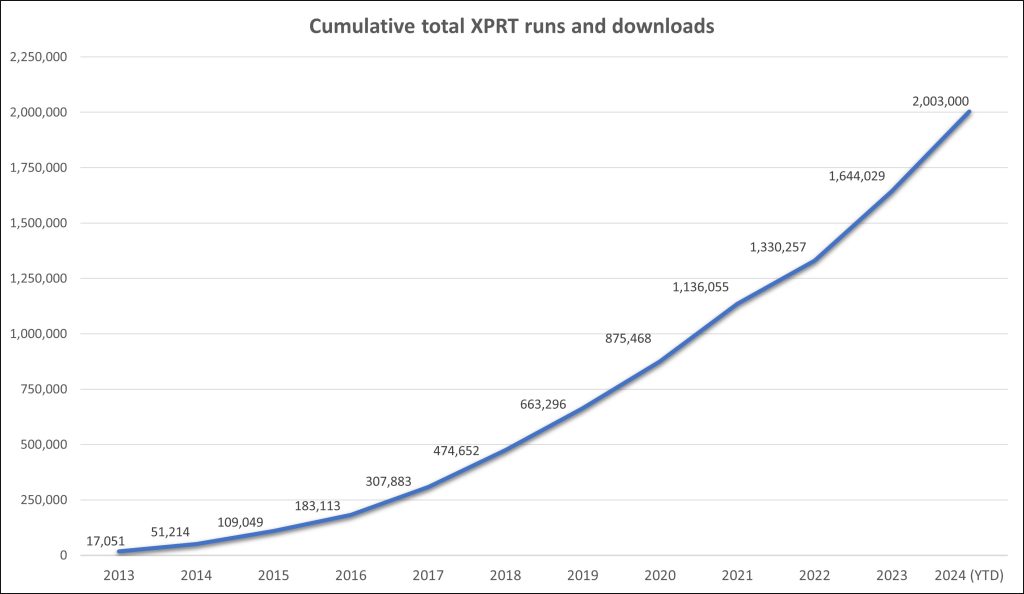
As we near the end of 2024, we’re excited to share that the XPRTs have passed another notable milestone—over 2,000,000 combined runs and downloads! The rate of growth in the total number of XPRT runs and downloads is exciting. It took about seven and a half years for the XPRTs to pass one million total runs and downloads—but it’s taken less than half that, three and a half years, to add another million. Figure 1 shows the climb to the two-million-run mark.

Figure 1: The cumulative number of total yearly XPRT runs and downloads over time.

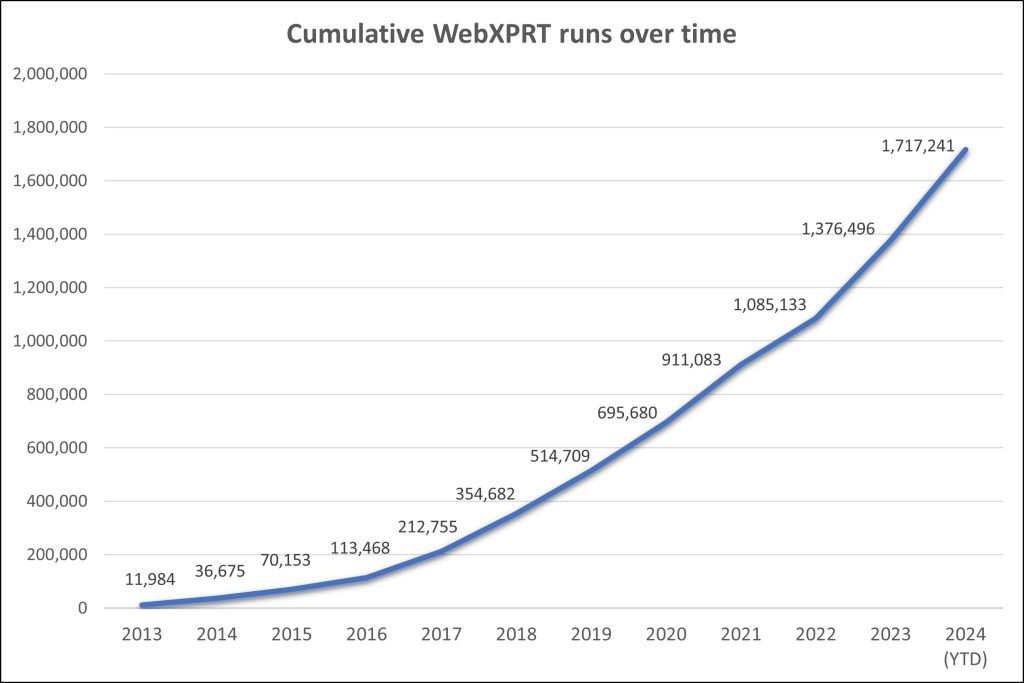
As you would expect, most of the runs contributing to that total come from WebXPRT tests. If you’ve run WebXPRT in any of the 983 cities and 84 countries from which we’ve received completed test data—including newcomers El Salvador, Malaysia, Morocco, and Saudi Arabia—we’re grateful for your help in reaching this milestone! As Figure 2 illustrates, WebXPRT use has grown steadily since the debut of WebXPRT 2013. On average, we now record more than twice as many WebXPRT runs each month than we recorded in WebXPRT’s entire first year. With over 340,000 runs so far in 2024—an increase of more than 16 percent over last year’s total—that growth is showing no signs of slowing down.

Figure 2: The cumulative number of total yearly WebXPRT runs over time.

This milestone isn’t just about numbers. Establishing and maintaining a presence in the industry and experiencing year-over-year growth requires more than technical know-how and marketing efforts. It requires the ongoing trust and support of the benchmarking community—including OEM labs, the tech press, and independent computer enthusiasts—and those who simply want to know how good their devices are at web browsing.

Once again, we’re thankful for the support of everyone who’s used the XPRTs over the years, and we look forward to another million!

If you have any questions or comments about any of the XPRTs, we’d love to hear from you!

Justin

Using WebXPRT 4’s language options

Sohu, a major Chinese site, recently published a tech review discussing their first impressions from Intel Core Ultra 5 245K and Intel Core Ultra 9 285K white box testing. In the article, they included screenshots of the WebXPRT 4 test results they produced during their evaluation. The screenshots showed that the testers had enabled WebXPRT 4’s Simplified Chinese UI. They’re not the first to use this option, and it’s one we are glad worked for them.

Though WebXPRT’s language settings menu has proven to be a popular feature for many users around the world, some folks may not even know the option is there. In today’s blog, we’ll go over the basics of this simple but helpful testing option.

On WebXPRT’s Start screen, you can choose from three language options in the WebXPRT 4 UI: Simplified Chinese, German, and English. We included Simplified Chinese and German because of the large number of tests we see from China and Central Europe. We wanted to make testing a little easier for users who prefer those languages and we’re glad to see people using the options.

Changing languages in the WebXPRT UI is quick and easy. Locate the “Change Language?” prompt under the WebXPRT 4 logo at the top of the Start screen, and click or tap the arrow beside it. After the drop-down menu appears, select the language you want. The language of the start screen will then change to the language you selected, and the in-test workload headers and end-of-test results screen will also appear in the language you selected.

Figures 1–3 below my sig show the “Change Language?” drop-down menu and how the Start screen appears when you select Simplified Chinese or German. It’s important to note that if you have a translation extension installed in your browser, it may override the WebXPRT UI by reverting the language back to your browser’s default. You can avoid this conflict by temporarily disabling the browser’s translation extension for the duration of WebXPRT testing.

We hope WebXPRT 4’s language options will help facilitate the testing process for many users around the world. If you’re a frequent WebXPRT user and would like to see us add support for another language, please contact us. And, of course, if you have any questions about WebXPRT 4 testing, please let us know!

Justin

Figure 1: A screenshot of the WebXPRT 4 Start screen showing the language options drop-down menu.
Figure 2: A screenshot of the WebXPRT 4 Start screen with a Simplified Chinese UI.
Figure 3: A screenshot of the WebXPRT 4 Start screen with a German UI.

Check out the other XPRTs:

Forgot your password?