We’re happy to announce that the WebXPRT
5 source code is now available! We’re offering the source code in the form of a
build package that contains all the necessary files and step-by-step instructions
for setting up a locally hosted version of WebXPRT 5. While you’re free to use
the code for purposes of review, internal testing, or experimentation, we do
ask that you publish only test results from the official version of WebXPRT 5
that we host at WebXPRT.com.
We’re offering the build package upon
request, rather than posting a permanent download link, to prevent bots or
other malicious actors from downloading it. This method also lets us engage
with folks who are interested in the source code and answer any questions they
may have.
To request the code, simply click the “Request WebXPRT 5 source code” link in the gray Helpful Info box on the WebXPRT 5 home page (see Figure 1 below). Clicking the link will allow you to email the BenchmarkXPRT Support team directly and request the code.
Figure 1: A screenshot showing the location of the link to request WebXPRT 5 source code on WebXPRT.com
After we receive your request, we’ll
send you a secure link to the current WebXPRT 5 build package.
If you have any questions about
accessing the WebXPRT 5 source code, let us know!
The big day
has finally arrived—WebXPRT 5 is now available!
You can
access the benchmark at WebXPRT.com or WebXPRT5.com. For longtime WebXPRT users, the WebXPRT 5 UI will have an
all-new look but a very familiar feel. The general process for kicking off both
manual and automated tests is the same as with WebXPRT 4, so the transition to
WebXPRT 5 testing will be straightforward. For legacy testing purposes, we will
continue to make WebXPRT 4 available on our site.
Here is a
quick overview of the differences between WebXPRT 4 and WebXPRT 5:
General changes
We’ve updated the aesthetics of the WebXPRT UI to make WebXPRT 5 visually distinct from older versions. We did not significantly change the flow of the UI.
We’ve updated content in some of the workloads to reflect changes in everyday technology, such as upgrading most of the photos in the photo processing workloads to higher resolutions.
We’ve updated the base calibration system for score calculations and adjusted the scoring scale. WebXPRT 5 scores will be in a lower numerical range than WebXPRT 4 scores. You should not compare these results to scores from previous versions of WebXPRT.
The workloads
WebXPRT 5 includes the following seven workloads:
Video Background Blur with AI. Blurs the background of a video call using an AI-powered segmentation model.
Photo Effects. Applies a filter to six photos using the Canvas API.
Detect Faces with AI. Detects faces and organizes photos in an album using computer vision (OpenCV.js with Caffe Model).
Image Classification with AI. Labels images in an album using machine learning (OpenCV.js and ML Classify with the SqueezeNet model).
Document Scan with AI. Scans a document image and converts it to text using ML-based OCR (Wasm with LSTM).
School Science Project. Processes a DNA sequencing task using Regex and String manipulation.
Homework Spellcheck. Spellchecks a document using Typo.js and Web Workers.
We’re thankful for all of the feedback we received during the WebXPRT 5 development process and Preview period, and we look forward to seeing your WebXPRT 5 results. If you have any questions about WebXPRT, please feel free to contact us!
We’re excited to announce
that the WebXPRT 5 Preview is now available!
The Preview is available to
everyone. You can access it at www.WebXPRT5.com or
through a link on WebXPRT.com.
You are free to publish
scores from testing with this Preview build; in fact, we encourage it. We want
to know how it is performing for you, so we love to see both test scores and
any feedback you would like to give.
We may still tweak a few things
in the benchmark between this Preview and the final release. We plan to limit
any potential changes, however, to areas like the UI and other features, things
we do not expect to affect test scores.
Longtime WebXPRT users will
notice that while the WebXPRT 5 Preview UI has a new look and feel, the basic
layout has not changed. The general process for kicking off both manual and
automated tests is the same as with WebXPRT 4, so the transition from WebXPRT 4
to WebXPRT 5 testing should be straightforward.
We also encourage you to check
out our recent XPRT blog post on the WebXPRT
5 workload lineup for more
details about what’s new in the Preview release—including more AI-oriented
scenarios than ever before!
After you try the WebXPRT 5 Preview, please send us your comments. Thanks, and happy testing!
We’re excited to
announce that it’s been 10 years since the initial launch of WebXPRT! In early
2013, we introduced WebXPRT as a unique browser performance benchmark in a market
space that was already crowded with a variety of specialized measurement tools.
Our goal was to offer a benchmark that could compare the performance of almost
any web-enabled device, using scenarios created to mirror real-world tasks. We
wanted it to be a free, easily accessible, easy-to-run, useful, and appealing
testing option for OEM labs, vendors, and the tech press.
When we look back on
the last 10 years of WebXPRT, we can’t help but conclude that our efforts have
been successful. Since those early days, the WebXPRT market presence has grown
from humble beginnings into a worldwide industry standard. Hundreds of tech
press publications have used WebXPRT in thousands of articles and reviews, and testers
have now run the benchmark well over 1.1 million times.
Below, I’ve listed
some of the WebXPRT team’s accomplishments over the last decade. If you’ve been
following WebXPRT from the beginning, this may all be familiar, but if you’re
new to the community, it may be
interesting to see some of the steps that contributed to making WebXPRT what it
is today.
We added subtests and updated existing workloads along the way to measure browser performance with newer HTML5, JavaScript, and WebAssembly technologies.
We added Simplified Chinese and German language options to the WebXPRT UI.
We added a WebXPRT host server in Singapore for testers in East Asia.
We published six WebXPRT white papers, along with three results calculation spreadsheets.
In future blog posts, we’ll look at how the number of WebXPRT runs has grown over time, and how WebXPRT use has grown among OEMs, vendors, and the tech press worldwide. Do you have any thoughts that you’d like to share from your WebXPRT testing experience? If so, let us know!
If you’ve been reading the XPRT blog for a while, you know that
we occasionally like to revisit a series of in-house WebXPRT comparison tests
to see if recent updates have changed the performance rankings of popular web
browsers. We published our most
recent comparison last April, when we
used WebXPRT 4 to compare the performance of five browsers on the same system.
For this round of tests, we used a Dell
XPS 13 7930, which features an Intel Core i3-10110U processor and 4 GB of RAM, running
Windows 11 Home updated to version 22H2 (22621.1105). We installed all current
Windows updates, and updated each of the browsers under test: Brave, Google
Chrome, Microsoft Edge, Mozilla Firefox, and Opera.
After the update process completed, we turned off updates to
prevent them from interfering with test runs. We ran WebXPRT 4 three times on each
of the five browsers. The score we post for each browser is the median of the
three test runs.
In our last round of tests, Edge was the clear winner, with a
2.2 percent performance advantage over Chrome. Firefox came in last, about 3
percent slower than Opera, which was in the middle of the pack. With updated
versions of the browsers, the only change in rank order was that Brave moved
into a tie with Opera.
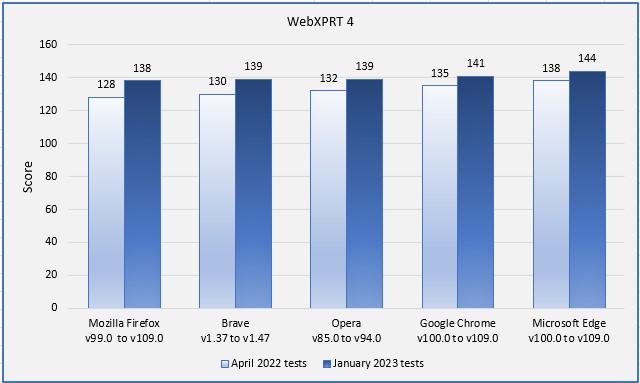
While the rank order from this round of tests was very similar to the previous round, we did observe two clear performance trends: (1) the range between high and low scores was tighter, dropping from a difference of 7.8 percent to 4.3 percent, and (2) every browser demonstrated improved performance. The chart below illustrates both trends. Firefox showed the single largest score improvement at 7.8 percent, but the performance jump for each browser was considerable.
Do these results mean that Microsoft
Edge will always provide a speedier web experience, or Firefox will always be
slower than the others? Not necessarily. It’s true that a device with a higher
WebXPRT score will probably feel faster during daily web activities than one
with a much lower score, but your experience depends in part on the types of
things you do on the web, along with your system’s privacy settings, memory
load, ecosystem integration, extension activity, and web app capabilities.
In addition, browser speed can noticeably
increase or decrease after an update, and OS-specific optimizations can affect
performance, such as with Edge on Windows 11 and Chrome on Chrome OS. All these
variables are important to keep in mind when considering how WebXPRT results
translate to your everyday experience.
Have you used WebXPRT to compare browser performance on the same system? Let us know how it turned out!
From time to time, we like to run a series of in-house WebXPRT comparison tests to see if recent updates have changed the performance rankings of popular web browsers. We published our most recent comparison last October, when we used WebXPRT 3 to compare Windows 10 and Windows 11 browser performance on the same system. Now that WebXPRT 4 is live, it’s time to update our comparison series with the newest member of the XPRT family.
For this round of tests, we used a Dell
XPS 13 7930, which features an Intel Core i3-10110U processor and 4 GB of RAM, running
Windows 11 Home updated to version 21H2 (22000.593). We installed all current
Windows updates and tested on a clean system image. After the update process
completed, we turned off updates to prevent them from interfering with test
runs. We ran WebXPRT 4 three times each across five browsers: Brave, Google
Chrome, Microsoft Edge, Mozilla Firefox, and Opera. The posted score for each
browser is the median of the three test runs.
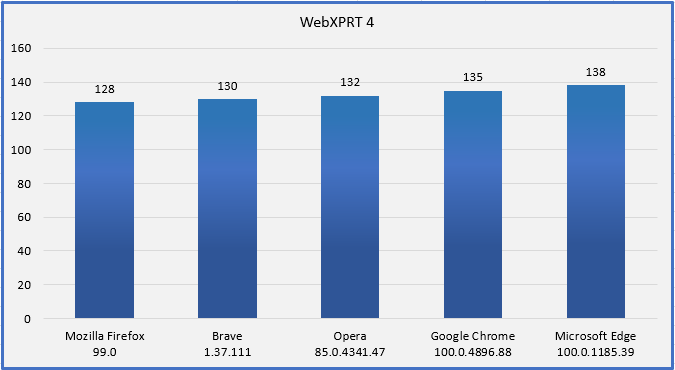
In our previous round of tests with WebXPRT 3, Google Chrome narrowly beat out Firefox in Windows 10 and Windows 11 testing, but the scores among three of the Chromium-based browsers (Chrome, Edge, and Opera) were close enough that most users performing common daily tasks would be unlikely to notice a difference. Brave performance lagged by about 7 percent, a difference that may be noticeable to most users. This time, when testing updated versions of the browsers with WebXPRT 4 on Windows 11, the rankings changed. Edge was the clear winner, with a 2.2 percent performance advantage over Chrome. Firefox came in last, about 3 percent slower than Opera, which was in the middle of the pack. Performance from Brave improved to the point that it was no longer lagging the other Chromium-based browsers.
Do these results mean that Microsoft
Edge will always provide you with a speedier web experience? A device with a
higher WebXPRT score will probably feel faster during daily use than one with a
lower score. For comparisons on the same system, however, the answer depends in
part on the types of things you do on the web, how the extensions you’ve
installed affect performance, how frequently the browsers issue updates and
incorporate new web technologies, and how accurately each browser’s default
installation settings reflect how you would set up that browser for your daily
workflow.
In addition, browser speed can
increase or decrease significantly after an update, only to swing back in the
other direction shortly thereafter. OS-specific optimizations can also affect
performance, such as with Edge on Windows 11 and Chrome on Chrome OS. All these
variables are important to keep in mind when considering how WebXPRT results
translate to your everyday experience.
Do you have insights you’d like to share from using WebXPRT to compare browser performance? Let us know!
Cookie Notice: Our website uses cookies to deliver a smooth experience by storing logins and saving user information. By continuing to use our site, you agree with our usage of cookies as our privacy policy outlines.