BenchmarkXPRT Blog banner

Category: Google Chrome

Recent WebXPRT mentions in tech press articles, reviews, and more!

We’ve been excited to see steady growth in the number and variety of media outlets discussing WebXPRT around the world—especially WebXPRT 5. Tracking WebXPRT’s reach in the global tech press—with both English- and non-English-speaking audiences—helps us assess how well WebXPRT’s effectiveness as a benchmarking tool is translating across geographies and cultures.

One way we track WebXPRT’s reach is by paying attention to how much people use and discuss the benchmark in ads, articles, or tech reviews. We call each of those instances a “mention.” We know that our readers won’t see all of those mentions during their normal reading, so we occasionally like to share a sample of recent WebXPRT mentions here in the blog. Whether you just started following WebXPRT or you’re a longtime blog reader, we hope you’ll enjoy exploring the links below!

Recent WebXPRT mentions include the following:

  • PCMag used WebXPRT 5 in an article comparing the speed of the Apple Safari, Brave, Google Chrome, Microsoft Edge, and Mozilla Firefox browsers.
  • Intel referenced WebXPRT 5 performance scores in a press release and product brief for Core Series 3 processors.
  • Tom’s Hardware included WebXPRT 5 in an updated list of recommended CPU benchmarks.
  • Notebookcheck published WebXPRT 5 scores for more than 50 devices on its Benchmark and Test Results page, including the Alienware 16 Area-51, Apple MacBook Pro 16 2025 M5 Pro, ASUS ROG Zephyrus Duo, Lenovo Legion 7 16, MSI Prestige 16 AI, and Samsung Galaxy Book6 Ultra.
  • Microsoft’s Windows Performance Lab published a range of benchmark results that included WebXPRT 4 scores for devices from a wide range of vendors, including an array of Dell laptops.
  • Other outlets that have published articles, ads, or reviews mentioning WebXPRT in the last few months include the following: 3DNews.ru (Russia), AboutChromebooks.com, Alibaba.com (China), BenchLife.info (China), ComputerBase (Germany), iPon (Germany), ITC.ua (Ukraine), Mobasai (Taiwan), Phoronix, TechRadar, Tweakers, XFastest (Taiwan), and ZDNET Korea, among many others.

On a related note, if you’d like to receive monthly updates on XPRT-related news and activity, we encourage you to sign up for our XPRT newsletter. It’s completely free, and all you need to do to join the newsletter mailing list is let us know! We never publish, share, or sell any of the contact information our readers provide, and we’ll only send you the monthly newsletter and occasional benchmark-related announcements, such as important news about patches or releases.

If you have any questions or comments about WebXPRT 5 or the XPRTs in general, please feel free to contact us. We love to hear from the folks that are using our benchmarks!

Justin
CrXPRT 2 functionality is ending with ChromeOS 139

Back in January, we discussed the ChromeOS team’s decision to eventually end support for all user-installed Chrome Apps—including CrXPRT 2—upon the release of Chrome 138 in July of this year. As best we can tell, the move is part of their overall strategy of transitioning all support to Chrome extensions and Progressive Web Apps. We knew that after the support cutoff date, we would not be able to publish any fixes or updates for CrXPRT 2, but we weren’t exactly sure how the transition would affect the app’s overall functionality.

We’ve now confirmed that while CrXPRT 2 still functions normally through Chrome 138.0.7204.255 (beta), the app does not launch at all on Chrome Canary 139. Consequently, we expect that stable channel system updates will disable CrXPRT 2 on most systems after Chrome 139 goes live on August 5th. We will initially leave CrXPRT 2 on our site for those who want to use it on older versions of Chrome, but over time we will archive it as an inactive benchmark.

We want to extend our heartfelt thanks to the many people around the world who used CrXPRT 2 for lab evaluations, product reviews, and individual testing over the past several years. We’re grateful for your support! We will update readers here in the blog if we decide to pursue new ChromeOS benchmark development work in the future.

Justin

February 2025 WebXPRT 4 browser performance comparisons

Once or twice per year, we refresh our ongoing series of WebXPRT comparison tests to see if software version updates have reordered the performance rankings of popular web browsers. We published our most recent comparison last June, when we used WebXPRT 4 to compare the performance of five browsers—Brave, Google Chrome, Microsoft Edge, Mozilla Firefox, and Opera—on a Lenovo ThinkPad T14s Gen 3. When assessing performance differences, it’s worth noting that all the browsers—except for Firefox—are built on a Chromium foundation. In the last round of tests, the scores were very tight, with a difference of only four percent between the last-place browser (Brave) and the winner (Chrome). Firefox’s score landed squarely in the middle of the pack.

Recently, we conducted a new set of tests to see how performance scores may have changed. To maintain continuity with our last comparison, we stuck with the same ThinkPad T14s as our reference system. That laptop is still in line with current mid-range laptops, so our comparison scores are likely to fall within the range of scores we would see from a typical user today. The ThinkPad is equipped with an Intel Core i7-1270P processor and 16 GB of RAM, and it’s running Windows 11 Pro, version 23H2 (22631.4890).

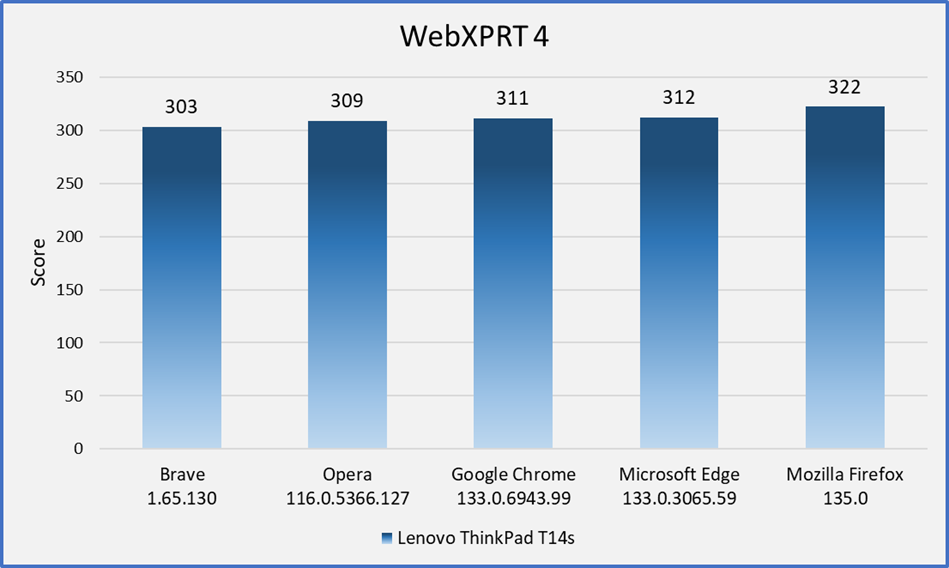
Before testing, we installed all current Windows updates, and we updated each of the browsers to the latest available stable version. After the update process was complete, we turned off updates to prevent any interference with test runs. We ran WebXPRT 4 five times on each of the five browsers. In Figure 1 below, each browser’s score is the median of the five test runs.

In this round of tests, the gap widened a bit between first and last place scores, with a difference of just over six percent between the lowest median score of 303 (Brave) and the highest median score of 322 (Firefox).

Figure 1: The median scores from running WebXPRT 4 five times with each browser on the Lenovo ThinkPad T14s Gen 3.

In this round of tests, the distribution of scores indicates that most users would not see a significant performance difference if they switched between the latest versions of these browsers. The one exception may be a change from the latest version of Brave to the latest version of Firefox. Even then, the quality of your browsing experience will often depend on other factors. The types of things you do on the web (e.g., gaming, media consumption, or multi-tab browsing), the type and number of extensions you’ve installed, and how frequently the browsers issue updates and integrate new technologies—among other things—can all affect browser performance over time. It’s important to keep such variables in mind when thinking about how browser performance comparison results may translate to your everyday web experience.

Have you tried using WebXPRT 4 in your own browser performance comparison? If so, we’d love to hear about it! Also, please let us know if there are other types of WebXPRT comparisons you’d like to see!

Justin

An update on CrXPRT support in ChromeOS

CrXPRT users may remember that back in 2022, we discussed the ChromeOS team’s decision to end formal support for Chrome Apps and instead focus on Chrome extensions and Progressive Web Apps. This decision meant that we would not be able to publish any future fixes or updates for CrXPRT 2, although moving forward, we weren’t sure how it would affect the app’s functionality.

After receiving a lot of feedback regarding their original timeline, the ChromeOS team decided to extend Chrome App support for Enterprise and Education account customers through January 2025. Because we publish CrXPRT through a private BenchmarkXPRT developer account, we assumed at the time that the support extension would not apply to CrXPRT.

Recently, the ChromeOS team released new information about their scheduled support timeline. Now, they plan to end formal support for all user-installed Chrome Apps in July 2025 (Chrome 138). In February 2028, the Chrome 168 release will mark the end of life for all Chrome Apps.

The good news is that—in spite of a lack of formal ChromeOS support over the past couple of years—the CrXPRT 2 performance and battery life tests have continued to run without any known issues. As of today, the app functions normally up through the Beta release of ChromeOS version 132.0.6834.52.

We will continue to run the benchmark on a regular basis to monitor functionality, and we will disclose any future issues here in the blog and on CrXPRT.com. We hope the app will continue to run both performance and battery life tests well into the future. However, given the frequency of Chrome updates, it’s difficult for us to predict how long the benchmark will remain viable.

If you have any questions about CrXPRT, please let us know!

Justin

Web APIs: Possible paths for the AI-focused WebXPRT 4 auxiliary workload

In our last blog post, we discussed one of the major decision points we’re facing as we work on what we hope will be the first new AI-focused WebXPRT 4 auxiliary workload: choosing a Web AI framework. In today’s blog, we’re discussing another significant decision that we need to make for the future workload’s development path: choosing a web API.

Many of you are familiar with the concept of an application programming interface (API). Simply put, APIs implement sets of software rules, tools, and/or protocols that serve as intermediaries that make it possible for different computer programs or components to communicate with each other. APIs simplify many development tasks for programmers and provide standardized ways for applications to share data, functions, and system resources.

Web APIs fulfill the intermediary role of an API—through HTTP-based communication—for web servers (on the server side) or web browsers (on the client side). Client-side web APIs make it possible for browser-based applications to expand browser functionality. They execute the kinds of JavaScript, HTML5, and WebAssembly (Wasm) workloads—among other examples—that support the wide variety of browser extensions many of us use every day. WebXPRT uses those types of browser-based workloads to evaluate system performance. To lay a solid foundation for the first future browser-based AI workload, we need to choose a web API that will be compatible with WebXPRT and the Web AI framework and AI inference workload(s) we ultimately choose.

Currently, there are three main web API paths for running AI inference in a web browser: Web Neural Network (WebNN), Wasm, and WebGPU. These three web technologies are in various stages of development and standardization. Each has different levels of support within the major browsers. Here are basic overviews of each of the three options, as well as a few of our thoughts on the benefits and limitations that each may bring to the table for a future WebXPRT AI workload:

  • WebNN is a JavaScript API that enables developers to directly execute machine learning (ML) tasks on neural networks within web-based applications. WebNN makes it easier to integrate ML models into web apps, and it allows web apps to leverage the power of neural processing units (NPUs). WebNN has a lot going for it. It’s hardware-agnostic and works with various ML frameworks. It’s likely to be a major player in future browser-based inference applications. However, as a web standard, WebNN is still in the development stage and is only available in developer previews for Chromium-based browsers. Full default WebNN support could take a year or more.
  • Wasm is a binary instruction format that works across all modern browsers. Wasm provides a sandboxed environment that operates at near-native speeds and takes advantage of common hardware specs across platforms. Wasm’s capabilities offer web developers a great deal of flexibility for running complex client applications in the browser. Simply put, Wasm can help developers adapt their existing code for additional platforms and browser-based applications without requiring extensive code rewrites. Wasm’s flexibility and cross-platform compatibility is one of the reasons that we’ve already made use of Wasm in two existing WebXPRT 4 workloads that feature AI tasks: Organize Album using AI, and Encrypt Notes and OCR Scan. Wasm can also work together with other web APIs, such as WebGPU.
  • WebGPU enables web-based applications to directly access the graphics rendering and computational capabilities of a system’s GPU. The parallel computational abilities of GPUs make them especially well-suited to efficiently handle some of the demands of AI inference workloads, including image-based GenAI workloads or large language models. Google Chrome and Microsoft Edge currently support WebGPU, and it’s available in Safari through a tech preview.

Right now, we don’t think that WebNN will be fully out of the development phase in time to serve as our go-to web API for a new WebXPRT AI workload. Wasm and/or WebGPU appear to our best options for now. When WebNN is fully baked and available in mainstream browsers, it’s possible that we could port any existing Wasm- or WebGPU-based WebXPRT AI workloads to WebNN, which may open the possibility of cross-platform browser-based NPU performance comparisons.

All that said and as we mentioned in our previous post about Web AI frameworks, we have not made any final decisions about a web API or any aspect of the future workload. We’re still in the early stages of this project. We want your input.

If this discussion has sparked web AI ideas that you think would benefit the process, or if you have feedback you’d like to share, please feel free to contact us!

Justin

Updating our WebXPRT 4 browser performance comparisons with new gear

Once or twice per year, we refresh an ongoing series of WebXPRT comparison tests to see if recent updates have reordered the performance rankings of popular web browsers. We published our most recent comparison in January, when we used WebXPRT 4 to compare the performance of five browsers on the same system.

This time, we’re publishing an updated set of comparison scores sooner than we normally would because we chose to move our testing to a newer reference laptop. The previous system—a Dell XPS 13 7930 with an Intel Core i3-10110U processor and 4 GB of RAM—is now several years old. We wanted to transition to a system that is more in line with current mid-range laptops. By choosing to test on a capable mid-tier laptop, our comparison scores are more likely to fall within the range of scores we would see from a typical user today.

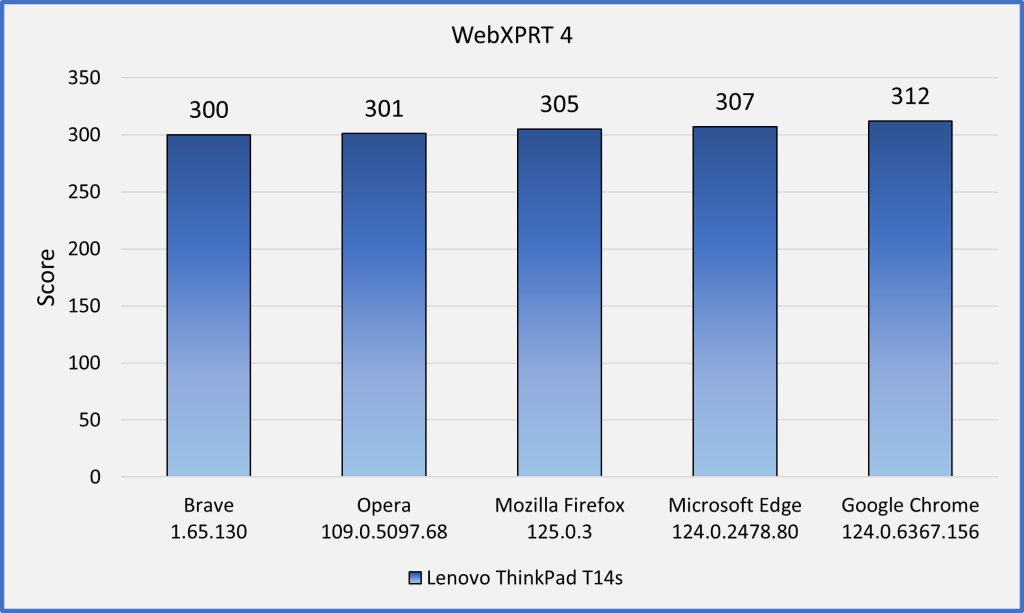
Our new reference system is a Lenovo ThinkPad T14s Gen 3 with an Intel Core i7-1270P processor and 16 GB of RAM. It’s running Windows 11 Pro, updated to version 23H2 (22631.3527). Before testing, we installed all current Windows updates and tested on a clean system image. After the update process was complete, we turned off updates to prevent any further updates from interfering with test runs. We ran WebXPRT 4 three times each on five browsers: Brave, Google Chrome, Microsoft Edge, Mozilla Firefox, and Opera. In Figure 1 below, each browser’s score is the median of the three test runs.

In our last round of tests—on the Dell XPS 13—the four Chromium-based browsers (Brave, Chrome, Edge, and Opera) produced close scores, with Edge taking a small lead among the four. Each of the Chromium browsers significantly outperformed Firefox, with the slowest of the Chromium browsers (Brave) outperforming Firefox by 13.5 percent.

In this round of tests—on the Lenovo ThinkPad T14s—the scores were very tight, with a difference of only 4 percent between the last-place browser (Brave) and the winner (Chrome). Interestingly, Firefox no longer trailed the four Chromium browsers—it was squarely in the middle of the pack.

Figure 1: The median scores from running WebXPRT 4 three times with each browser on the Lenovo ThinkPad T14s.

Unlike previous rounds that showed a higher degree of performance differentiation between the browsers, scores from this round of tests are close enough that most users wouldn’t notice a difference. Even if the difference between the highest and lowest scores was substantial, the quality of your browsing experience will often depend on factors such as the types of things you do on the web (e.g., gaming, media consumption, or multi-tab browsing), the impact of extensions on performance, and how frequently the browsers issue updates and integrate new technologies, among other things. It’s important to keep such variables in mind when thinking about how browser performance comparison results may translate to your everyday web experience.

Have you tried using WebXPRT 4 to test the speed of different browsers on the same system? If so, we’d love for you to tell us about it! Also, please tell us what other WebXPRT data you’d like to see!

Justin

Check out the other XPRTs:

Forgot your password?