BenchmarkXPRT Blog banner

Category: Dell

The WebXPRT 4 results viewer: A powerful tool for browsing hundreds of test results

In our recent blog post about the XPRT results database, we promised to discuss the WebXPRT 4 results viewer in more detail. We developed the results viewer to serve as a feature-rich interactive tool that visitors to WebXPRT.com can use to browse the test results that we’ve published on our site, dig into the details of each result, and compare scores from multiple devices. The viewer currently has almost 700 test results, and we add new PT-curated entries each week.

Figure 1 shows the tool’s default display. Each vertical bar in the graph represents the overall score of a single test result, with bars arranged left-to-right, from lowest to highest. To view a single result in detail, hover over a bar to highlight it, and a small popup window will display the basic details of the result. You can then click to select the highlighted bar. The bar will turn dark blue, and the dark blue banner at the bottom of the viewer will display additional details about that result.
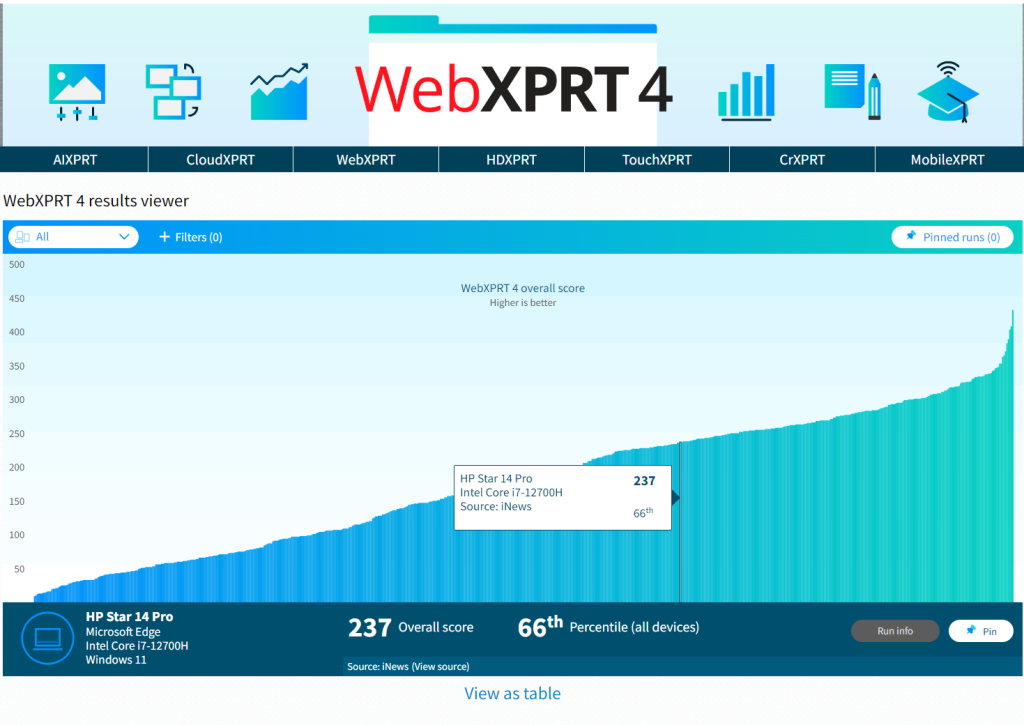
Figure 1: The WebXPRT 4 results viewer tool’s default display

In the example in Figure 1, the banner shows the overall score (237), the score’s percentile rank (66th) among the scores in the current display, the name of the test device, and basic hardware configuration information. If the source of the result is PT, you can click the Run info button in the bottom right-hand corner of the display to see the run’s individual workload scores. If the source is an external publisher, users can click the Source link to navigate to the original site.

The viewer includes a drop-down menu that lets users quickly filter results by major device type categories, plus a tab with additional filtering options, such as browser type, processor vendor, and result source. Figure 2 shows the viewer after I used the device type drop-down filter to select only laptops.
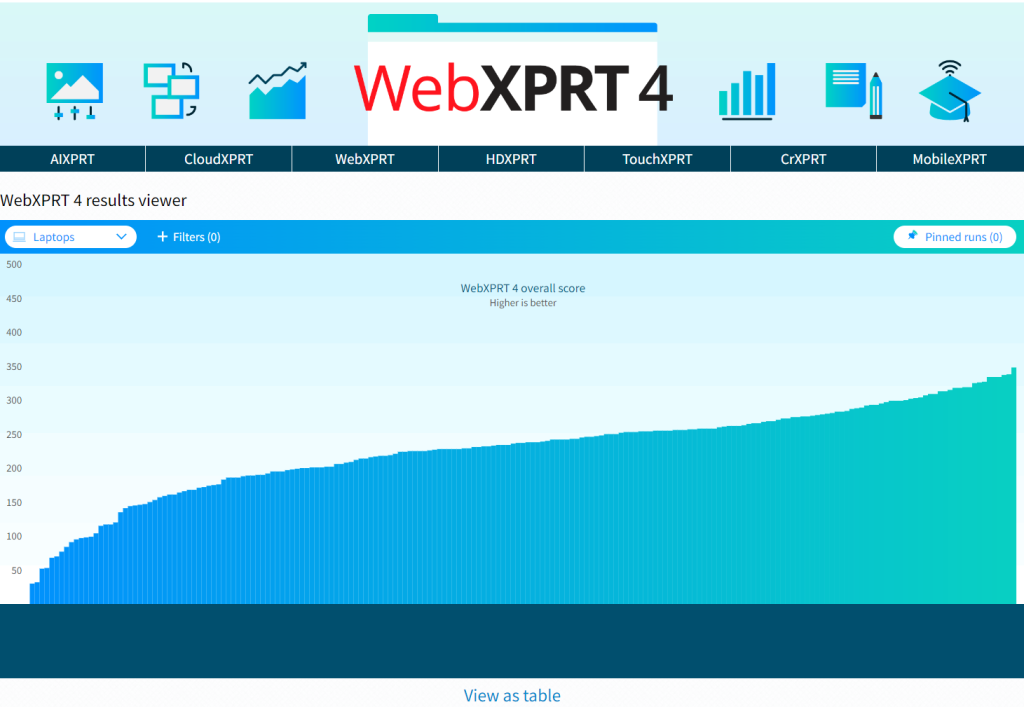
Figure 2: Screenshot from the WebXPRT 4 results viewer showing results filtered by the device type drop-down menu.

Figure 3 shows the viewer as I use the filter tab to explore additional filter options, such as processor vendor.
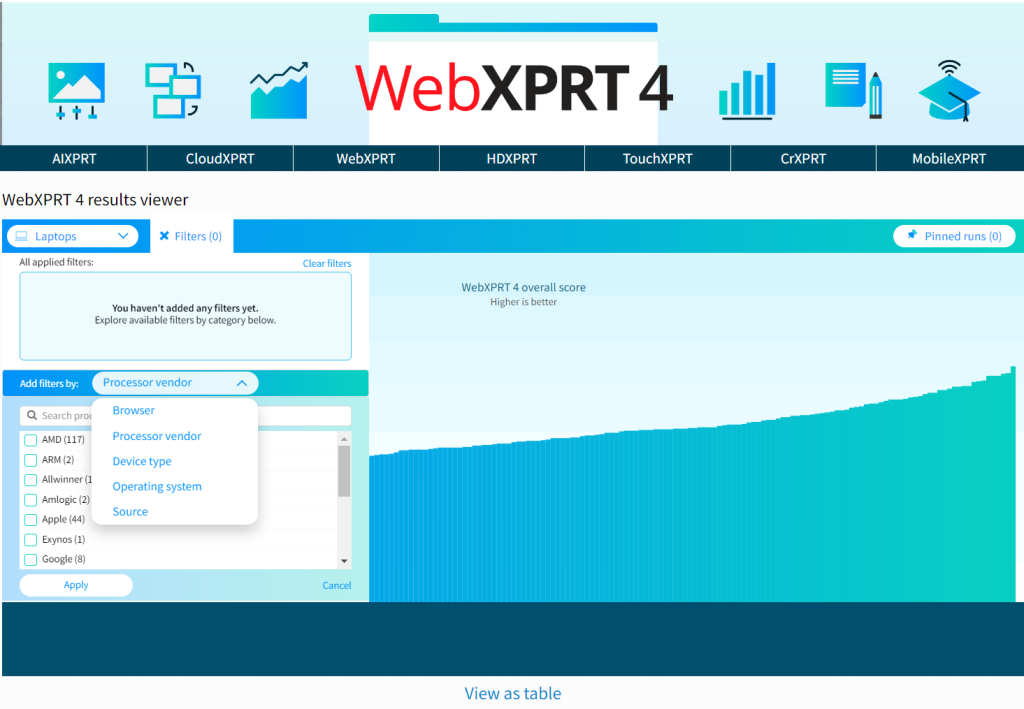
Figure 3: Screenshot from the WebXPRT 4 results viewer showing the filter options available with the filter tab.

The viewer will also let you pin multiple specific runs, which is helpful for making side-by-side comparisons. Figure 4 shows the viewer after I pinned four runs and viewed them on the Pinned runs screen.
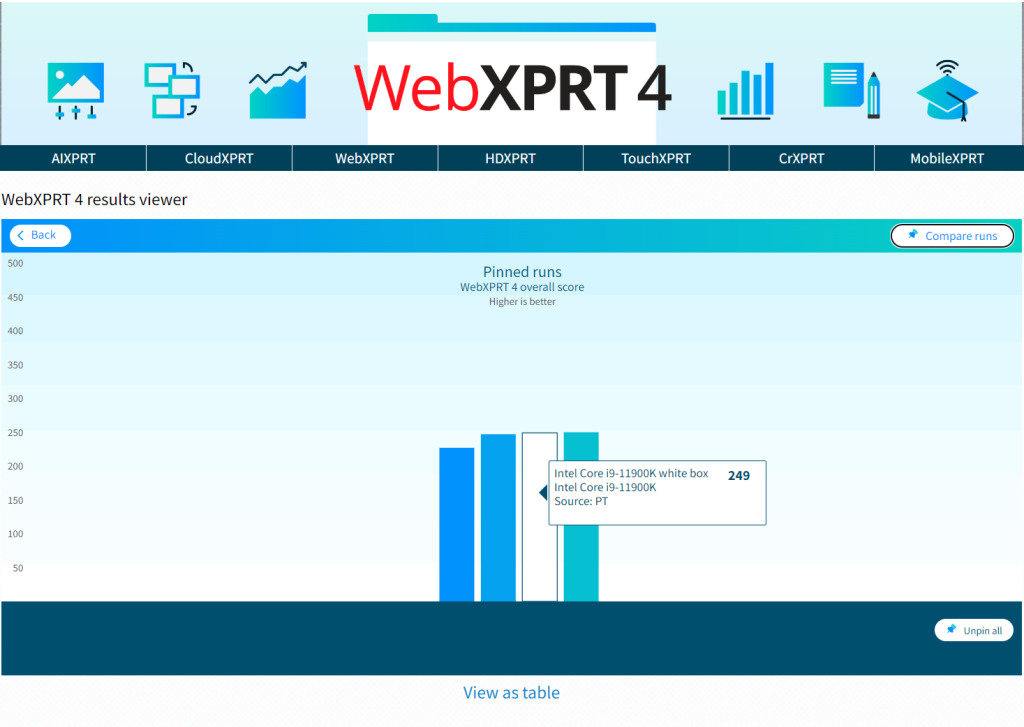
Figure 4: Screenshot from the WebXPRT 4 results viewer showing four pinned runs on the Pinned runs screen.

Figure 5 shows the viewer after I clicked the Compare runs button. The overall and individual workload scores of the pinned runs appear in a table.
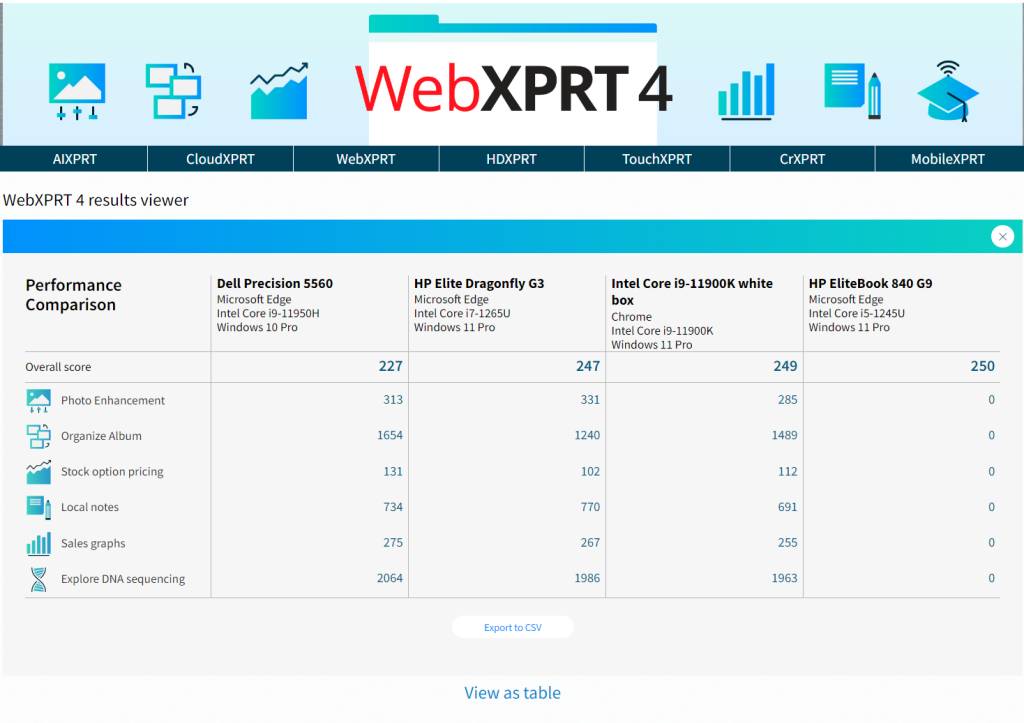
Figure 5: Screenshot from the WebXPRT 4 results viewer showing four pinned runs on the Compare runs screen.

We hope that you’ll enjoy using the results viewer to browse our WebXPRT 4 results database and that it will become one of your go-to resources for device comparison data.  

Are there additional features you’d like to see in the viewer, or other ways we can improve it? Please let us know, and send us your latest test results!

Justin

WebXPRT in PT reports

We don’t just make WebXPRT—we use it, too. If you normally come straight to BenchmarkXPRT.com or WebXPRT.com, you may not even realize that Principled Technologies (PT) does a lot more than just managing and administering the BenchmarkXPRT Development Community. We’re also the tech world’s leading provider of hands-on testing and related fact-based marketing services. As part of that work, we’re frequent WebXPRT users.

We use the benchmark when we test devices such as Chromebooks, desktops, mobile workstations, and consumer laptops for our clients. (You can see a lot of that work and many of our clients on our public marketing portfolio page.) We run the benchmark for the same reasons that others do—it’s a reliable and easy-to-use tool for measuring how well devices handle web browsing and other web work.

We also sometimes use WebXPRT simply because our clients request it. They request it for the same reason the rest of us like and use it: it’s a great tool. Regardless of job titles and descriptions, most laptop and tablet users surf the web and access web-based applications every day. Because WebXPRT is a browser benchmark, higher scores on it could indicate that a device may provide a superior online experience.

Here are just a few of the recent PT reports that used WebXPRT:

  • In a project for Dell, we compared the performance of a Dell Latitude 7340 Ultralight to that of a 13-inch Apple MacBook Air (2022).
  • In this study for HP, we compared the performance of an HP ZBook Firefly G10, an HP ZBook Power G10, and an HP ZBook Fury G10.
  • Finally, in a set of comparisons for Lenovo, we evaluated the system performance and end-user experience of eight Lenovo ThinkBook, ThinkCentre, and ThinkPad systems along with their Apple counterparts.

All these projects, and many more, show how a variety of companies rely on PT—and on WebXPRT—to help buyers make informed decisions. P.S. If we publish scores from a client-commissioned study in the WebXPRT 4 results viewer, we will list the source as “PT”, because we did the testing.

By Mark L. Van Name and Justin Greene

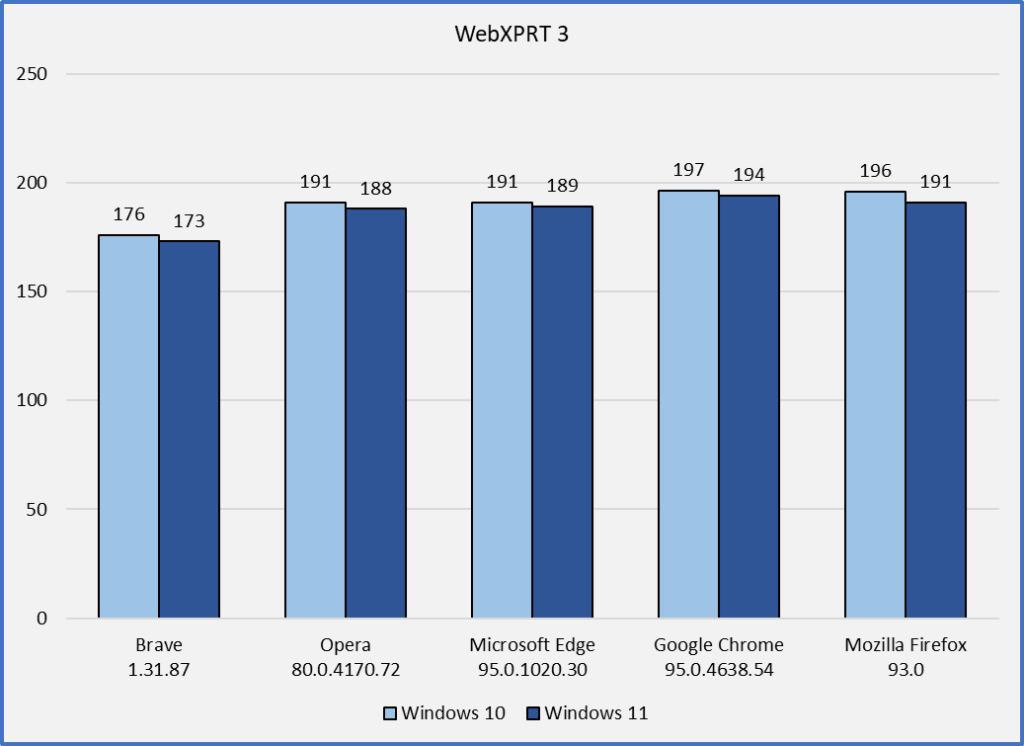
Using WebXPRT 3 to compare the performance of popular browsers in Windows 10 and Windows 11

People choose a default web browser based on several factors. Speed is sometimes the deciding factor, but privacy settings, memory load, ecosystem integration, and web app capabilities can also come into play. Regardless of the motivations behind a person’s go-to browser choice, the dominance of software-as-a-service (SaaS) computing means that new updates are always right around the corner. In previous blog posts, we’ve talked about how browser speed can increase or decrease significantly after an update, only to swing back in the other direction shortly thereafter. OS-specific optimizations can also affect performance, such as with Microsoft Edge on Windows and Google Chrome on Chrome OS.

Windows 11 began rolling out earlier this month, and tech press outlets such as AnandTech and PCWorld have used WebXPRT 3 to evaluate the impact of the new OS—or specific settings in the OS—on browser performance. Our own in-house tests, which we discuss below, show a negligible impact on browser performance when updating our test system from Windows 10 to Windows 11. It’s important to note that depending on a system’s hardware setup, the impact might be more significant in certain scenarios. For more information about such scenarios, we encourage you to read the PCWorld article discussing the impact of the Windows 11 default virtualization-based security (VBS) settings on browser performance in some instances.

In our comparison tests, we used a Dell XPS 13 7930 with an Intel Core i3-10110U processor and 4 GB of RAM. For the Windows 10 tests, we used a clean Windows 10 Home image updated to version 20H2 (19042.1165). For the Windows 11 tests, we updated the system to Windows 11 Home version 21H2 (22000.282). On each OS version, we ran WebXPRT 3 three times on the latest versions of five browsers: Brave, Google Chrome, Microsoft Edge, Mozilla Firefox, and Opera. For each browser, the score we post below is the median of the three test runs.

In our last round of tests on Windows 10, Firefox was the clear winner. Three of the Chromium-based browsers (Chrome, Edge, and Opera) produced very close scores, and the performance of Brave lagged by about 7 percent. In this round of Windows 10 testing, performance on every browser improved slightly, with Google Chrome taking a slight lead over Firefox.

In our Windows 11 testing, we were interested to find that without exception, browser scores were slightly lower than in Windows 10 testing. However, none of the decreases were statistically significant. Most users performing daily tasks are unlikely to notice that degree of difference.

Have you observed any significant differences in WebXPRT 3 scores after upgrading to Windows 11? If so, let us know!

Justin

The 2019 XPRT Spotlight Back-to-School Roundup

With the new school year approaching, we’re pleased to announce that we’ve just published our fourth annual XPRT Spotlight Back-to-School Roundup! The Roundup allows shoppers to view side-by-side comparisons of XPRT test scores and hardware specs from some of this year’s most popular Chromebooks, laptops, tablets, and convertibles. After testing the devices in our lab using XPRT benchmarks, we’ve provided performance scores as well as photo galleries, PT-verified device specs, and prices. Parents, teachers, students, and administrators who are considering buying devices to use in their education environments have many options. The Roundup helps make their decisions easier by gathering product and performance facts in one convenient place.

The Back-to-School Roundup is just one of the features we offer through the XPRT Weekly Tech Spotlight. Every week, the Spotlight highlights a new device, making it easier for consumers to select a new laptop, phone, tablet, or PC. Recent devices in the Spotlight include the Dell G7 15 Gaming laptop, the HP Stream 14, the ASUS Chromebook Flip, the OnePlus 7 Pro phone, and the 2019 Apple iPad Mini. The Spotlight device comparison page lets you view side-by-side comparisons of all of the devices we’ve tested.

If you’re interested in having your devices featured in the XPRT Weekly Tech Spotlight or in this year’s Black Friday and Holiday Showcases, which we publish in late November, visit the website for more details.

If you have any ideas for the Spotlight page or suggestions for devices you’d like to see, let us know!

Justin

Quarterly review

It’s been one of our busiest quarters ever! Here’s a quick review of what’s been happening:

The XPRTs were on the road a lot!

 
While I was at CES, I was lucky enough to be able to sit down and talk on-the-record with a couple of community members:

 
Many thanks to them for being so generous with their time and their insights.

We also gave folks a lot to look at:

 
That is a great start to the year, but we’re going to top it – Next week, we’ll kick off Q2 with one of our biggest announcements ever!

Eric

Is it hot in here?

One of the great meetings I had at CES was with another community member, Patrick Chang, Senior System Engineer in the Tablet Performance group at Dell.  I was glad to hear that, when he tests his devices, Patrick makes frequent use of TouchXPRT.

While TouchXPRT stresses the system appropriately, Patrick’s job requires him to understand not only how well the device performs, but why it performs that way. He was wondering what we could do to help him correlate the temperature, power consumption, and performance of a device.

That information is not typically available to software and apps like the XPRTs. However, it may be possible to add some hooks that would let the XPRTs coordinate with third-party utilities and hardware that do.

As always, the input from the community guides the design of the XPRTs. So, we’d love to know how much interest the community has in having this type of information. If you have thoughts about this, or other kinds of information you’d like the XPRTs to gather, please let us know!

Eric

Last week in the XPRTs
We published the XPRT Weekly Tech Spotlight on the Apple iPad Pro.
We added one new BatteryXPRT ’14 result.
We added one new CrXPRT ’15 result.
We added one new MobileXPRT ’13 result.
We added four new WebXPRT ’15 results.

Check out the other XPRTs:

Forgot your password?