BenchmarkXPRT Blog banner

Category: BenchmarkXPRT development community

Gain a deeper understanding of WebXPRT 4 with our results calculation white paper

More people around the world are using WebXPRT 4 now than ever before. It’s exciting to see that growth, which also means that many people are visiting our site and learning about the XPRTs for the first time. Because new visitors may not know how the XPRT family of benchmarks differs from other benchmarking efforts, we occasionally like to revisit the core values of our open development community here in the blog—and show how those values translate into more free resources for you.

One of our primary values is transparency in all our benchmark development and testing processes. We share information about our progress with XPRT users throughout the development process, and we invite people to contribute ideas and feedback along the way. We also publish both the source code of our benchmarks and detailed information about how they work, unlike benchmarks that use a “black box” model.

For WebXPRT 4 users who are interested in knowing more about the nuts and bolts of the benchmark, we offer several information-packed resources, including our focus for today, the WebXPRT 4 results calculation and confidence interval white paper. The white paper explains the WebXPRT 4 confidence interval, how it differs from typical benchmark variability, and the formulas the benchmark uses to calculate the individual workload scenario scores and overall score on the end-of-test results screen. The paper also provides an overview of the statistical methodology that WebXPRT uses to translate raw timings into scores.

In addition to the white paper’s discussion of the results calculation process, we’ve also provided a results calculation spreadsheet that shows the raw data from a sample test run and reproduces the calculations WebXPRT uses to generate both the workload scores and an overall score.

In potential future versions of WebXPRT, it’s likely that we’ll continue to use the same—or very similar—statistical methodologies and results calculation formulas that we’ve documented in the results calculation white paper and spreadsheet. That said, if you have suggestions for how we could improve those methods or formulas—either in part or in whole—please don’t hesitate to contact us. We’re interested in hearing your ideas!

The white paper is available on WebXPRT.com and on our XPRT white papers page. If you have any questions about the paper or spreadsheet, WebXPRT, or the XPRTs in general, please let us know.

Justin

Web AI frameworks: Possible paths for the AI-focused WebXPRT 4 auxiliary workload

A few months ago, we announced that we’re moving forward with the development of a new auxiliary WebXPRT 4 workload focused on local, browser-side AI technology. Local AI has many potential benefits, and it now seems safe to say that it will be a common fixture of everyday life for many people in the future. As the growth of browser-based inference technology picks up steam, our goal is to equip WebXPRT 4 users with the ability to quickly and reliably evaluate how well devices can handle substantial local inference tasks in the browser.

To reach our goal, we’ll need to make many well-researched and carefully considered decisions along the development path. Throughout the decision-making process, we’ll be balancing our commitment to core XPRT values, such as ease of use and widespread compatibility, with the practical realities of working with rapidly changing emergent technologies. In today’s blog, we’re discussing one of the first decision points that we face—choosing a Web AI framework.

AI frameworks are suites of tools and libraries that serve as building blocks for developers to create new AI-based models and apps or integrate existing AI functions in custom ways. AI frameworks can be commercial, such as OpenAI, or open source, such as Hugging Face, PyTorch, and TensorFlow. Because the XPRTs are available at no cost for users and we publish our source code, open-source frameworks are the right choice for WebXPRT.

Because the new workload will focus on locally powered, browser-based inference tasks, we also need to choose an AI framework that has browser integration capabilities and does not rely on server-side computing. These types of frameworks—called Web AI—use JavaScript (JS) APIs and other web technologies, such as WebAssembly and WebGPU, to run machine learning (ML) tasks on a device’s CPU, GPU, or NPU.

Several emerging Web AI frameworks may provide the compatibility and functionality we need for the future WebXPRT workload. Here are a few that we’re currently researching:

  • ONNX Runtime Web: Microsoft and other partners developed the Open Neural Network Exchange (ONNX) as an open standard for ML models. With available tools, users can convert models from several AI frameworks to ONNX, which can then be used by ONNX Runtime Web. ONNX Runtime Web allows developers to leverage the broad compatibility of ONNX-formatted ML models—including pre-trained vision, language, and GenAI models—in their web applications.
  • Transformers.js: Transformers.js, which uses ONNX Runtime Web, is a JS library that allows users to run AI models from the browser and offline. Transformers.js supports language, computer vision, and audio ML models, among others.
  • MediaPipe: Google developed MediaPipe as a way for developers to adapt TensorFlow-based models for use across many platforms in real-time on-device inference applications such as face detection and gesture recognition. MediaPipe is particularly useful for inference work in images, videos, and live streaming.
  • TensorFlow.js: TensorFlow has been around for a long time, and the TensorFlow ecosystem provides users with a broad variety of models and datasets. TensorFlow is an end-to-end ML solution—training to inference—but with available pre-trained models, developers can focus on inference. TensorFlow.js is an open-source JS library that helps developers integrate TensorFlow with web apps.

We have not made final decisions about a Web AI framework or any aspect of the future workload. We’re still in the research, discussion, and experimentation stages of development, but we want to be transparent with our readers about where we are in the process. In future blog posts, we’ll discuss some of the other major decision points in play.

Most of all, we invite you to join us in these discussions, make recommendations, and give us any other feedback or suggestions you may have, so please feel free to share your thoughts!

Justin

Up next for WebXPRT 4: A new AI-focused workload!

We’re always thinking about ways to improve WebXPRT. In the past, we’ve discussed the potential benefits of auxiliary workloads and the role that such workloads might play in future WebXPRT updates and versions. Today, we’re very excited to announce that we’ve decided to move forward with the development of a new WebXPRT 4 workload focused on browser-side AI technology!

WebXPRT 4 already includes timed AI tasks in two of its workloads: the Organize Album using AI workload and the Encrypt Notes and OCR Scan workload. These two workloads reflect the types of light browser-side inference tasks that have been available for a while now, but most heavy-duty inference on the web has historically happened in on-prem servers or in the cloud. Now, localized AI technology is growing by leaps and bounds, and the integration of new AI capabilities with browser-based tasks is on the threshold of advancing rapidly.

Because of this growth, we believe now is the time to start work on giving WebXPRT 4 the ability to evaluate new browser-based AI capabilities—capabilities that are likely to become a part of everyday life in the next few years. We haven’t yet decided on a test scenario or software stack for the new workload, but we’ll be working to refine our plan in the coming months. There seems to be some initial promise in emerging frameworks such as ONNX Runtime Web, which allows users to run and deploy web-based machine learning models by using JavaScript APIs and libraries. In addition, new Web APIs like WebGPU (currently supported in Edge, Chrome, and tech preview in Safari) and WebNN (in development) may soon help facilitate new browser-side AI workloads.

We know that many longtime WebXPRT 4 users will have questions about how this new workload may affect their tests. We want to assure you that the workload will be an optional bonus workload and will not run by default during normal WebXPRT 4 tests. As you consider possibilities for the new workload, here are a few points to keep in mind:

  • The workload will be optional for users to run.
  • It will not affect the main WebXPRT 4 subtest or overall scores in any way.
  • It will run separately from the main test and will produce its own score(s).
  • Current and future WebXPRT 4 results will still be comparable to one another, so users who’ve already built a database of WebXPRT 4 scores will not have to retest their devices.
  • Because many of the available frameworks don’t currently run on all browsers, the workload may not run on every platform.

As we research available technologies and explore our options, we would love to hear from you. If you have ideas for an AI workload scenario that you think would be useful or thoughts on how we should implement it, please let us know! We’re excited about adding new technologies and new value to WebXPRT 4, and we look forward to sharing more information here in the blog as we make progress.

Justin
XPRT mentions in the tech press

One of the ways we monitor the effectiveness of the XPRT family of benchmarks is to regularly track XPRT usage and reach in the global tech press. Many tech journalists invest a lot of time and effort into producing thorough device reviews, and relevant and reliable benchmarks such as the XPRTs often serve as indispensable parts of a reviewer’s toolkit. Trust is hard-earned and easily lost in the benchmarking community, so we’re happy when our benchmarks consistently achieve “go-to” status for a growing number of tech assessment professionals around the world.

Because some of our newer readers may be unaware of the wide variety of outlets that regularly use the XPRTs, we occasionally like to share an overview of recent XPRT-related tech press activity. For today’s blog, we want to give readers a sampling of the press mentions we’ve seen over the past few months.

Recent mentions include:

Each month, we send out a BenchmarkXPRT Development Community newsletter that contains the latest updates from the XPRT world and provides a summary of the previous month’s XPRT-related activity, including new mentions of the XPRTs in the tech press. If you don’t currently receive the monthly BenchmarkXPRT newsletter but would like to join the mailing list, please let us know! There is no cost to join, and we will not publish or sell any of the contact information you provide. We will send only the monthly newsletter and occasional benchmark-related announcements, such as news about patches or new releases.

Justin

Working with the WebXPRT 4 source code

In our last blog post, we discussed the WebXPRT 4 source code and how you can contact us to request free access to the build package. In this post, we’ll address two questions that users sometimes ask about code access. The first question is, “How do I build a local instance of WebXPRT?” The second is, “What can I do with it?”

How to build a local WebXPRT 4 instance

After we receive your request, we’ll send you a secure link to the current WebXPRT 4 build package, which contains all the necessary source code files and installation instructions. You will need a system to use as a server, and you will need to be familiar with Apache, PHP, and MySQL configuration to follow the build instructions. WebXPRT 4 uses a LAMP (Linux, Apache, MySQL, and PHP) setup on the “server” side, but it’s also possible to set up an instance with a WAMP or XAMPP stack.

The build instructions include a step-by-step methodology for setup. If you are familiar with LAMP stack configuration, the build and configuration process should take about two to three hours, depending on whether your LAMP-related extensions and libraries are current.

What you can do with a local WebXPRT 4 instance

We allow users to set up their own WebXPRT 4 instances for purposes of review, internal testing, or experimentation.

One use-case example is internal OEM lab testing. Some labs use WebXPRT to conduct extensive testing on preproduction hardware, and they follow stringent security guidelines to avoid the possibility of any hardware or test information leaving the lab. Even though we have our own strict policies about how we handle the little amount of data that WebXPRT gathers from tests, a local WebXPRT 4 instance provides those labs with an extra layer of security for sensitive tests.

We do ask that users publish results only from tests that they run on WebXPRT.com. As we mentioned in our most recent post, benchmarking requires a product that is consistent to enable valid comparisons over time. We allow people to download the source, but we reserve the right to control derivative works and which products can use the name “WebXPRT.” That way, when people see WebXPRT scores in tech press articles or vendor marketing materials, they can run their own tests on WebXPRT.com and be confident that they’re using the same standard for comparison.

If you have any questions about using the WebXPRT 4 source code, let us know!

Justin

Accessing the WebXPRT 4 source code

If you’re new to the XPRTs, you may not be aware that we provide free access to XPRT benchmark source code. Publishing XPRT source code is part of our commitment to making the XPRT development process as transparent as possible. By allowing interested parties to access and review our source code, we’re encouraging openness and honesty in the benchmarking industry. We’re also inviting constructive feedback that can help ensure that the XPRTs continue to improve and contribute to a level playing field for all the types of products they measure.

While we do offer free access to the XPRT source code, we’ve decided to offer the code upon request instead of using a permanent download link. This approach prevents bots or other malicious actors from downloading the code. It also has the benefit of allowing us to interact with users who are interested in the source code and answer any questions they may have. We’re always keen to learn more about what others are thinking about the XPRTs and the types of work they measure.

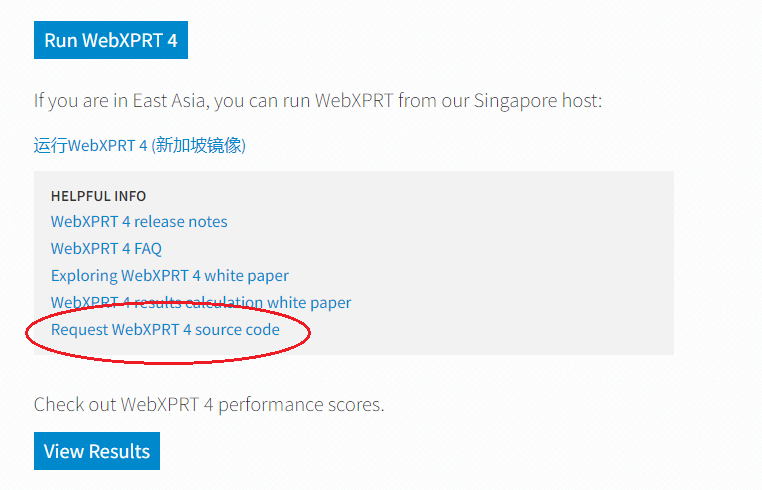
We recently received some questions about accessing the WebXPRT 4 source code, which made us realize that we needed to make a clearer way for people to ask for the code. In response, we added a “Request WebXPRT 4 source code” link to the gray Helpful Info box on WebXPRT.com (see it in the screenshot below). Clicking the link will allow you to email the BenchmarkXPRT Support team directly and request the code.

After we receive your request, we’ll send you a secure link to the current WebXPRT 4 build package. For those users who wish to set up a local instance of WebXPRT 4 for their own internal testbeds, the package will contain all the necessary files and installation instructions. We allow folks to set up their own instances for purposes of review, internal testing, or experimentation, but we ask that users publish only test results from the official WebXPRT 4 site.

While we offer free access to XPRT source code, our approach to derivative works differs from some traditional open-source models that encourage developers to change products and even take them in different directions. Because benchmarking requires a product that remains static to enable valid comparisons over time, we allow people to download the source, but we reserve the right to control derivative works. This discourages a situation where someone publishes an unauthorized version of the benchmark and calls it an “XPRT.”

If you have any questions about accessing the WebXPRT 4 source code, let us know!

Justin

Check out the other XPRTs:

Forgot your password?