BenchmarkXPRT Blog banner

Category: results

The WebXPRT 4 results viewer: A powerful tool for browsing hundreds of test results

In our recent blog post about the XPRT results database, we promised to discuss the WebXPRT 4 results viewer in more detail. We developed the results viewer to serve as a feature-rich interactive tool that visitors to WebXPRT.com can use to browse the test results that we’ve published on our site, dig into the details of each result, and compare scores from multiple devices. The viewer currently has almost 700 test results, and we add new PT-curated entries each week.

Figure 1 shows the tool’s default display. Each vertical bar in the graph represents the overall score of a single test result, with bars arranged left-to-right, from lowest to highest. To view a single result in detail, hover over a bar to highlight it, and a small popup window will display the basic details of the result. You can then click to select the highlighted bar. The bar will turn dark blue, and the dark blue banner at the bottom of the viewer will display additional details about that result.
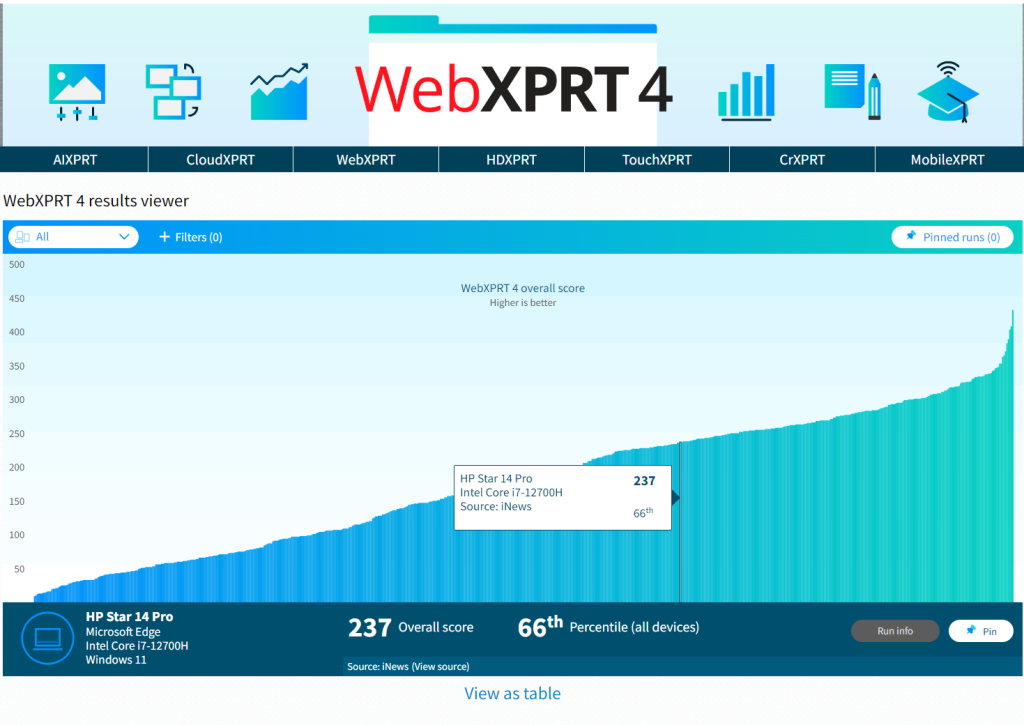
Figure 1: The WebXPRT 4 results viewer tool’s default display

In the example in Figure 1, the banner shows the overall score (237), the score’s percentile rank (66th) among the scores in the current display, the name of the test device, and basic hardware configuration information. If the source of the result is PT, you can click the Run info button in the bottom right-hand corner of the display to see the run’s individual workload scores. If the source is an external publisher, users can click the Source link to navigate to the original site.

The viewer includes a drop-down menu that lets users quickly filter results by major device type categories, plus a tab with additional filtering options, such as browser type, processor vendor, and result source. Figure 2 shows the viewer after I used the device type drop-down filter to select only laptops.
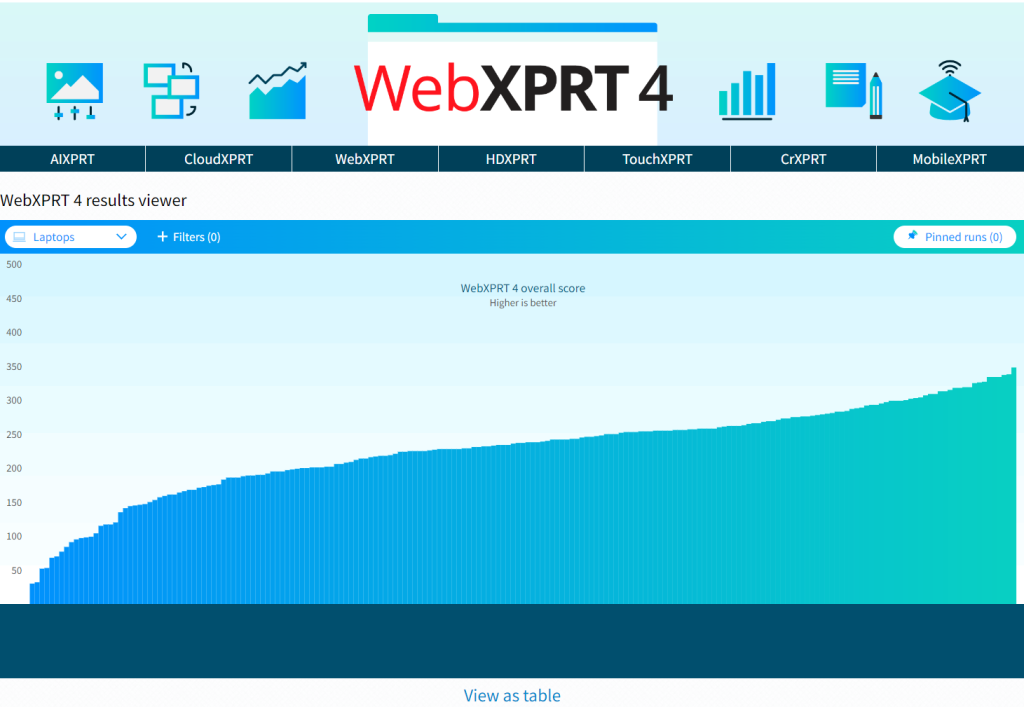
Figure 2: Screenshot from the WebXPRT 4 results viewer showing results filtered by the device type drop-down menu.

Figure 3 shows the viewer as I use the filter tab to explore additional filter options, such as processor vendor.
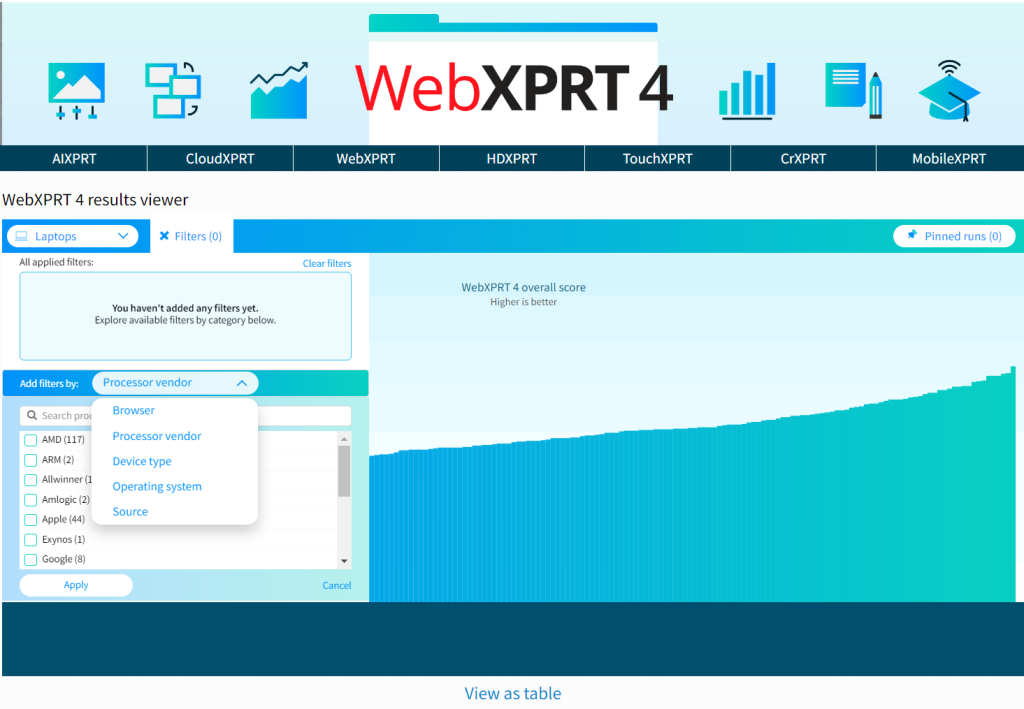
Figure 3: Screenshot from the WebXPRT 4 results viewer showing the filter options available with the filter tab.

The viewer will also let you pin multiple specific runs, which is helpful for making side-by-side comparisons. Figure 4 shows the viewer after I pinned four runs and viewed them on the Pinned runs screen.
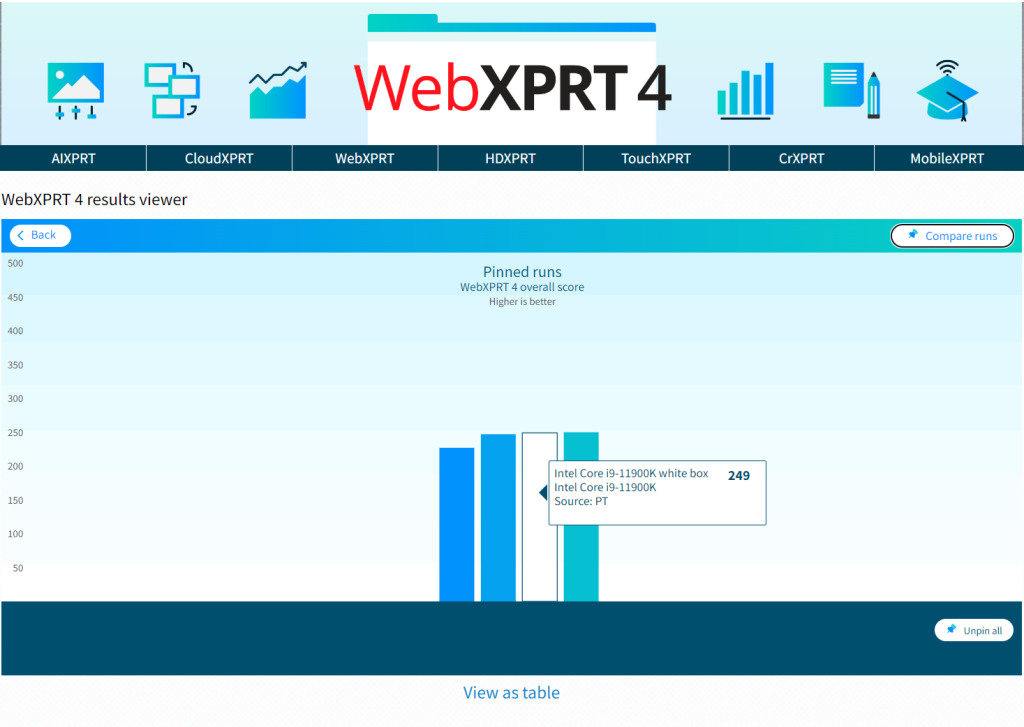
Figure 4: Screenshot from the WebXPRT 4 results viewer showing four pinned runs on the Pinned runs screen.

Figure 5 shows the viewer after I clicked the Compare runs button. The overall and individual workload scores of the pinned runs appear in a table.
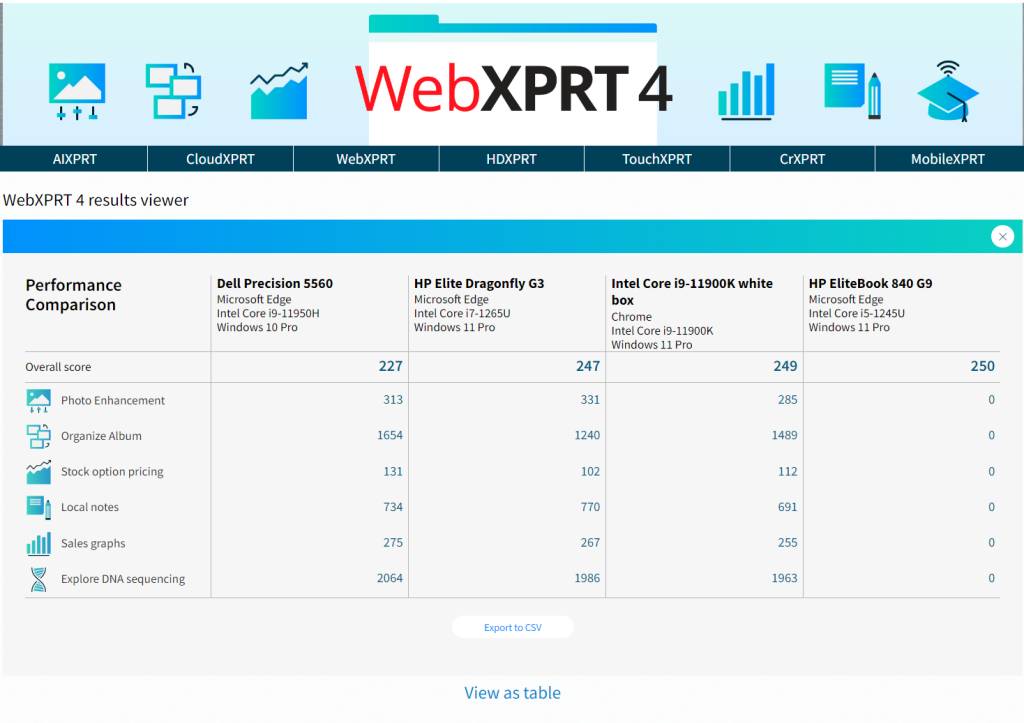
Figure 5: Screenshot from the WebXPRT 4 results viewer showing four pinned runs on the Compare runs screen.

We hope that you’ll enjoy using the results viewer to browse our WebXPRT 4 results database and that it will become one of your go-to resources for device comparison data.  

Are there additional features you’d like to see in the viewer, or other ways we can improve it? Please let us know, and send us your latest test results!

Justin
Want to know how your device performs? Explore the XPRT results database

If you only recently started using the XPRT benchmarks, you may not know about one of the free resources we offer—the XPRT results database. Our results database currently holds more than 3,650 test results from over 150 sources, including global tech press outlets, OEM labs, and independent testers. It serves as a treasure trove of current and historical performance data across all the XPRT benchmarks and hundreds of devices. You can use these results and the results of the same XPRTs on your device to get a sense of how well your device performs.

We update the results database several times a week, adding selected results from our own internal lab testing, reliable media sources, and end-of-test user submissions. (After you run one of the XPRTs, you can choose to submit the results, but don’t worry—this is opt-in. Your results do not automatically appear in the database.) Before adding a result, we also look at any available system information and evaluate whether the score makes sense and is consistent with general expectations.

There are three primary ways that you can explore the XPRT results database.

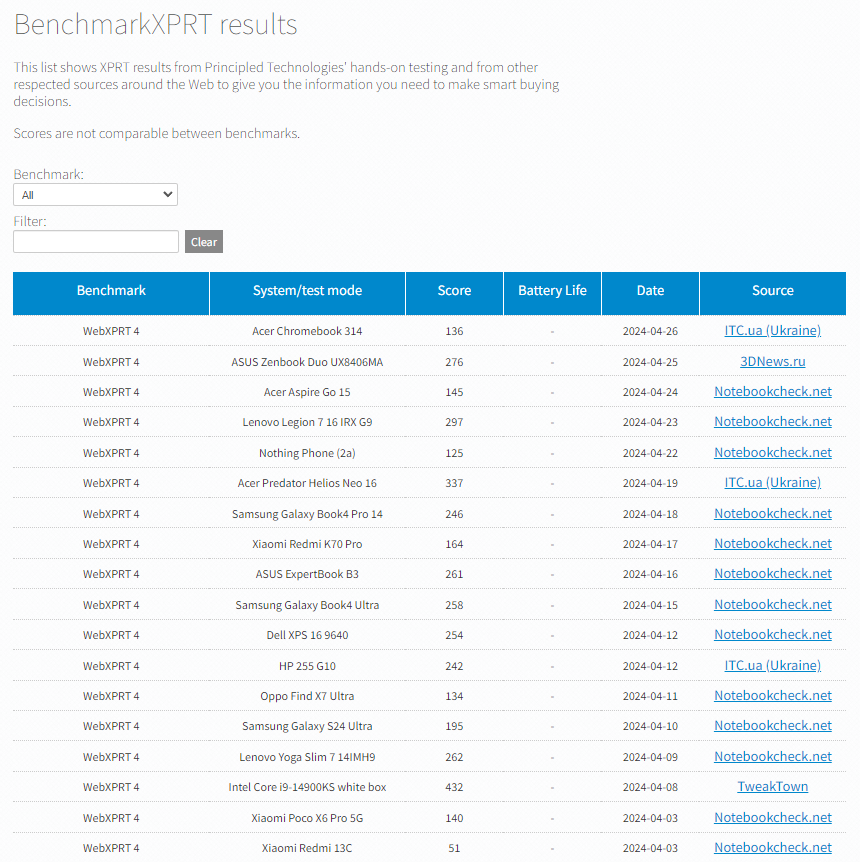
The first is by visiting the main BenchmarkXPRT results browser, which displays results entries for all of the XPRT benchmarks in chronological order (see the screenshot below). You can filter the results by selecting a benchmark from the drop-down menu. You can also type values, such as a vendor name (e.g., Dell) or the name of a tech publication (e.g., PCWorld) into the free-form filter field. For results we’ve produced in our lab, clicking “PT” in the Source column takes you to a page with additional configuration information for the test system. For sources outside our lab, clicking the source name takes you to the original article or review that contains the result.

The second way to access our published results is by visiting the results page for an individual XPRT benchmark. Start by going to the page of the benchmark that interests you (e.g., CrXPRT.com) , and looking for the blue View Results button. Clicking the button takes you to a page that displays results for only that benchmark. You can use the free-form filter on the page to filter those results, and you can use the Benchmarks drop-down menu to jump to the other individual XPRT results pages.

The third way to view our results database is with the WebXPRT 4 results viewer. The viewer provides an information-packed, interactive tool with which you can explore data from the curated set of WebXPRT 4 results we’ve published on our site. We’ll discuss the features of the WebXPRT 4 results viewer in more detail in a future post.

You can use any of these approaches to compare the results of an XPRT on your device with our many published results. We hope you’ll take some time to explore the information in our results database and that it proves to be helpful to you. If you have ideas for new features or suggestions for improvement, we’d love to hear from you!

Justin

Looking back on 2023 with the XPRTs

Around the beginning of each new year, we like to take the opportunity to look back and summarize the XPRT highlights from the previous year. Readers of our newsletter are familiar with the stats and updates we include each month, but for our blog readers who don’t receive the newsletter, we’ve compiled highlights from 2023 below.

Benchmarks
In March, we celebrated the 10-year anniversary of WebXPRT! WebXPRT 4 has now taken the lead as the most commonly-used version of WebXPRT, even as the overall number of runs has continued to grow.

XPRTs in the media
Journalists, advertisers, and analysts referenced the XPRTs thousands of times in 2023. It’s always rewarding to know that the XPRTs have proven to be useful and reliable assessment tools for technology publications around the world. Media sites that used the XPRTs in 2023 include 3DNews (Russia), AnandTech, Benchlife.info (China), CHIP.pl (Poland), ComputerBase (Germany), eTeknix, Expert Reviews, Gadgetrip (Japan), Gadgets 360, Gizmodo, Hardware.info, IT168.com (China), ITC.ua (Ukraine), ITWorld (Korea), iXBT.com (Russia), Lyd & Bilde (Norway), Notebookcheck, Onchrome (Germany), PCMag, PCWorld, QQ.com (China), Tech Advisor, TechPowerUp, TechRadar, Tom’s Guide, TweakTown, Yesky.com (China), and ZDNet.

Downloads and confirmed runs
In 2023, we had more than 16,800 benchmark downloads and 296,800 confirmed runs. Users have run our most popular benchmark, WebXPRT, more than 1,376,500 times since its debut in 2013! WebXPRT continues to be a go-to, industry-standard performance benchmark for OEM labs, vendors, and leading tech press outlets around the globe.

Trade shows
In January, Justin attended the 2023 Consumer Electronics Show (CES) Las Vegas. In March, Mark attended Mobile World Congress (MWC) 2023 in Barcelona. You can view Justin’s recap of CES here and Mark’s thoughts from MWC here.

We’re thankful for everyone who used the XPRTs and sent questions and suggestions throughout 2023. We’re excited to see what’s in store for the XPRTs in 2024!

Justin

Recent XPRT mentions in the tech press

Each month, we send out a BenchmarkXPRT Development Community newsletter that contains the latest updates from the XPRT world and provides a summary of the previous month’s XPRT-related activity, including mentions of the XPRTs in the tech press. More people read the weekly XPRT blog than receive the monthly newsletter, so we realized that some blog readers may be unaware of the wide variety of tech outlets that regularly use or mention the XPRTs.

For today’s blog, we want to give readers a sampling of the XPRT press mentions we see on a weekly basis. Recent mentions include:

If you don’t currently receive the monthly BenchmarkXPRT newsletter, but would like to join the mailing list, please let us know! There is no cost to join, and we will not publish or sell any of the contact information you provide. We will send only the monthly newsletter and occasional benchmark-related announcements, such as patch notifications or news of upcoming benchmark releases.

Justin

Passing two important WebXPRT milestones

Over the past few months, we’ve been excited to see a substantial increase in the total number of completed WebXPRT runs. To put the increase in perspective, we had more total WebXPRT runs last month alone (40,453) than we had in the first two years WebXPRT was available (36,674)! This boost has helped us to reach two important milestones as we close in on the end of 2023.

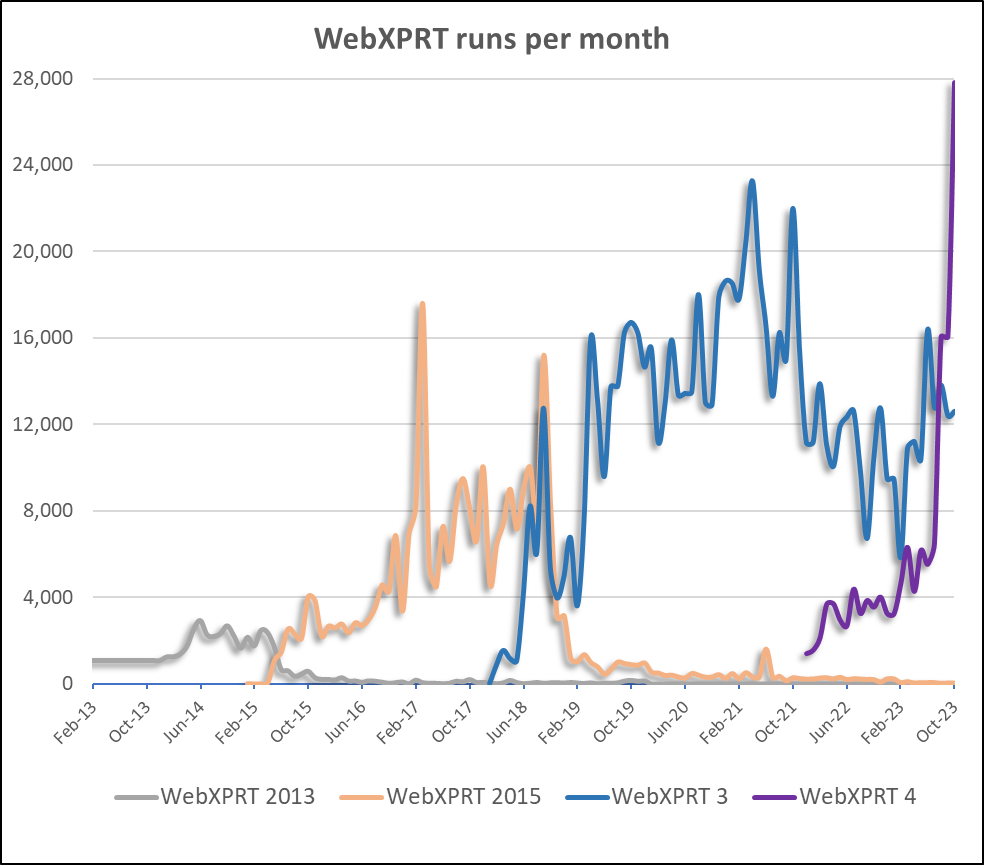
The first milestone is that the number of WebXPRT 4 runs per month now exceeds the number of WebXPRT 3 runs per month. When we release a new version of an XPRT benchmark, it can take a while for users to transition from using the older version. For OEM labs and tech journalists, adding a new benchmark to their testing suite often involves a significant investment in back testing and gathering enough test data for meaningful comparisons. When the older version of the benchmark has been very successful, adoption of the new version can take longer. WebXPRT 3 has been remarkably popular around the world, so we’re excited to see WebXPRT 4 gain traction and take the lead even as the total number of WebXPRT runs increases each month. The chart below shows the number of WebXPRT runs per month for each version of WebXPRT over the past ten years. WebXPRT 4 usage first surpassed WebXPRT 3 in August of this year, and after looking at data for the last three months, we think its lead is here to stay.

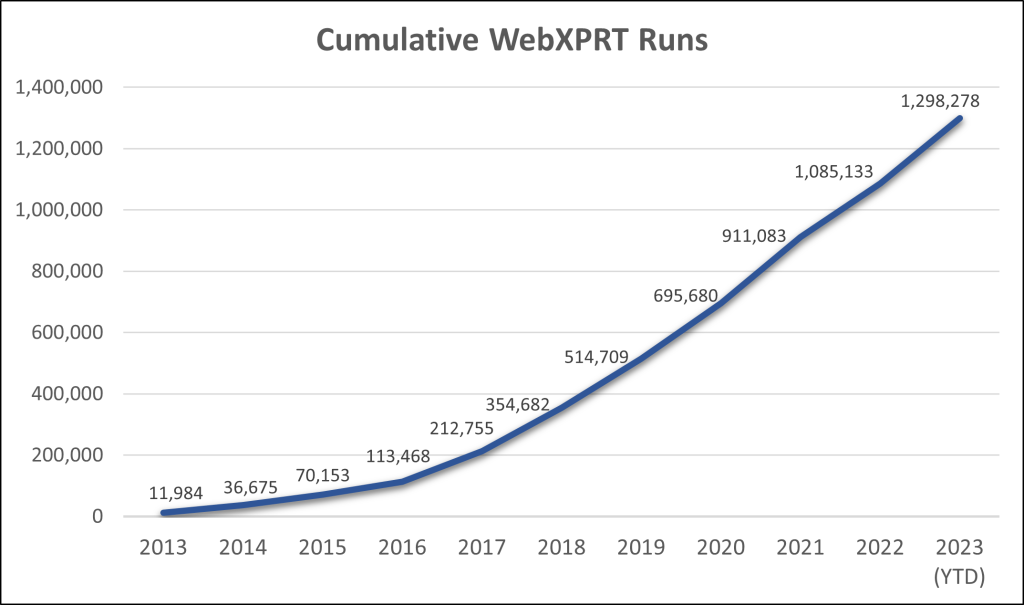
The second important milestone is the cumulative number of WebXPRT runs, which recently passed 1.25 million, as the chart below shows. For us, this moment represents more than a numerical milestone. For a benchmark to succeed, developers need the trust and support of the benchmarking community. WebXPRT’s consistent year-over-year growth tells us that the benchmark continues to hold value for manufacturers, OEM labs, the tech press, and end users. We see it as a sign of trust that folks repeatedly return to the benchmark for reliable performance metrics. We’re grateful for that trust, and for everyone that has contributed to the WebXPRT development process over the years.

We look forward to seeing how far WebXPRT’s reach can extend in 2024! If you have any questions or comments about using WebXPRT, let us know!

Justin

Let the XPRTs be your holiday shopping companion!

The holiday shopping season is right around the corner, and choosing the right tech gift can be a daunting task. If you’re considering new phones, tablets, Chromebooks, laptops, or desktops as gifts this year, and are unsure where to get reliable device information, the XPRTs can help!

The XPRTs provide objective, reliable measures of a device’s performance that can help cut through competing marketing claims. For example, instead of guessing whether the performance of a new phone justifies its price, you can use its WebXPRT performance score to see how it stacks up against both older models and competitors while tackling everyday tasks.

A good place to start looking for device scores is our XPRT results browser, which lets you access our database of more than 3,500 test results from over 150 sources, including major tech review publications around the world, OEMs, and independent testers. You can find a wealth of current and historical performance data across all the XPRT benchmarks and hundreds of devices. Learn how to use the results browser here.

If you’re considering a popular device, chances are good that a recent tech review includes an XPRT score for it. Go to your favorite tech review site and search for “XPRT,” or enter the name of the device and the appropriate XPRT (e.g., “Pixel” and “WebXPRT”) in a search engine. Here are a few recent tech reviews that used the XPRTs to evaluate popular devices:

The XPRTs can help consumers make better-informed and more confident tech purchases this holiday season, and we hope you’ll find the data you need on our site or in an XPRT-related tech review. If you have any questions about the XPRTs, XPRT scores, or the results database please feel free to ask!

Justin

Check out the other XPRTs:

Forgot your password?