We’re happy to announce that the WebXPRT
5 source code is now available! We’re offering the source code in the form of a
build package that contains all the necessary files and step-by-step instructions
for setting up a locally hosted version of WebXPRT 5. While you’re free to use
the code for purposes of review, internal testing, or experimentation, we do
ask that you publish only test results from the official version of WebXPRT 5
that we host at WebXPRT.com.
We’re offering the build package upon
request, rather than posting a permanent download link, to prevent bots or
other malicious actors from downloading it. This method also lets us engage
with folks who are interested in the source code and answer any questions they
may have.
To request the code, simply click the “Request WebXPRT 5 source code” link in the gray Helpful Info box on the WebXPRT 5 home page (see Figure 1 below). Clicking the link will allow you to email the BenchmarkXPRT Support team directly and request the code.
Figure 1: A screenshot showing the location of the link to request WebXPRT 5 source code on WebXPRT.com
After we receive your request, we’ll
send you a secure link to the current WebXPRT 5 build package.
If you have any questions about
accessing the WebXPRT 5 source code, let us know!
The WebXPRT 5 Preview has been
available for only a few weeks, but users have already started submitting test results
for us to review for publication in the WebXPRT 5 Preview results viewer.
We’re excited to receive those submissions, but we know that some of our
readers are either new to WebXPRT or may never have submitted a test result. In
today’s post, we’ll cover the straightforward process of submitting your
WebXPRT 5 Preview test results for publication in the viewer.
Unlike
sites that automatically publish all results submissions, we publish only
results that meet a set of evaluation criteria. Those results can come from OEM
labs, third-party labs, tech media sources, or independent user submissions.
What’s important to us is that the scores must be consistent with general
expectations, and for sources outside of our labs and data centers, each must
include enough detailed system information that we can determine whether the
score makes sense. That said, if your scores are different from what you see in
our database, please don’t hesitate to send them to us; we may be able to work
it out together.
The actual result submission process is simple. On the end-of-test results page that displays after a test run, click the Submit your results button below the overall score. Then, complete the short submission form that pops up, and click Submit.
When filling in the system information fields in the submission form, please be as specific as possible. Detailed device information helps us assess whether individual scores represent valid test runs.
That’s all there is to it!
Figure 1 below shows the end-of-test results screen and the Submit your results button below the overall score.
Figure 1: A screenshot of the WebXPRT 5 Preview end-of-test results screen, showing the Submit your results button below the overall score.
Figure 2 below shows how the results submission form would look if I filled in the necessary information and submitted a score at the end of a recent WebXPRT 5 Preview run on one of the systems here in our lab.
Figure 2: A screenshot of the WebXPRT 5 Preview results submission pop-up window after filling in the email address and system information fields.
After you submit your test
result, we’ll review the information. If the test result meets the evaluation
criteria, we’ll contact you to confirm how we should display its source in our
database. For that purpose, you can choose one of the following:
Your first and last name
“Independent tester” (if you wish to remain anonymous)
Your company’s name, if you have permission to submit
the result under that name. If you want to use a company name, please
provide a valid corresponding company email address.
As
always, we will not publish any additional information about you or your
company without your permission.
We look
forward to seeing your scores! If you have questions about WebXPRT 5 Preview
testing or results submission—or you’d like to share feedback on WebXPRT 5—please
let us know!
Here at the XPRTs,
our primary goal is to provide free, easy-to-use benchmark tools that can help
everyone—from OEM labs to tech press journalists to individual consumers—understand
how well devices will perform while completing everyday computing tasks. We
track progress toward that goal in several ways, but one of the most important
is how much people use and discuss the XPRTs. When the name of one of our apps
appears in an ad, article, or tech review, we call it a “mention.” Tracking
mentions helps us gauge our reach.
We
occasionally like to share a sample of recent XPRT mentions here in the blog.
If you just started following the XPRTs, it may be surprising to see our
program’s global reach. If you’re a longtime reader and you’re used to seeing
WebXPRT or CrXPRT in major tech press articles, it may be surprising to learn
more about overseas tech press publications or see how some government agencies
use the XPRTs to make decisions. In any case, we hope you’ll enjoy exploring
the links below!
Recent
mentions include:
Computerworld noted that the Polish government’s Ministry of Digital Affairs used WebXPRT to establish a minimum performance baseline for Chromebooks that could be eligible for their Laptops for Teachers program.
Other outlets that have published articles, ads, or reviews mentioning the XPRTs in the last few months include the following: 3DNews.ru (Russia), Acer, Alza.cz (Czech Republic), Android Headlines, Android.com.pl (Poland), BenchLife.info, ComputerBase (Germany), Dell, DGL.ru (Russia), eTeknix, Gadgety (Israel), GeekWeek (Poland), GSMArena.com, ID.nl (Netherlands), Intel, ITC.ua (Ukraine), ITMedia (Japan), Komputronik (Poland), Mashable, MSN, PC Games Hardware (Germany), PCMag, PurePC.pl (Poland), QQ.com (China), SlashGear, Sohu.com (China), TechHut, TechRadar, TechToday (Ukraine), Tom’s Hardware, Tool Elvaliant (Italy), Tweakers, and ZDNet, among others.
If you’d like to receive monthly updates on XPRT-related news and activity, we encourage you to sign up for the BenchmarkXPRT Development Community newsletter. It’s completely free, and all you need to do to join the newsletter mailing list is let us know! We won’t publish, share, or sell any of the contact information you provide, and we’ll only send you the monthly newsletter and occasional benchmark-related announcements, such as important news about patches or releases.
If
you have any questions about the XPRTs, suggestions, or requests for future
blog topics, please feel free to contact us.
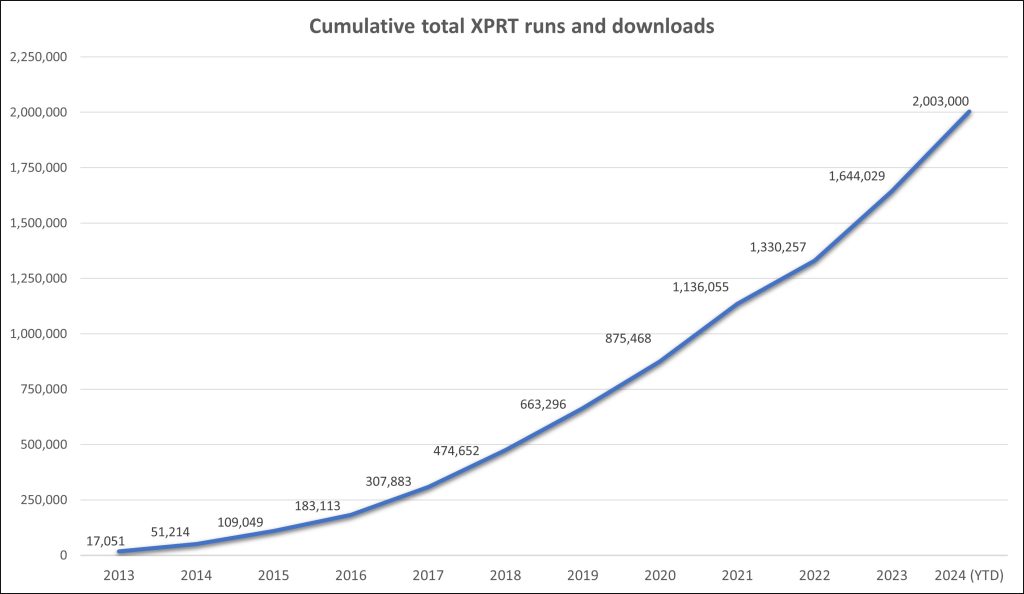
As we near the end of 2024, we’re excited to share that the XPRTs have passed another notable milestone—over 2,000,000 combined runs and downloads! The rate of growth in the total number of XPRT runs and downloads is exciting. It took about seven and a half years for the XPRTs to pass one million total runs and downloads—but it’s taken less than half that, three and a half years, to add another million. Figure 1 shows the climb to the two-million-run mark.
Figure 1: The cumulative number of total yearly XPRT runs and downloads over time.
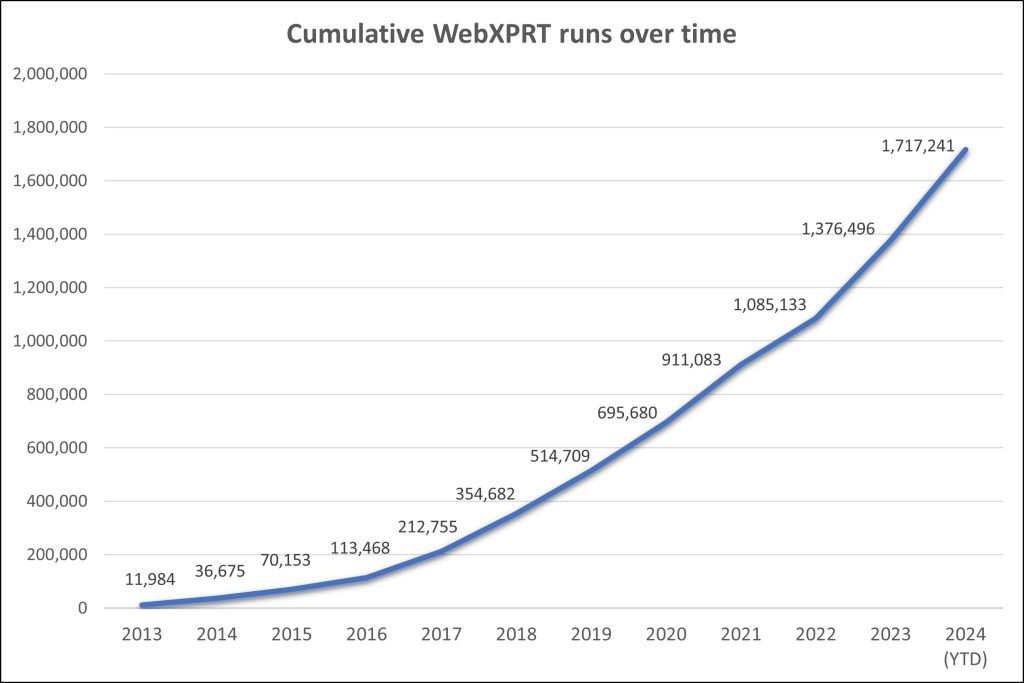
As you would expect, most of the runs contributing to that total come from WebXPRT tests. If you’ve run WebXPRT in any of the 983 cities and 84 countries from which we’ve received completed test data—including newcomers El Salvador, Malaysia, Morocco, and Saudi Arabia—we’re grateful for your help in reaching this milestone! As Figure 2 illustrates, WebXPRT use has grown steadily since the debut of WebXPRT 2013. On average, we now record more than twice as many WebXPRT runs each month than we recorded in WebXPRT’s entire first year. With over 340,000 runs so far in 2024—an increase of more than 16 percent over last year’s total—that growth is showing no signs of slowing down.
Figure 2: The cumulative number of total yearly WebXPRT runs over time.
This milestone isn’t
just about numbers. Establishing and maintaining a presence in the industry and
experiencing year-over-year growth requires more than technical know-how and
marketing efforts. It requires the ongoing trust and support of the
benchmarking community—including OEM labs, the tech press, and independent
computer enthusiasts—and those who simply want to know how good their devices
are at web browsing.
Once again, we’re
thankful for the support of everyone who’s used the XPRTs over the years, and
we look forward to another million!
If you have any questions or comments about any of the XPRTs, we’d love to hear from you!
In recent blog posts, we discussed
an issue that we encountered when attempting to run WebXPRT 4 on iOS 17 devices.
If you missed those posts, you can find more details about the nature of the
problem here. In
short, the issue is that the Encrypt Notes and OCR scan subtest in WebXPRT 4
gets stuck when the Tesseract.js Optical Character Recognition (OCR) engine
attempts to scan a shopping receipt. We’ve verified that the issue occurs on
devices running iOS 17, iPadOS 17, and macOS Sonoma with Safari 17.
After a good bit of troubleshooting and research to try and identify the cause of the problem, we decided to build an updated version of WebXPRT 4 that uses a newer version of Tesseract for the OCR task. Aside from updating Tesseract in the new build, we aimed to change as little as possible. To try and maximize continuity, we’re still using the original input image for the receipt scanning task, and we decided to stick with using the WASM library instead of a WASM-SIMD library. Aside from a new version of tesseract.js, WebXPRT 4 version number updates, and updated documentation where necessary, all other aspects of WebXPRT 4 will remain the same.
We’re currently
testing a candidate build of this new version on a wide array of devices. The
results so far seem promising, but we want to complete our due diligence and
make sure this is the best approach to solving the problem. We know that OEM
labs and tech reviewers put a lot of time and effort into compiling databases
of results, so we hope to provide a solution that minimizes results disruption
and inconvenience for WebXPRT 4 users. Ideally, folks would be able to
integrate scores from the new build without any questions or confusion about comparability.
We don’t yet have an exact release date for a new WebXPRT 4 build, but we can say that we’re shooting for the end of October. We appreciate everyone’s patience as we work towards the best possible solution. If you have any questions or concerns about an updated version of WebXPRT 4, please let us know.
From time to time, a tester writes to ask for help determining why they see different WebXPRT scores on two systems that have the same hardware configuration. The scores sometimes differ by a significant percentage. This can happen for many reasons, including different software stacks, but score variability can also result from different testing behavior and environments. While a small amount of variability is normal, these types of questions provide an opportunity to talk about the basic benchmarking practices we follow in the XPRT lab to produce the most consistent and reliable scores.
Below,
we list a few basic best practices you might find useful in your testing. Most
of them relate to evaluating browser performance with WebXPRT, but several of
these practices apply to other benchmarks as well.
Test with clean images: We typically use an out-of-box (OOB) method for testing new devices in the XPRT lab. OOB testing means that other than running the initial OS and browser version updates that users are likely to run after first turning on the device, we change as little as possible before testing. We want to assess the performance that buyers are likely to see when they first purchase the device, before installing additional apps and utilities. This is the best way to provide an accurate assessment of the performance retail buyers will experience. While OOB is not appropriate for certain types of testing, the key is to not test a device that’s bogged down with programs that will influence results.
Turn off automatic updates: We do our best to eliminate or minimize app and system updates after initial setup. Some vendors are making it more difficult to turn off updates completely, but you should always double-check update settings before testing.
Get a baseline for system processes: Depending on the system and the OS, a significant amount of system-level activity can be going on in the background after you turn it on. As much as possible, we like to wait for a stable (idle) baseline of system activity before kicking off a test. If we start testing immediately after booting the system, we often see higher variance in the first run before the scores start to tighten up.
Hardware is not the only important factor: Most people know that different browsers produce different performance scores on the same system. However, testers aren’t always aware of shifts in performance between different versions of the same browser. While most updates don’t have a large impact on performance, a few updates have increased (or even decreased) browser performance by a significant amount. For this reason, it’s always worthwhile to record and disclose the extended browser version number for each test run. The same principle applies to any other relevant software.
Use more than one data point: Because of natural variance, our standard practice in the XPRT lab is to publish a score that represents the median from three to five runs, if not more. If you run a benchmark only once, and the score differs significantly from other published scores, your result could be an outlier that you would not see again under stable testing conditions.
We hope these tips will help make your testing more accurate. If you have any questions about the XPRTs, or about benchmarking in general, feel free to ask!
Cookie Notice: Our website uses cookies to deliver a smooth experience by storing logins and saving user information. By continuing to use our site, you agree with our usage of cookies as our privacy policy outlines.