BenchmarkXPRT Blog banner

Category: Performance benchmarking

Using WebXPRT 3 to compare the performance of popular browsers

Microsoft recently released a new Chromium-based version of the Edge browser, and several tech press outlets have released reviews and results from head-to-head browser performance comparison tests. Because WebXPRT is a go-to benchmark for evaluating browser performance, PCMag, PCWorld, and VentureBeat, among others, used WebXPRT 3 scores as part of the evaluation criteria for their reviews.

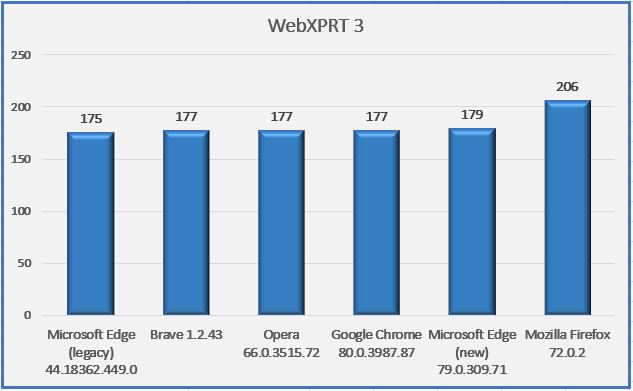
We thought we would try a quick experiment of our own, so we grabbed a recent laptop from our Spotlight testbed: a Dell XPS 13 7930 running Windows 10 Home 1909 (18363.628) with an Intel Core i3-10110U processor and 4 GB of RAM. We tested on a clean system image after installing all current Windows updates, and after the update process completed, we turned off updates to prevent them from interfering with test runs. We ran WebXPRT 3 three times on six browsers: a new browser called Brave, Google Chrome, the legacy version of Microsoft Edge, the new version of Microsoft Edge, Mozilla Firefox, and Opera. The posted score for each browser is the median of the three test runs.

As you can see in the chart below, five of the browsers (legacy Edge, Brave, Opera, Chrome, and new Edge) produced scores that were nearly identical. Mozilla Firefox was the only browser that produced a significantly different score. The parity among Brave, Chrome, Opera, and the new Edge is not that surprising, considering they are all Chromium-based browsers. The rank order and relative scaling of these results is similar to the results published by the tech outlets mentioned above.

Do these results mean that Mozilla Firefox will provide you with a speedier web experience? Generally, a device with a higher WebXPRT score is probably going to feel faster to you during daily use than one with a lower score. For comparisons on the same system, however, the answer depends in part on the types of things you do on the web, how the extensions you’ve installed affect performance, how frequently the browsers issue updates and incorporate new web technologies, and how accurately the browsers’ default installation settings reflect how you would set up the same browsers for your daily workflow.

In addition, browser speed can increase or decrease significantly after an update, only to swing back in the other direction shortly thereafter. OS-specific optimizations can also affect performance, such as with Edge on Windows 10 and Chrome on Chrome OS. All of these variables are important to keep in mind when considering how browser performance comparison results translate to your everyday experience. In such a competitive market, and with so many variables to consider, we’re happy that WebXPRT can help consumers by providing reliable, objective results.

What are your thoughts on today’s competitive browser market? We’d love to hear from you.

Justin

A preview of the new CrXPRT 2 UI

As we get closer to the CrXPRT 2 Community Preview (CP), we want to provide readers with a glimpse of the new CrXPRT 2 UI. In line with the functional and aesthetic themes we used for the latest versions of WebXPRT, MobileXPRT, and HDXPRT, we’re implementing a clean, bright look with a focus on intuitive navigation. The screenshots below show how we’ve used that approach to rework the home, battery life test, performance test, and battery life test results screens. (We’re still tweaking the UI, so the screens you see in the CP may differ slightly.)

On the home screen, we kept the performance test and battery life test buttons, but made it clearer that you can choose only one. We also added a link to the user manual to the bottom ribbon for quick access.

If you choose to run a battery life test and click Next, the screen below appears. The CrXPRT 2 battery life test requires a full rundown, so you’ll need charge your device to 100 percent before you can start the test. Once you’ve done that, enter a name for the test run, unplug the system, and click Start. (Note that you no longer need to enter values for screen brightness and audio levels.)

The CrXPRT 2 performance test includes updated versions of six of the seven workloads in CrXPRT 2015. (As we discussed in a previous blog post, newer versions of Chrome can’t run the Photo Collage workload without a workaround, so we removed it from CrXPRT 2.)  To run the performance test, enter a name for the test run, customize the workloads if you wish, and click Start.

For the results screens, we wanted to highlight the most important end-of-test information while still offering clear paths for options such as getting additional details on the test, submitting results, and running the test again. Below, we show the results screen from a battery life test. Note the “Main menu” link in the upper-left corner, which we added to all screens to give users a quick way to navigate back to the home screen.

CrXPRT 2 development and testing are still underway. We don’t yet have an exact release date for the CP, but once we do, we’ll announce it here in the blog.

What do you think about the new CrXPRT 2 UI? Let us know!

Justin

CloudXPRT is on the way

A few months ago, we wrote about the possibility of creating a datacenter XPRT. In the intervening time, we’ve discussed the idea with folks both in and outside of the XPRT Community. We’ve heard from vendors of datacenter products, hosting/cloud providers, and IT professionals that use those products and services.

The common thread that emerged was the need for a cloud benchmark that can accurately measure the performance of modern, cloud-first applications deployed on modern infrastructure as a service (IaaS) platforms, whether those platforms are on-premises, hosted elsewhere, or some combination of the two (hybrid clouds). Regardless of where clouds reside, applications are increasingly using them in latency-critical, highly available, and high-compute scenarios.

Existing datacenter benchmarks do not give a clear indication of how applications will perform on a given IaaS infrastructure, so the benchmark should use cloud-native components on the actual stacks used for on-prem and public cloud management.

We are planning to call the benchmark CloudXPRT. Our goal is for CloudXPRT to address the needs described above while also including the elements that have made the other XPRTs successful. We plan for CloudXPRT to

  • Be relevant to on-prem (datacenter), private, and public cloud deployments
  • Run on top of cloud platform software such as Kubernetes
  • Include multiple workloads that address common scenarios like web applications, AI, and media analytics
  • Support multi-tier workloads
  • Report relevant metrics including both throughput and critical latency for responsiveness-driven applications and maximum throughput for applications dependent on batch processing

CloudXPRT’s workloads will use cloud-native components on an actual stack to provide end-to-end performance metrics that allow users to choose the best IaaS configuration for their business.

We’ve been building and testing preliminary versions of CloudXPRT for the last few months. Based on the progress so far, we are shooting to have a Community Preview of CloudXPRT ready in mid- to late-March with a version for general availability ready about two months later.

Over the coming weeks, we’ll be working on getting out more information about CloudXPRT and continuing to talk with interested parties about how they can help. We’d love to hear what workflows would be of most interest to you and what you would most like to see in a datacenter/cloud benchmark. Please feel free to contact us!

Bill

AIXPRT’s unique development path

With four separate machine learning toolkits on their own development schedules, three workloads, and a wide range of possible configurations and use cases, AIXPRT has more moving parts than any of the XPRT benchmark tools to date. Because there are so many different components, and because we want AIXPRT to provide consistently relevant evaluation data in the rapidly evolving AI and machine learning spaces, we anticipate a cadence of AIXPRT updates in the future that will be more frequent than the schedules we’ve used for other XPRTs in the past. With that expectation in mind, we want to let AIXPRT testers know that when we release an AIXPRT update, they can expect minimized disruption, consideration for their testing needs, and clear communication.

Minimized disruption

Each AIXPRT toolkit (Intel OpenVINO, TensorFlow, NVIDIA TensorRT, and Apache MXNet) is on its own development schedule, and we won’t always have a lot of advance notice when new versions are on the way. Hypothetically, a new version of OpenVINO could release one month, and a new version of TensorRT just two months later. Thankfully, the modular nature of AIXPRT’s installation packages ensures that we won’t need to revise the entire AIXPRT suite every time a toolkit update goes live. Instead, we’ll update each package individually when necessary. This means that if you only test with a single AIXPRT package, updates to the other packages won’t affect your testing. For us to maintain AIXPRT’s relevance, there’s unfortunately no way to avoid all disruption, but we’ll work to keep it to a minimum.

Consideration for testers

As we move forward, when software compatibility issues force us to update an AIXPRT package, we may discover that the update has a significant effect on results. If we find that results from the new package are no longer comparable to those from previous tests, we’ll share the differences that we’re seeing in our lab. As always, we will use documentation and versioning to make sure that testers know what to expect and  that there’s no confusion about which package to use.

Clear communication

When we update any package, we’ll make sure to communicate any updates in the new build as clearly as possible. We’ll document all changes thoroughly in the package readmes, and we’ll talk through significant updates here in the blog. We’re also available to answer questions about AIXPRT and any other XPRT-related topic, so feel free to ask!

Justin

Planning for the next CrXPRT

We’re currently planning the next version of CrXPRT, our benchmark that evaluates the performance and battery life of Chromebooks. If you’re unfamiliar with CrXPRT, you can find out more about how it works both here in the blog and at CrXPRT.com. If you’ve used CrXPRT, we’d love to hear any suggestions you may have. What do you like or dislike about CrXPRT? What features do you hope to see in a new version?

When we begin work on a new version of any benchmark, one of our first steps is to determine whether the workloads will provide value during the years ahead. As technology and user behavior evolve, we update test content to be more relevant. One example is when we replace photos with ones that use more contemporary file resolutions and sizes.

Sometimes the changing tech landscape prompts us to remove entire workloads and add new ones. The Photo Collage workload in CrXPRT uses Portable Native Client (PNaCl) technology, for which the Chrome team will soon end support. CrXPRT 2015 has a workaround for this issue, but the best course of action for the next version of CrXPRT will be to remove this workload altogether.

The battery life test will also change. Earlier this year, we started to see unusual battery life estimates and high variance when running tests at CrXPRT’s default battery life test length of 3.5 hours, so we’ve been recommending that users perform full rundowns instead. In the next CrXPRT, the battery life test will require full rundowns.

We’ll also be revamping the CrXPRT UI to improve the look of the benchmark and make it easier to use, as we’ve done with the other recent XPRT releases.

We really do want to hear your ideas, and any feedback you send has a chance to shape the future of the benchmark. Let us know what you think!

Justin

The XPRT Spotlight Black Friday Showcase helps you shop with confidence

Black Friday and Cyber Monday are almost here, and you may be feeling overwhelmed by the sea of tech gifts to choose from. The XPRTs are here to help. We’ve gathered the product specs and performance facts for some of the hottest tech devices in one convenient place—the XPRT Spotlight Black Friday Showcase. The Showcase is a free shopping tool that provides side-by-side comparisons of some of the season’s most popular smartphones, laptops, Chromebooks, tablets, and PCs. It helps you make informed buying decisions so you can shop with confidence this holiday season.

Want to know how the Google Pixel 4 stacks up against the Apple iPhone 11 or Samsung Galaxy Note10 in web browsing performance or screen size? Simply select any two devices in the Showcase and click Compare. You can also search by device type if you’re interested in a specific form factor such as consoles or tablets.

The Showcase doesn’t go away after Black Friday. We’ll rename it the XPRT Holiday Showcase and continue to add devices such as the Microsoft Surface Pro X throughout the shopping season. Be sure to check back in and see how your tech gifts measure up.

If this is the first you’ve heard about the XPRT Tech Spotlight, here’s a little background. Our hands-on testing process equips consumers with accurate information about how devices function in the real world. We test devices using our industry-standard BenchmarkXPRT tools: WebXPRT, MobileXPRT, TouchXPRT, CrXPRT, BatteryXPRT, and HDXPRT. In addition to benchmark results, we include photographs, specs, and prices for all products. New devices come online weekly, and you can browse the full list of almost 200 that we’ve featured to date on the Spotlight page.

If you represent a device vendor and want us to feature your product in the XPRT Tech Spotlight, please visit the website for more details.

Justin

Check out the other XPRTs:

Forgot your password?