
A Principled Technologies report: Hands-on testing. Real-world results.

Boost app development and management with VMware Data Services Manager
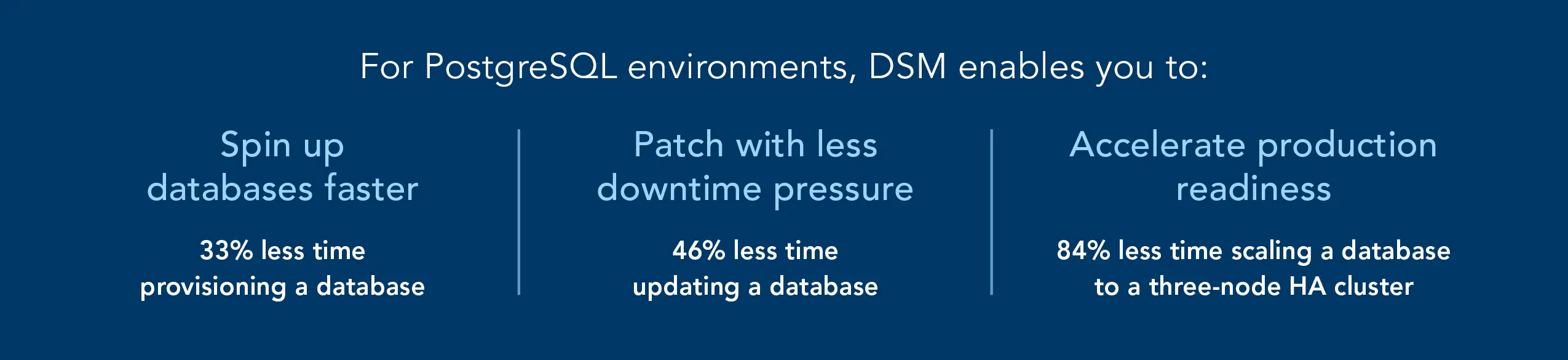
Compared to a manual approach, VMware Data Services Manager (DSM) simplified private-cloud PostgreSQL operations, from provisioning and patching databases to deploying and expanding highly available clusters, reducing administrative time
Enterprises increasingly rely on data-driven applications, yet managing the databases that support those applications can place significant demands on IT teams. In many organizations, provisioning, cloning, patching, and high-availability (HA) configuration tasks require specialized expertise and numerous manual steps. These workflows can slow development timelines, consume administrative resources, and introduce opportunities for configuration errors.
VMware Data Services Manager aims to address these challenges through automated, self-service database lifecycle management. To understand how DSM can help developers and administrators manage PostgreSQL databases, we compared the time and effort required to complete five common database operations using DSM and manual methods. Across every scenario—from provisioning and cloning databases to deploying and expanding HA clusters—DSM reduced the time required to complete the task, which can help organizations respond more quickly to application requirements while reducing operational complexity.
Why it matters
Organizations depend on databases to support modern applications, but managing those databases can require significant administrative effort. Without automation, provisioning new databases, applying updates, and configuring highly available environments can involve dozens of manual steps, command-line operations, and validation checks. Even when performed by experienced administrators, these tasks require active attention from the person performing them.
DSM changes this process by shifting much of the work from manual execution to policy-driven automation. Rather than manually entering commands and configuring settings throughout a workflow, administrators can define approved configurations and policies that guide database deployment and management. The self-service approach with DSM then transfers deployment and management to the consumer, often a developer, who completes a guided workflow and reviews configuration options, and DSM performs the underlying work in the background, enabling the consumer to focus elsewhere.
This distinction between active administration time and automation time can be particularly important at scale. In a manual environment, administrators often perform database tasks sequentially, remaining involved throughout each operation. With DSM, administrators can initiate a workflow and move on to other responsibilities while automation completes the requested task. As the number of databases, applications, and users grows, reducing the amount of hands-on effort required for routine operations can help teams support more database services without increasing operational complexity.
DSM also gives administrators greater control over how database services are consumed. Through policies and predefined options, administrators can determine which database versions, configurations, and capabilities are available to users. These guardrails help standardize deployments while enabling developers and application teams to obtain resources more quickly. By combining automation with policy-based governance, DSM can help organizations streamline database operations while maintaining consistency across environments.
The following sections compare DSM and manual approaches for common PostgreSQL lifecycle and availability-management tasks, illustrating how automation can reduce the time and effort required to deploy, manage, and expand database services. In addition to PostgreSQL, DSM also supports MySQL and Microsoft SQL databases, providing a potentially quick and efficient multi-database management platform.
Note that the graphs in this report use different scales to keep a consistent size. Please be mindful of each graph’s data range as you compare.
What we found
Spin up databases faster
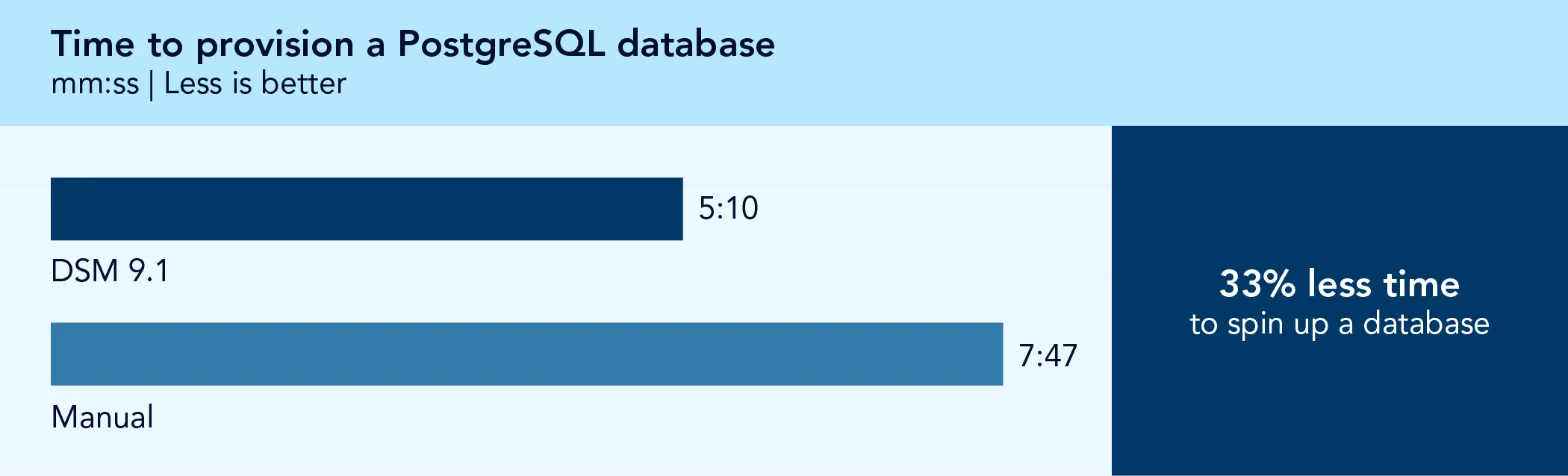
For provisioning, we measured how long it took to create a PostgreSQL instance and populate it with data. As Figure 1 shows, DSM shortened the process by 33 percent, compared to completing the same workflow manually. The automated DSM process also included configuring a backup destination and schedule—tasks that were not part of our manual baseline workflow. In a manual process, adding backup protection would require additional configuration steps and scripting, which could extend deployment time further.
For organizations whose development teams request new PostgreSQL databases frequently, automating the provisioning process can help reduce administrative bottlenecks while ensuring that new databases follow consistent operational policies, such as backup configuration and standardized provisioning practices.
Create a database copy more quickly
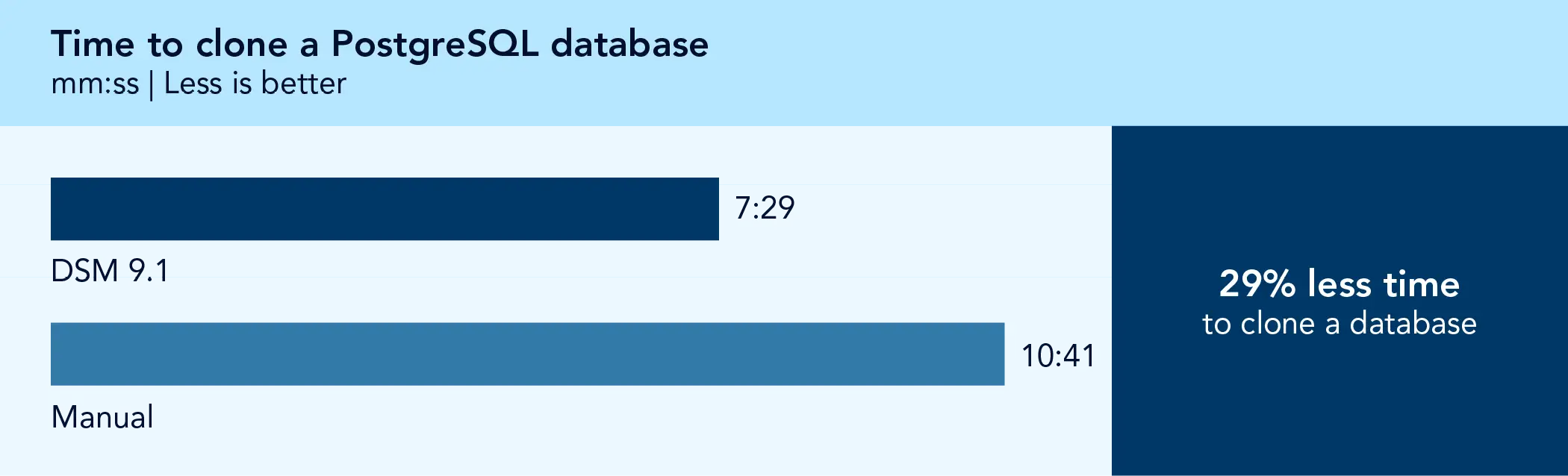
Using DSM to clone a PostgreSQL database took 29 percent less time than our manual process for cloning the database (see Figure 2). Cloning or copying a database allows developers to create working environments that mirror an existing environment to test application changes, validate updates, or troubleshoot issues without affecting production data or disrupting active workloads, which could turn into downtime. Faster cloning can help developers begin testing and development work sooner, reducing delays between request and execution and supporting more efficient iteration cycles.
Patch with less downtime pressure
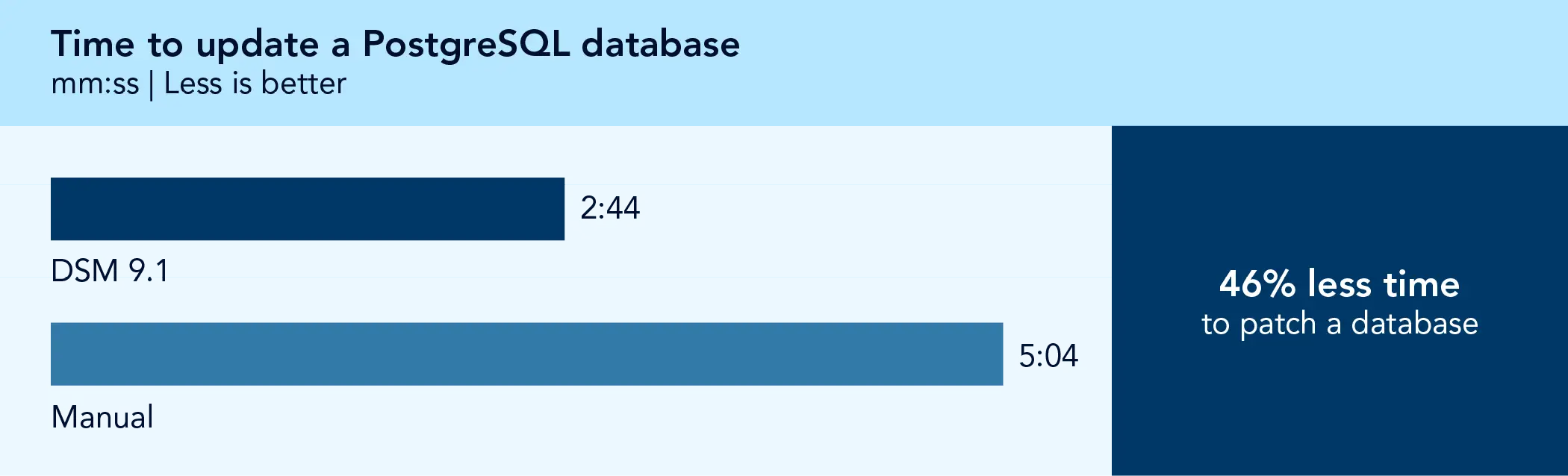
Database administrators regularly need to update databases and applications to maintain security, stability, and compatibility. This is especially critical for Frontier AI cybersecurity, where quick and efficient patching helps safeguard data services from the rapid-evolution of threats. In this scenario, we applied updates to our PostgreSQL database, which took 46 percent less time using DSM than our manual PostgreSQL updating process (see Figure 3). DSM streamlines patching to a few clicks, reducing effort while enabling teams to apply updates more efficiently.
Configure high availability (HA) to help ensure uptime and maintain operations
As applications move from development and testing into production, organizations often add high-availability (HA) capabilities to help maintain service continuity and reduce the risk of downtime. We evaluated two PostgreSQL workflows that enable HA: provisioning a new three-node HA cluster and scaling an existing single-node database instance into a three-node HA cluster.
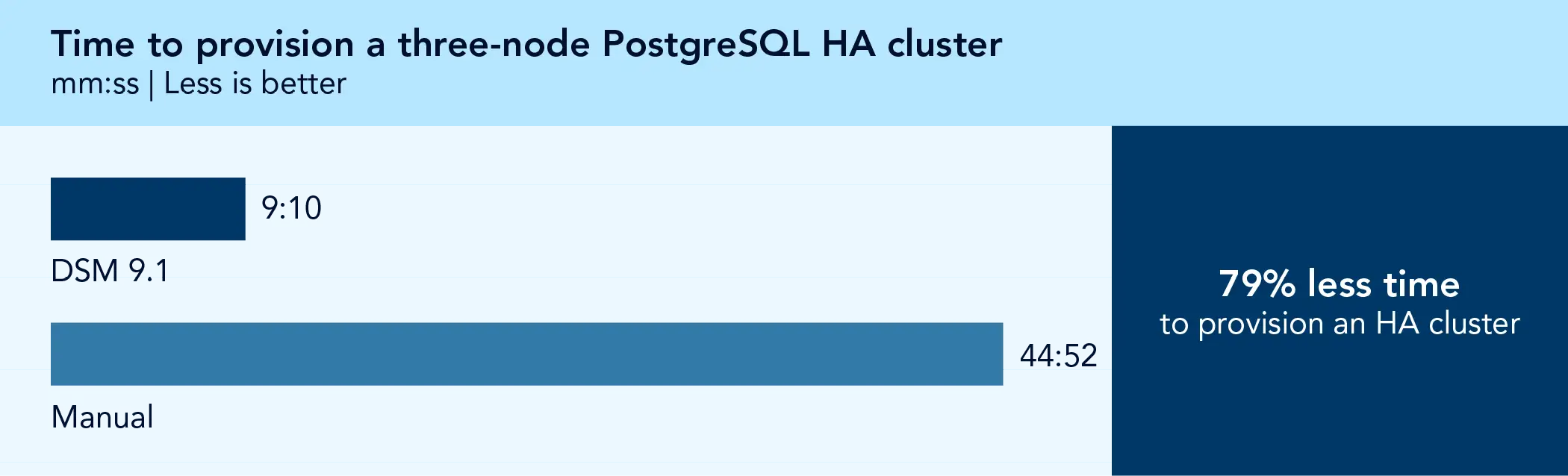
As Figure 4 shows, provisioning a three-node PostgreSQL HA cluster took 79 percent less time—more than 35 minutes—using DSM compared to our manual process. Although administrators may perform this task less frequently than routine database administration activities, provisioning an HA cluster typically involves multiple configuration steps across several nodes. Automating those steps can reduce administrative effort and help minimize opportunities for configuration errors.
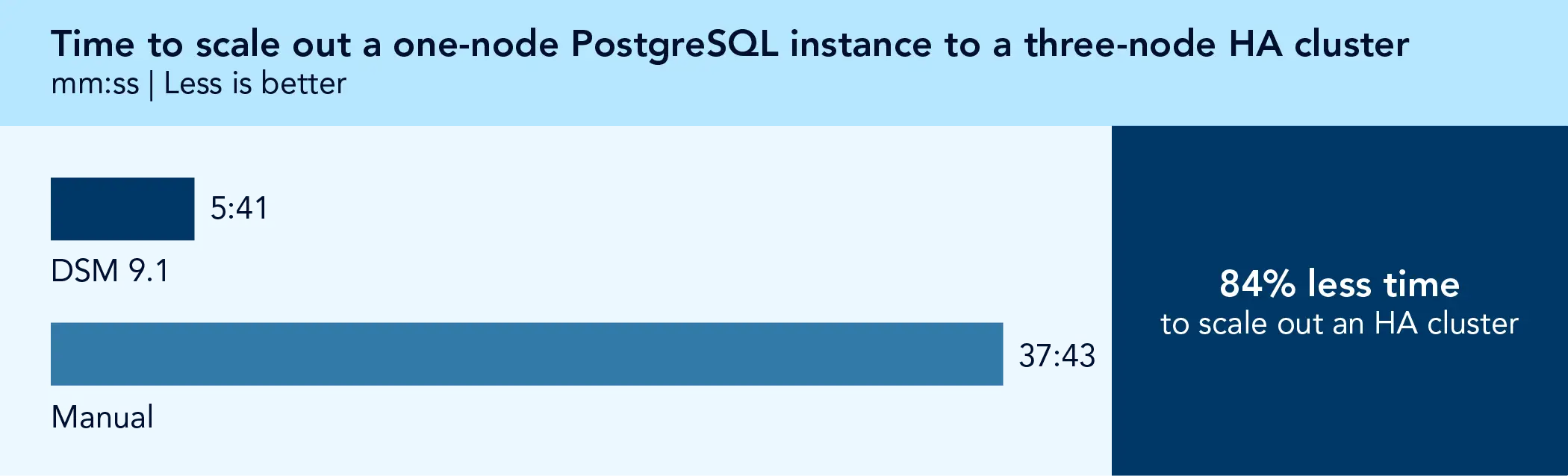
Next, we scaled out a one-node PostgreSQL instance to a three-node HA cluster. Figure 5 shows that DSM reduced the time to complete this task by 84 percent—a 32-minute savings—compared to our manual process. As with provisioning a new HA cluster, scaling an existing database to an HA configuration involves coordinating multiple systems and settings. Automating these tasks can help reduce administrative effort while promoting more consistent deployment of availability features.
In the first three scenarios, we used a DSM deployment with a limited resource pool assigned to our user account. We used a different DSM deployment for HA testing to ensure we had enough available resources to meet HA demands.
Conclusion
VMware DSM can streamline database lifecycle management for private-cloud environments by automating critical database operations, allowing teams to spend less time on administration and more time supporting application needs. In our hands-on testing, DSM reduced the time required to provision, clone, update, and configure PostgreSQL environments compared to manual processes, including reducing the time to deploy and expand highly available database clusters. We focused our testing on PostgreSQL, but DSM also supports MySQL and Microsoft SQL Server from the same console, which means database-facing teams could manage multiple platforms simultaneously with no additional learning curve. By simplifying both routine lifecycle tasks and more complex HA operations, DSM can help administrators and developers accelerate application delivery, improve operational consistency, and support service continuity while maintaining the governance and control of a VMware Cloud Foundation private cloud.
 Twitter
 Facebook
 LinkedIn
 Email
Email- Ulintz, Sue, “VMware Data Services Manager 9.1: Automating the Modern Databases that Drive AI and Private Cloud,” accessed June 22, 2026, https://blogs.vmware.com/cloud-foundation/2026/05/05/vmware-data-services-manager-9-1-automating-the-modern-databases-that-drive-ai-and-private-cloud/.
- Ulintz, Sue, “Rest Easy: Why Manual Database HA/DR Belongs in the Past,” accessed March 6, 2026, https://blogs.vmware.com/cloud-foundation/2026/02/27/rest-easy-why-manual-database-ha-dr-belongs-in-the-past/.

This project was commissioned by Broadcom.
July 2026
Primary contributors
- Tech: Chris B.
- Writing: Nathan P.
- Design: Laura K.
- PM: Scott Luchene
- Developer: Michelle H.
How we created this report
A PT team, which includes the contributors we’ve listed and others, created this report and performed the technical work behind it. We used AI to aid in research, methodology development, report outlining, and editing.

Principled Technologies is a registered trademark of Principled Technologies, Inc.
All other product names are the trademarks of their respective owners.
Principled Technologies disclaimer
Principled Technologies is a registered trademark of Principled Technologies, Inc.
All other product names are the trademarks of their respective owners.
DISCLAIMER OF WARRANTIES; LIMITATION OF LIABILITY:
Principled Technologies, Inc. has made reasonable efforts to ensure the accuracy and validity of its testing, however, Principled Technologies, Inc. specifically disclaims any warranty, expressed or implied, relating to the test results and analysis, their accuracy, completeness or quality, including any implied warranty of fitness for any particular purpose. All persons or entities relying on the results of any testing do so at their own risk, and agree that Principled Technologies, Inc., its employees and its subcontractors shall have no liability whatsoever from any claim of loss or damage on account of any alleged error or defect in any testing procedure or result.
In no event shall Principled Technologies, Inc. be liable for indirect, special, incidental, or consequential damages in connection with its testing, even if advised of the possibility of such damages. In no event shall Principled Technologies, Inc.’s liability, including for direct damages, exceed the amounts paid in connection with Principled Technologies, Inc.’s testing. Customer’s sole and exclusive remedies are as set forth herein.
Image close up


