A Principled Technologies report: Hands-on testing. Real-world results.
Run more Kubernetes pods and applications on VMware Cloud Foundation 9.0 with VMware vSphere Kubernetes Service
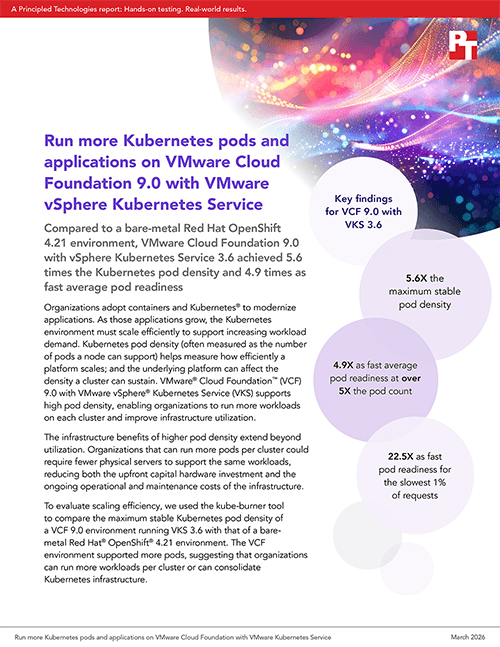
Compared to a bare-metal Red Hat OpenShift 4.21 environment, VMware Cloud Foundation 9.0 with vSphere Kubernetes Service 3.6 achieved 5.6 times the Kubernetes pod density and 4.9 times as fast average pod readiness
Organizations adopt containers and Kubernetes® to modernize applications. As those applications grow, the Kubernetes environment must scale efficiently to support increasing workload demand. Kubernetes pod density (often measured as the number of pods a node can support) helps measure how efficiently a platform scales; and the underlying platform can affect the density a cluster can sustain. VMware® Cloud Foundation™ (VCF) 9.0 with VMware vSphere® Kubernetes Service (VKS) supports high pod density, enabling organizations to run more workloads on each cluster and improve infrastructure utilization.
The infrastructure benefits of higher pod density extend beyond utilization. Organizations that can run more pods per cluster could require fewer physical servers to support the same workloads, reducing both the upfront capital hardware investment and the ongoing operational and maintenance costs of the infrastructure.
To evaluate scaling efficiency, we used the kube-burner tool to compare the maximum stable Kubernetes pod density of a VCF 9.0 environment running VKS 3.6 with that of a bare-metal Red Hat® OpenShift® 4.21 environment. The VCF environment supported more pods, suggesting that organizations can run more workloads per cluster or can consolidate Kubernetes infrastructure.
What are pods? A helpful explainer for decision makers
If you’re less involved in daily Kubernetes management and operations and want to look at the broader picture, let’s dig into what pods are so you can better understand the benefits of pod density.
As defined by the Cloud Native Computing Foundation (CNCF), a pod “acts as the most basic deployable unit. It represents an essential building block for deploying and managing containerized applications.”1 In terms of resources and operations, a pod’s containers are always co-located and co-scheduled. The containers in a pod run in a shared context, which are the specifications that isolate them from other pods or containers.2
When we talk about pod density, we’re discussing a key component for how admins, development and operations (DevOps) teams, and others will manage pods and thus containers. There are two use cases for pods that affect how they’re managed in addition to how they operate:
Most common: Pods that run a single container – In this case, you can think of a pod as a wrapper around a single container. Although the pod contains a single container, admins manage them through the container application platform (e.g., VKS or OpenShift) rather than managing the containers directly.
More advanced: Pods that run multiple containers that need to work together – In this case, a pod runs multiple tightly coupled, co-located containers that share resources. These co-located containers form a single unit, so managing the pod means managing multiple containers simultaneously.
Still following? Great, one more note to put it into focus: According to CNCF, each pod “contains a single application instance and can hold one or more containers.”3 If admins want to provide more overall resources to meet demand or address another concern, they can scale those containerized applications and run more instances. As each instance typically runs in its own pod, scaling an application usually means creating more pods. So greater pod density means supporting more applications.
A closer look at limiting factors
What is pod density? Pod density is not simply adding more containers. Kubernetes must place pods onto hosts or worker nodes while ensuring that the cluster does not exceed available resources or stability limits. So, pod density also needs to factor in resource limits.
Several factors influence how many pods a cluster can sustain. CPU and memory are the most obvious constraints because Kubernetes schedules pods based on the resource requests and limits defined for their containers. Networking capacity, available IP addresses, storage resources, and system reservations for Kubernetes components can also affect the number of pods a node can safely support. Because different Kubernetes platforms manage these resources and limits in different ways, the underlying platform can influence the maximum pod density a cluster can sustain.
About kube-burner
kube-burner is a CNCF open-source Kubernetes testing tool that measures Kubernetes performance and scalability.4 By generating workloads at scale, kube-burner helps identify how many pods a cluster can sustain before reaching stability limits. In this study, we used kube-burner to increase the number of pods running in each environment gradually and measured the maximum stable pod density supported by each platform using identical hardware infrastructure.
What we tested
Because each Kubernetes worker node can support only a limited number of pods, platform architecture can influence the maximum density a cluster can sustain. In bare-metal environments, each node runs on a dedicated physical server, while virtualized environments can have many virtual worker nodes on the same hardware.
To ensure a fair comparison, we configured four Dell™ PowerEdge™ R640 servers with identical processors, memory, and storage on each platform. We kept the number of servers running workloads consistent across both environments to represent organizations deploying either platform on the same infrastructure. Each solution required different allocations for management, storage, and hosts.
As processor and memory affect pod density, your results may differ, but you should have roughly comparable results to ours if your systems have similar configurations. We used the following for both solutions:
Given the identical hardware in our two four-host clusters, you might expect them to support similar numbers of pods. To explore this assumption, we used kube-burner to increase the number of pods running in each environment gradually until the cluster reached its maximum stable pod density—the point at which adding additional pods would cause performance degradation or cluster instability.
Why pod density matters
Kubernetes pod density affects how efficiently organizations can run containerized applications on their infrastructure. Higher pod density allows clusters to support more workloads without adding additional hardware, which can improve infrastructure utilization and reduce the number of clusters required to run applications. In large environments, this capability could enable teams to consolidate Kubernetes workloads, simplify operations, and make more effective use of available compute resources.
Maximize stable pod density
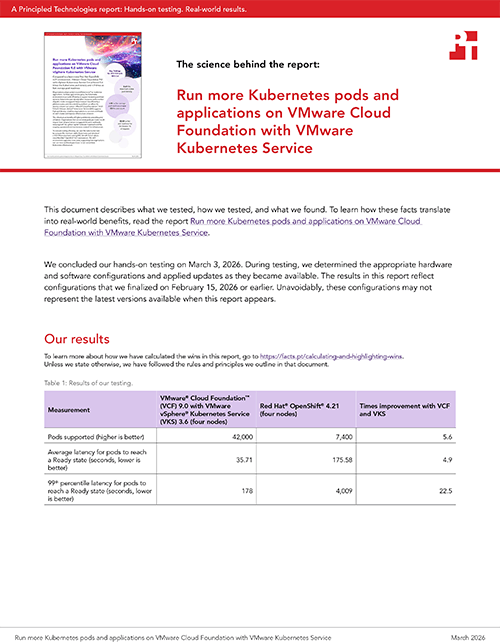
As Figure 1 shows, VKS supported a much higher maximum stable Kubernetes pod density than bare-metal OpenShift. VKS supported 42,000 pods—more than five times the number of pods supported by the OpenShift environment before reaching stability limits. These results show that, compared to Red Hat OpenShift, VKS can allow organizations to run more workloads on the same hardware infrastructure.
The total pods each solution supported before instability or failure. Source: PT.
As pod counts increased in the Red Hat OpenShift environment, the worker nodes eventually reached a stability threshold. When pod counts exceeded this level, worker nodes began transitioning to a Not Ready state, causing pods to terminate and cluster stability to degrade. We defined the maximum stable pod density as the highest pod count that the cluster could sustain without node instability.
In contrast, the VCF with VKS environment continued to scale much higher without node instability as we increased the number of worker nodes and pods. The cluster reached its maximum pod density when memory utilization approached the threshold at which additional pods would risk performance degradation due to memory pressure.
Because higher pod density allows organizations to run more workloads on each cluster, the ability to sustain more pods can enable teams to consolidate containerized applications into fewer servers and improve infrastructure utilization.
Get production-ready pods faster at scale
In addition to supporting higher pod density, VCF with VKS delivered significantly faster pod readiness than bare-metal Red Hat OpenShift across both average and tail latency. On average, VKS brought pods to a Ready state—able to serve application traffic—nearly five times as fast as OpenShift (35.7 seconds vs. 175.6 seconds). At the 99th percentile, representing the slowest 1 percent of requests, the gap widened to 22 times as fast, with VKS pods reaching readiness in 178 seconds, compared to 4,009 seconds for OpenShift pods, while sustaining five times the pod count.
Faster pod readiness can enable organizations to scale containerized applications more quickly, reduce recovery time following node failures, and deliver more consistent application availability.
The average and 99th percentile latency each solution supported during testing. Source: PT.
How does platform architecture affect Kubernetes clusters?
Platform architecture can influence how efficiently Kubernetes clusters scale. In a bare-metal deployment, each worker node runs directly on a physical server, which limits the number of nodes available within a fixed hardware footprint. In a virtualized environment such as VCF 9.0 with VKS, administrators can deploy additional worker node VMs on the same physical hosts. This flexibility can allow clusters to scale to a larger number of nodes and support a greater number of pods on the same underlying infrastructure. As a result, virtualization can help organizations make more effective use of available hardware when running large Kubernetes environments.
Conclusion
As organizations scale containerized applications, both pod density and pod readiness speed affect how efficiently infrastructure can support growing workload demand. In our testing, VCF 9.0 with VKS 3.6 supported over five times the pod density of bare-metal Red Hat OpenShift 4.21, while bringing pods to a Ready state significantly faster. These results suggest that organizations running VKS could:
Lower CapEx — Higher pod density means fewer physical servers required to run the same workloads, reducing upfront hardware procurement and networking infrastructure costs
Lower OpEx — Fewer servers means reduced power, cooling, rack space, networking, and IT management costs across the board
Scale applications faster — Shorter pod readiness latency times mean applications can respond to demand spikes, rolling deployments, and node failures more quickly
Improve service availability — Faster pod startup reduces the window of degraded service during incidents and recovery events
A PT team, which includes the contributors we’ve listed and others, created this report and performed the technical work behind it. We used AI to do some research and edit the report.
Principled Technologies is a registered trademark of Principled Technologies, Inc. All other product names are the trademarks of their respective owners.
Principled Technologies disclaimer
Principled Technologies is a registered trademark of Principled Technologies, Inc. All other product names are the trademarks of their respective owners.
DISCLAIMER OF WARRANTIES; LIMITATION OF LIABILITY: Principled Technologies, Inc. has made reasonable efforts to ensure the accuracy and validity of its testing, however, Principled Technologies, Inc. specifically disclaims any warranty, expressed or implied, relating to the test results and analysis, their accuracy, completeness or quality, including any implied warranty of fitness for any particular purpose. All persons or entities relying on the results of any testing do so at their own risk, and agree that Principled Technologies, Inc., its employees and its subcontractors shall have no liability whatsoever from any claim of loss or damage on account of any alleged error or defect in any testing procedure or result.
In no event shall Principled Technologies, Inc. be liable for indirect, special, incidental, or consequential damages in connection with its testing, even if advised of the possibility of such damages. In no event shall Principled Technologies, Inc.’s liability, including for direct damages, exceed the amounts paid in connection with Principled Technologies, Inc.’s testing. Customer’s sole and exclusive remedies are as set forth herein.



 Twitter
 Facebook
 LinkedIn
 Email
Email