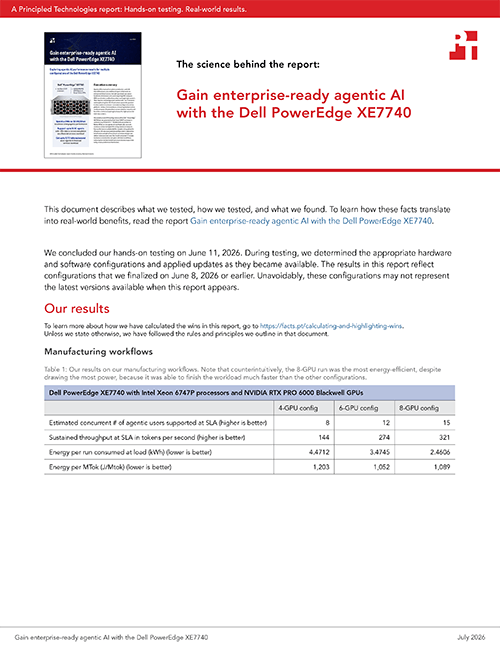
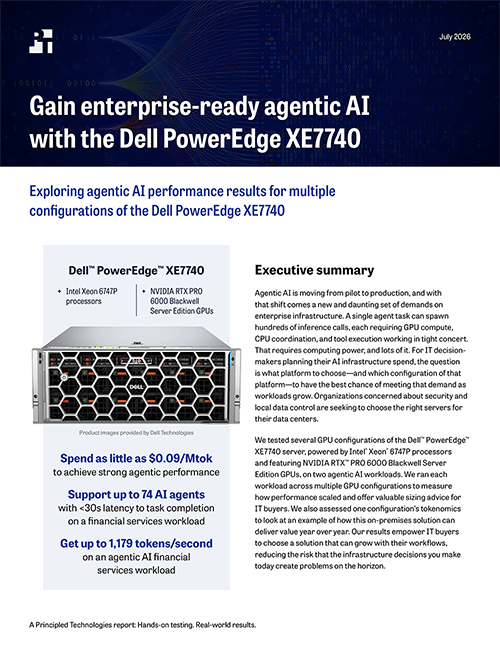
A Principled Technologies report: Hands-on testing. Real-world results.
Gain enterprise-ready agentic AI with the Dell PowerEdge XE7740
Exploring agentic AI performance results for multiple configurations of the Dell PowerEdge XE7740
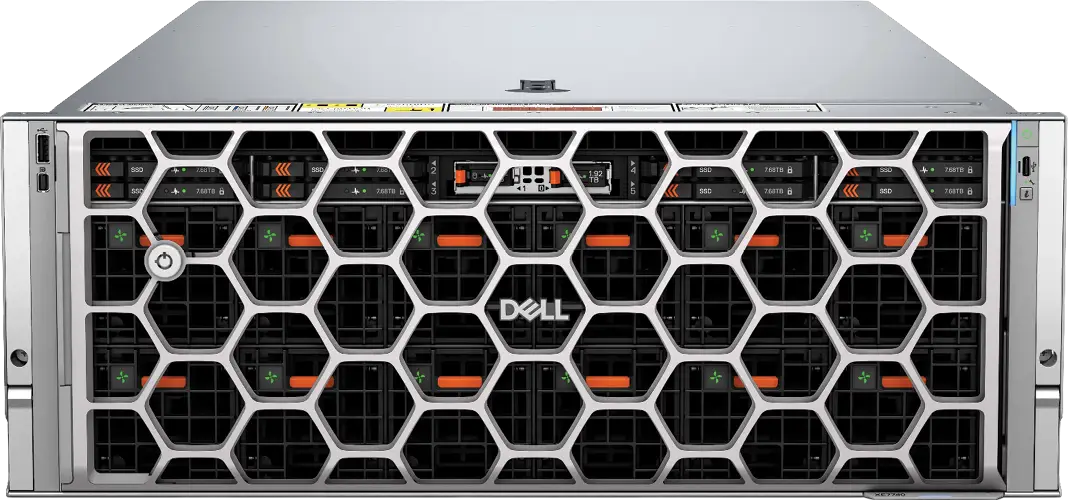
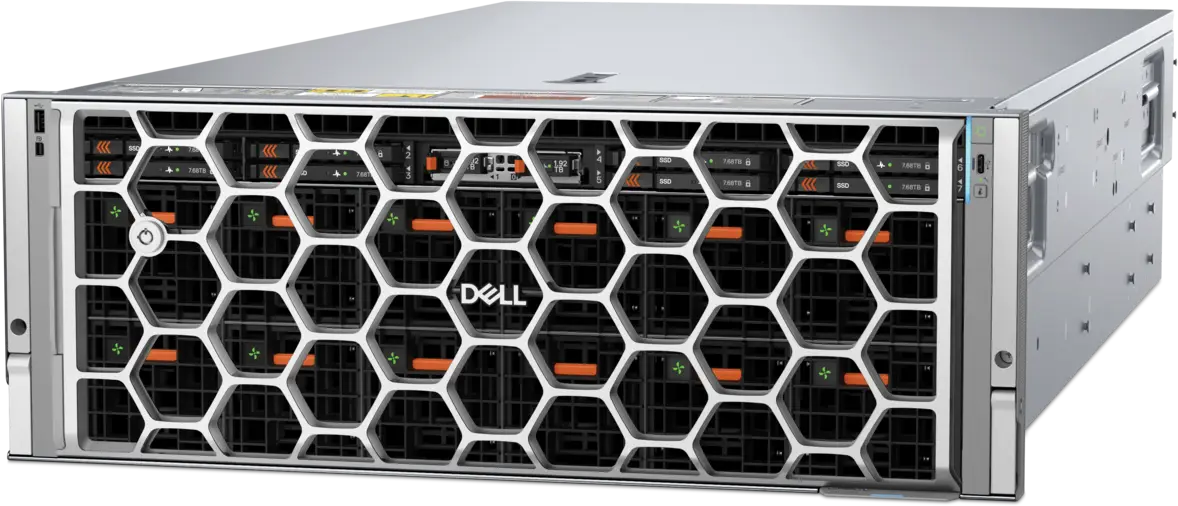
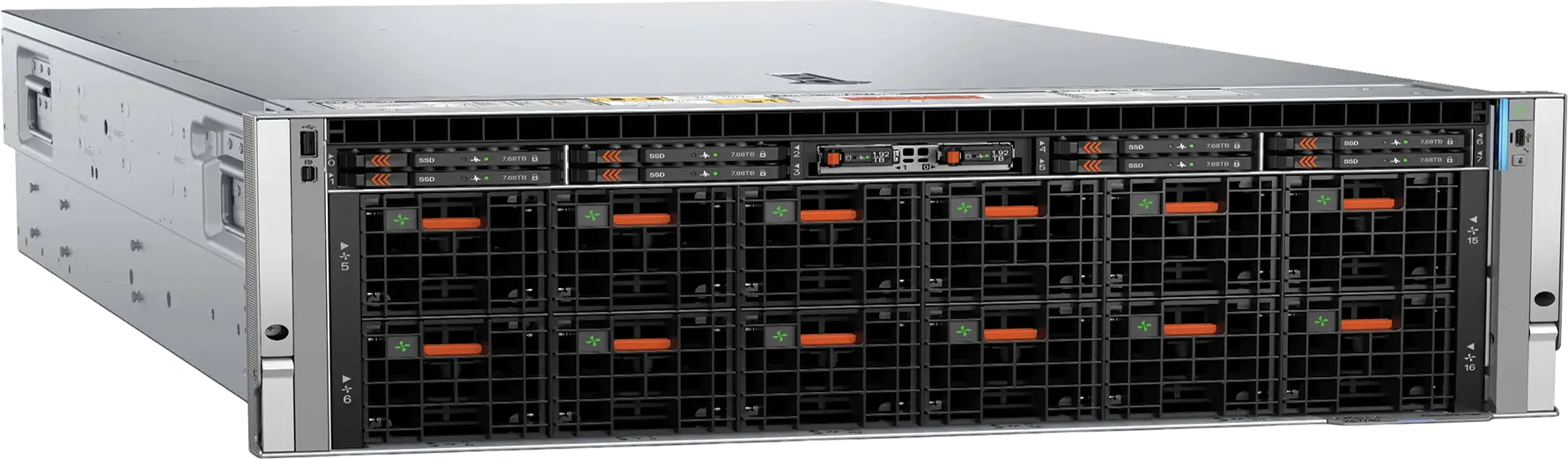
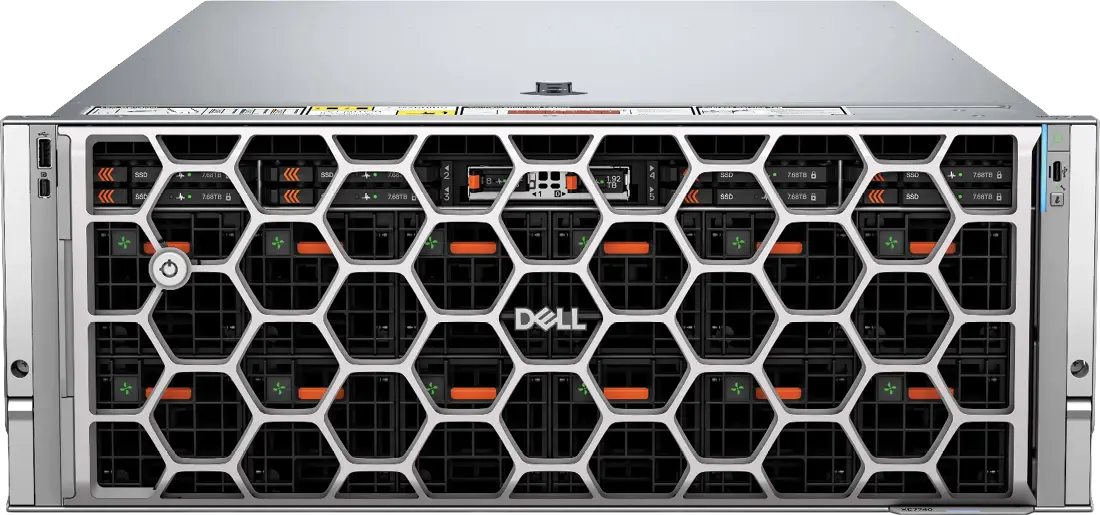
Dell™ PowerEdge™ XE7740
Intel Xeon 6747P processors
NVIDIA RTX PRO 6000 Blackwell Server Edition GPUs
Product images provided by Dell Technologies
Spend as little as $0.09/Mtok to achieve strong agentic performance
Support up to 74 AI agents with <30s latency to task completion on a financial services workload
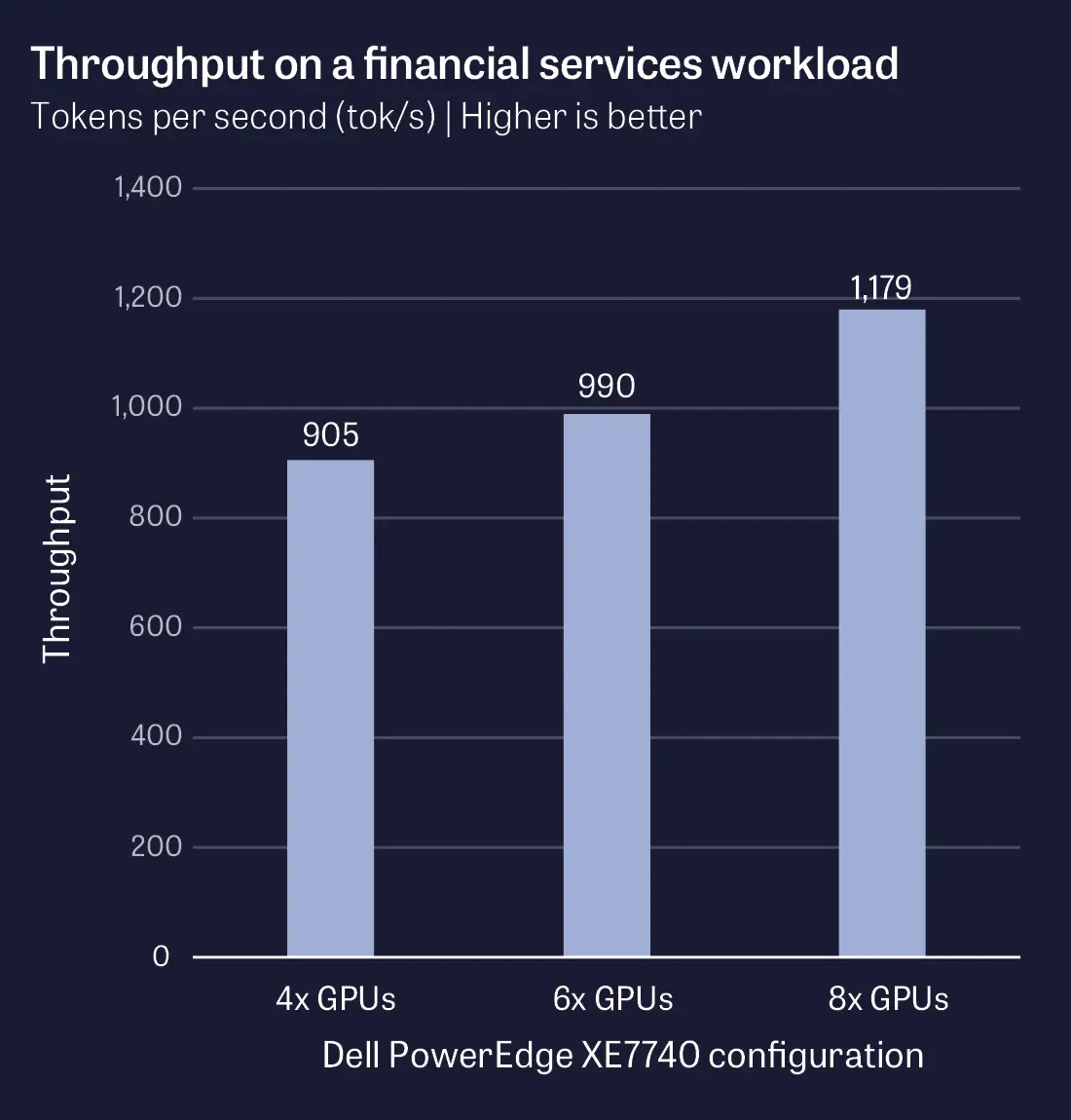
Get up to 1,179 tokens/second on an agentic AI financial services workload
Executive summary
Agentic AI is moving from pilot to production, and with that shift comes a new and daunting set of demands on enterprise infrastructure. A single agent task can spawn hundreds of inference calls, each requiring GPU compute, CPU coordination, and tool execution working in tight concert. That requires computing power, and lots of it. For IT decision-makers planning their AI infrastructure spend, the question is what platform to choose—and which configuration of that platform—to have the best chance of meeting that demand as workloads grow. Organizations concerned about security and local data control are seeking to choose the right servers for their data centers.
We tested several GPU configurations of the Dell™ PowerEdge™ XE7740 server, powered by Intel® Xeon® 6747P processors and featuring NVIDIA RTX™ PRO 6000 Blackwell Server Edition GPUs, on two agentic AI workloads. We ran each workload across multiple GPU configurations to measure how performance scaled and offer valuable sizing advice for IT buyers. We also assessed one configuration’s tokenomics to look at an example of how this on-premises solution can deliver value year over year. Our results empower IT buyers to choose a solution that can grow with their workflows, reducing the risk that the infrastructure decisions you make today create problems on the horizon.
Key takeaways
from this Principled Technologies report
“We tested the Dell PowerEdge XE7740 on real-world agentic workloads, giving you real, fact-based sizing data.”
To make a wise purchase decision, you need real sizing data
Agentic AI consumes much more computing power than a standard chatbot. Instead of a single inference call, an agentic task can spawn hundreds of calls—all running in parallel, with tool execution and agent coordination between every step. We tested the Dell PowerEdge XE7740 on real-world agentic workloads, giving you real, fact-based sizing data.
More GPUs mean more agents
On our financial services workload, the 8-GPU configuration supported up to 74 simultaneous AI agents while keeping task-completion latency under 30 seconds. On the manufacturing workload, doubling GPU count nearly doubled supported agents. While you should choose the right GPU count for your needs, it’s clear that more GPUs means more agentic AI opportunity.
Throughput scales with your GPU investment
More throughput means agents complete tasks faster. While all configurations performed well, the 8-GPU configuration we tested more than doubled the throughput of the 4-GPU configuration on the manufacturing workload while staying within our latency threshold.
On-premises ownership can give you a cost advantage
Cloud platforms charge per token. With an on-prem solution, however, hardware is a one-time expense. With high utilization, every PowerEdge XE7740 configuration we tested had a significantly lower cost per million tokens ($/Mtok) than Amazon Bedrock for the same model, an advantage that compounds for workloads running around the clock.
Agentic AI demands CPU as well as GPU power
Agentic AI requires both powerful CPUs and GPUs. In our testing, CPU utilization ranged up to 99% within a single run, peaking during task assignment and agent orchestration. GPU count alone doesn’t tell the full sizing story.
Why agentic AI matters today
Over the past several years, AI has become ubiquitous. The hottest frontier now is agentic AI: systems in which an AI agent receives a goal, rather than a single prompt, and works through the steps to accomplish that goal on its own. The agent plans, takes actions, evaluates the results, and decides what to do next. Along the way it can browse websites, query databases, write and run code, send emails, and invoke APIs and software tools, among other activities. Where a chatbot answers, an agent acts.
With more powerful and accurate models behind them, AI agents can handle increasingly complex tasks. That translates into cost savings for organizations, enabling staff to hand off their repetitive and manual tasks to AI agents and focus their time on more valuable, higher-order strategy. Businesses across industries are looking to take advantage of these potential benefits and move from demo to production. According to a recent Deloitte study of IT leaders, 74% of IT and business leaders anticipate that their companies will be using agentic AI “moderately” or more by 2027.1
But agentic AI requires a great deal of computing power—which falls on the entire platform, not just the GPU. A single chatbot exchange (one user message and its reply) typically maps to one inference call. In contrast, a single agent task can involve many, many more inference calls running in sequence and in parallel. A predefined workflow may run 5 to 20 model calls per task, while an open-ended agent that directs its own steps can run into the hundreds. In some workloads, agents can even spawn sub-agents, which multiply the workload. That is a dramatic increase in work per user request. Practically, it means that even if a company is happy with the servers running their internal LLMs in chat use cases, those same servers might not be the right fit for agentic workloads.
To find and size the computing solution that will best match their agentic AI goals, organizations need to understand how many agents a solution can support, what kind of performance users will see, and what that solution will cost. This report examines how one server, the Dell PowerEdge XE7740, performed on those metrics.
“Even if a company is happy with the servers running their internal LLMs in chat use cases, those same servers might not be the right fit for agentic workloads.”
Exploring the agentic AI performance of the Dell PowerEdge XE7740
What we tested
We wanted to understand how various configurations of the Dell PowerEdge XE7740 server perform for agentic AI workloads. The server is available in several different CPU and GPU configurations, and organizations considering the server will benefit from this data to size the right configuration for their agentic needs. (Note that customers can order only the 4-GPU and 8-GPU configurations; the 6-GPU configuration is supported, but not orderable.)
We measured how performance scaled with increasing numbers of GPUs. To do this, we configured the server with two Intel Xeon 6747P CPUs and tested with increasing numbers of NVIDIA RTX PRO 6000 Blackwell GPUs: first four, then six, then eight. This real-world data can help you determine which configuration of the PowerEdge XE7740 will be the best fit for your needs.
How we assessed real-world agentic performance
Many existing agentic benchmarks focus only on accuracy, or how well the agent did its job. For this study, we wanted to focus on performance, with the ultimate goal of providing sizing guidance for organizations choosing a server configuration for their agentic workloads. How many agents can the server support while keeping accuracy high and latency below an acceptable threshold? And how does that number change with different GPU configurations?
To answer these questions, we used a custom agentic benchmark that runs realistic AI-agent workflows end-to-end on a computing solution. These workflows are real-world; each of them represents work that an agentic AI system might actually perform in a corporate environment. When we combine our results with up-to-date cost data, this benchmark tells us:
How many tokens per second (throughput) the server can sustain
How many AI agents, or workers, a solution can run within a predefined service level agreement (SLA)/latency threshold
Tokenomics data, including cost to run, amortization of hardware, and cost of energy consumption
Enhanced security for critical AI workloads
For organizations putting sensitive data through agentic AI workflows, the PowerEdge XE7740 carries two layers of hardware-rooted security.
At the processor level, Intel Xeon 6 processors support Intel Trust Domain Extensions (TDX), which isolate workloads inside hardware-encrypted virtual machines that even the hypervisor cannot read. Intel TDX Connect, also supported on Intel Xeon 6 processors, extends that protection across the encrypted link between the CPU and connected GPUs, which is relevant for agentic workloads where sensitive data moves between the two many times per task. At the platform level, Dell PowerEdge servers offer a security framework that incorporates robust identity and access management, hardware intrusion detection, and a silicon-based root-of-trust—among other features—all based on a zero-trust framework.
We ran our tests on the PowerEdge XE7740 server on the benchmark’s medium difficulty tier, representing a medium to large business doing tasks of moderate complexity. (The benchmark allows us to run at simple, moderate, or complex difficulty tiers, with each tier representing an organization and task set of a different size and complexity.) We tested the benchmark with the well-known large language model (LLM) Llama-3.1-70B-Instruct (quantized to 8-bit precision); vLLM as an open-source engine serving the LLM; and Qwen3.5-2B (unified multimodal vision) as the vision-language model (VLM).
Because agentic AI agents can do a wide range of work, much of it industry- and company-specific, we built the benchmark to simulate a range of realistic industry-specific workflows. For this study, we used the financial services and manufacturing workflows, each of which incorporates eight workflow scenarios.
About the Dell PowerEdge XE7740
The Dell PowerEdge XE7740 is an AI server “purpose-built for evolving AI-powered enterprise performance and scalability needs.”2 In addition to agentic AI, Dell notes that the PowerEdge XE7740 is ideal for GenAI fine-tuning and inferencing, natural language processing, and digital twins.3
This 4U, air-cooled server fits into standard data center racks, eliminating the need for costly power and cooling retrofits that liquid-cooled AI servers may require. To enhance AI acceleration, the server supports up to 8 double-wide PCIe accelerators, giving organizations flexibility to choose the accelerator that fits their workload and budget.4
Whether they’re building cars or producing pharmaceuticals, many manufacturing facilities produce billions of telemetry rows of data. AI agents in these factories catch quality issues, identify faulty equipment, predict equipment failures, and trace contaminations. Because every pause in production has a dollar cost, keeping systems up and running is critical.
Statistical process control, where an agent loads multi-series production telemetry to identify which parameters are off and likely root causes
Overall equipment effectiveness, where an agent identifies the worst-performing factory lines and the reasons for any performance drops
Batch genealogy/recall tracing, where an agent traces batches and customers that received material from a simulated contaminated lot and recommends containment actions
Predictive maintenance, where an agent runs a diagnostic and classifies machines’ risk levels
Defect trend investigation, where an agent analyzes and investigates trends in production defects
Vision-based quality inspection, where an agent determines pass/fail quality of a part based on an image
Vision quality control (QC) + telemetry root cause, where an agent determines pass/fail quality and correlates the defect with telemetry signals to identify a likely cause
Full QC pipeline, where an agent runs a complete 4-stage QC pipeline
Manage your fleet of AI servers with ease
Deploying agentic AI workloads is tricky enough—IT teams shouldn’t have to worry about whether everyday manageability tasks will eat up their days. Dell PowerEdge servers ship with iDRAC10 for embedded management, OpenManage Enterprise for one-to-many control, and Dell AIOps for cloud-based monitoring. For IT teams running AI workloads, where firmware currency, configuration consistency, and uptime directly affect performance, those tools have the potential to translate into real time savings on routine work.
Financial firms—such as banks, asset managers, hedge funds, insurance brokers, and others—are using AI agents to catch errors, automate processes, and uncover fraud. AI agents in finance have the potential to automate significant numbers of tasks and assist humans in even more. According to Google, 53% of financial services organizations are using AI agents to improve customer experiences, reduce time-to-market, identify security threats, and much more.5
Our benchmark uses a synthetic dataset to simulate a realistic mid-sized financial services firm. It incorporates eight real-world financial services workflows:
Filing discrepancy analysis, where an agent reads a filing, cross-references numbers, and writes a risk summary flagging any mismatches in the filing
Transaction reconciliation, where an agent replays every posted transaction across the organization and flags potential issues
Portfolio valuation/net asset value (NAV) calculation, where an agent reviews positions a portfolio holds and ranks sector exposures by percent of NAV
Regulatory ratio compute, where an agent loads bank balance-sheet inputs and flags issues in regulatory ratios
Peer cohort analysis, where an agent analyzes and ranks a stock ticker against its peers
Fraud investigation, where an agent investigates potential fraud based on bank transactions and escalates issues to a human investigator
Long-context filing Q&A, where an agent answers specific questions based on a very large dataset
Board pack narrative, where an agent generates a board of directors-ready presentation about a financial services org
One example of how architecture can affect performance
The 6-GPU configuration required crossing NUMA boundaries to be allowed by the vLLM architecture, and that challenge negatively influenced that configuration’s performance somewhat.
The Dell PowerEdge XE7740 is a dual-socket, or two-processor, server, so it has two NUMA (non-uniform memory access) nodes. Each of the two processors has its own local memory and its own directly attached GPUs, and communication that stays within a node is faster than communication that crosses between them. In every configuration we tested, we balanced the GPUs evenly across the 2 nodes: 2 per node at 4 GPUs, 3 per node at 6 GPUs, and 4 per node at 8 GPUs.
That even balance suits the four- and eight-GPU configurations well. vLLM, the engine that serves the language model, splits the model’s computational work evenly across GPUs. In practice, this means that configurations with four or eight GPUs can keep every GPU group inside a single NUMA node. The six-GPU configuration, however, is more awkward. vLLM cannot form a valid group of three GPUs, so it can’t use the three GPUs on each node as a clean, node-local set. To put all six GPUs to work on the text workload, we paired two GPUs within the first node, two within the second, and a final two that spanned both nodes (one GPU on each). That last pair has to communicate across the NUMA boundary on every step, and the latency that results from crossing that boundary is why the six-GPU configuration delivered a smaller throughput gain than its GPU count alone would suggest.
What we found: Scale agentic AI performance by adding GPUs on the Dell PowerEdge XE7740
Support more agentic AI workers as you add GPUs
Conventional wisdom says that more GPUs empower more and faster AI workloads, and that’s exactly what we saw in our testing. Supported by the powerful Intel Xeon 6747P CPU, the Dell PowerEdge XE7740 was able to handle a significant number of users even at the lowest GPU count. As we scaled GPUs from four to six to eight, however, performance increased significantly.6
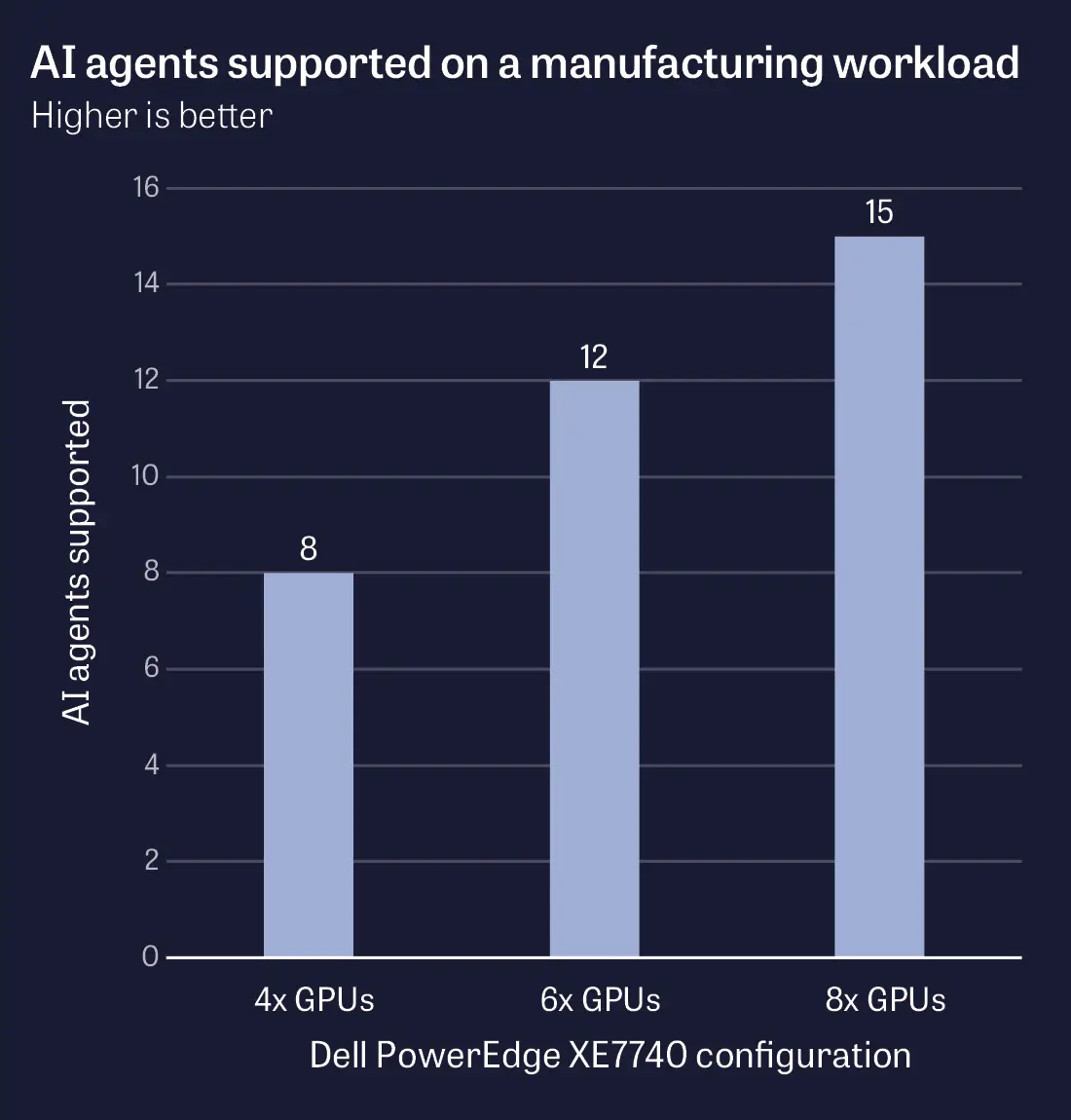
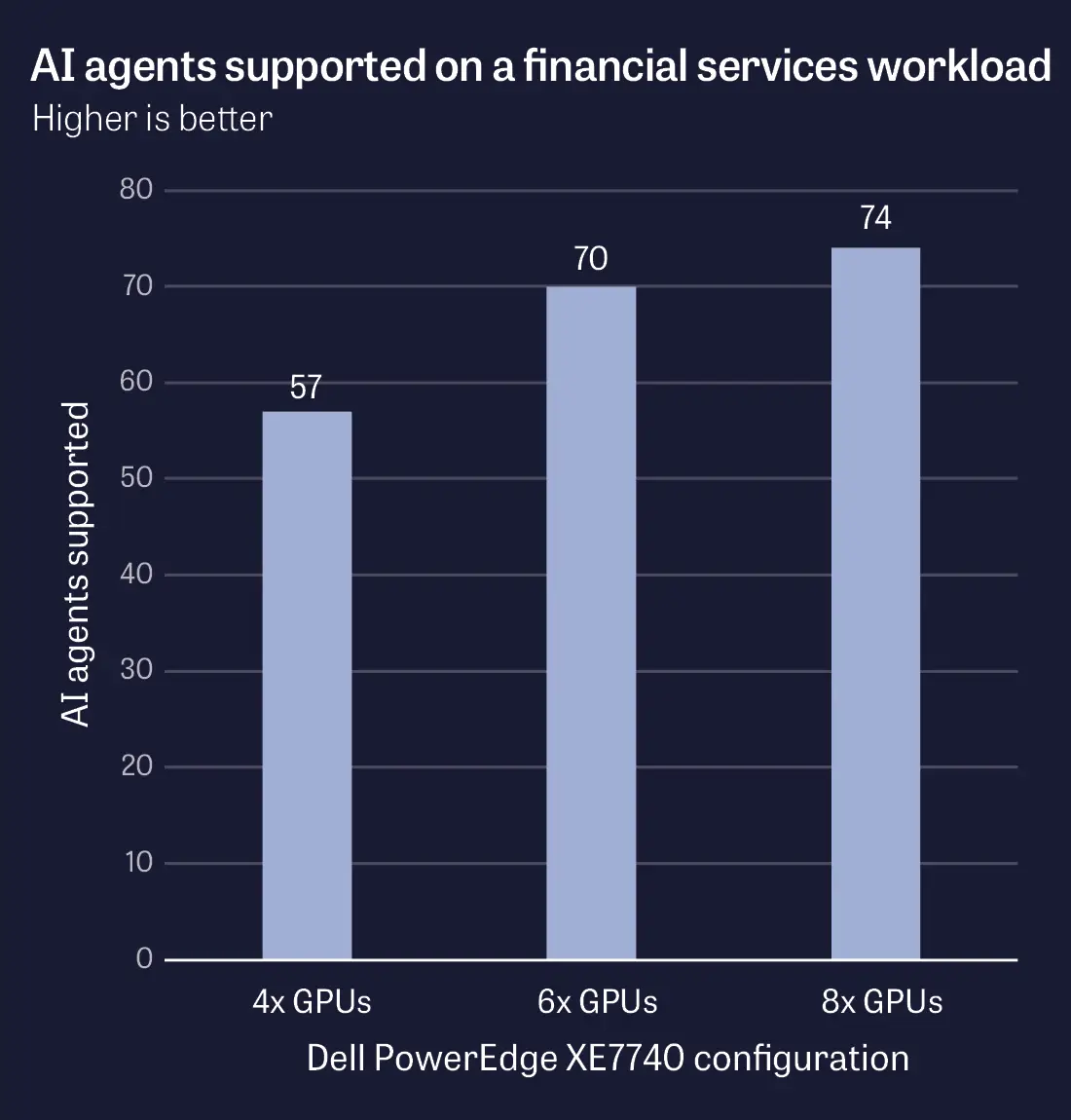
Figures 1 and 2 highlight what we saw on our manufacturing and financial services workloads, respectively. When we doubled GPU count on our manufacturing workload, we also nearly doubled the number of agentic users the server could support. The story was similar on the financial services workload. Here, the 8-GPU configuration supported 29% more agentic users than the 4-GPU configuration. (That said, the financial services workload sustained significantly more agents, because it is less complex than the much more intense manufacturing workload.)
If you need the maximum performance on agentic AI workloads, the message is clear: Use more GPUs.
We set a 30-second latency SLA for the financial services workload and a 90-second latency SLA for the manufacturing workload. The financial services latency SLA was significantly lower, because we assume that the financial services workflows involved a human reviewing the results in real time—imagine a wealth advisor seeking an answer during a client call, for example. The manufacturing agents, in contrast, are more likely to be working in the background, with a user submitting a request and returning to it later.
The number of AI agents each GPU configuration of the PowerEdge XE7740 solution supported on our manufacturing workload, while keeping latency for task completion below a threshold of 90 seconds. Higher is better. Source: PT.The number of AI agents each GPU configuration of the PowerEdge XE7740 solution supported on our financial services workload, while keeping latency for task completion below a threshold of 30 seconds. Higher is better. Source: PT.
Sustain higher throughput as you add GPUs
Throughput told a similar story. We measured throughput in tokens per second, with a token being the basic unit of input and output that large language models work with (typically a word or a part of a word).
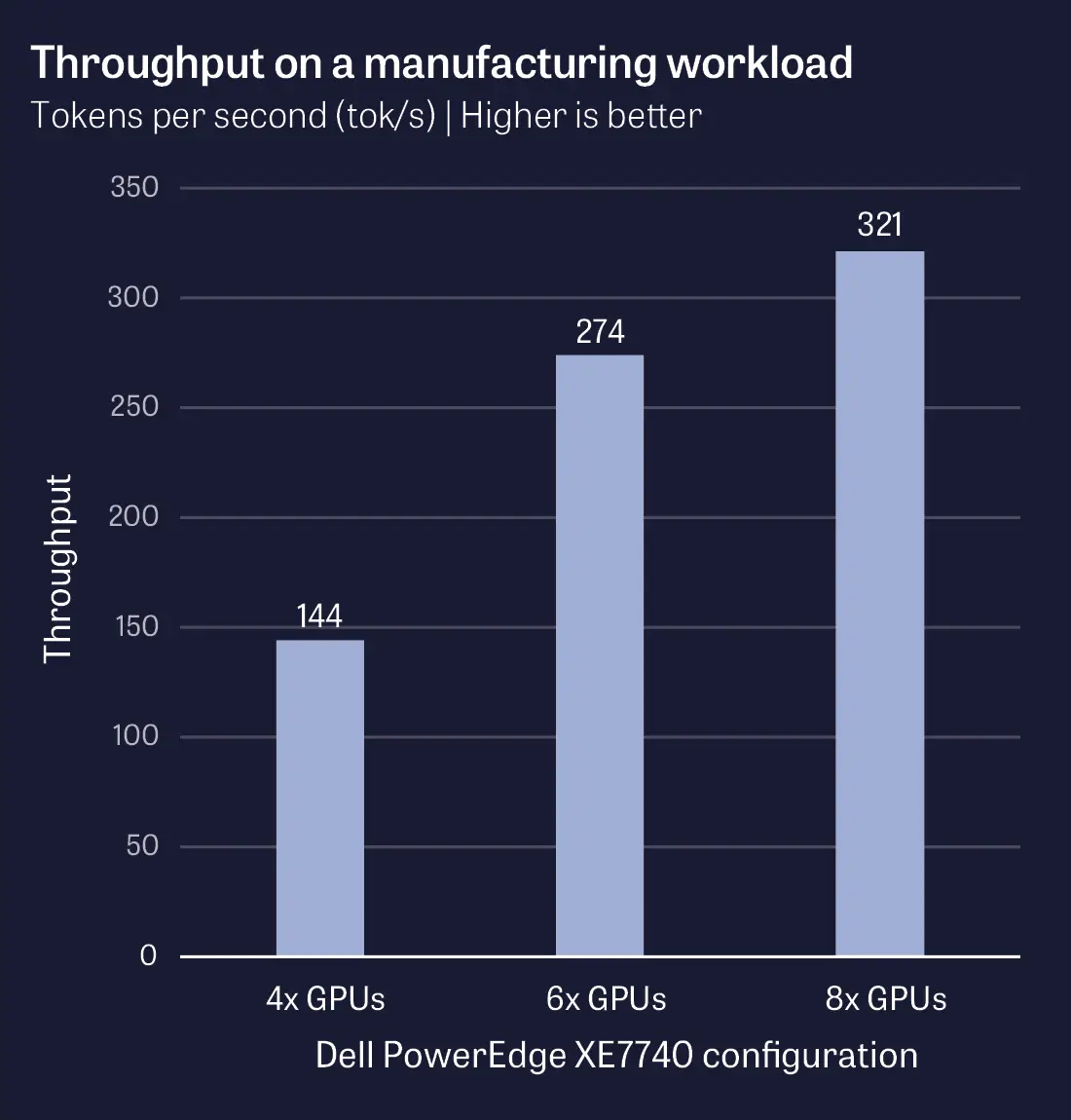
While keeping latency under our SLA, the eight-GPU configuration delivered over double the tokens per second (tok/s) of the four-GPU configuration on the manufacturing workload and 30% more tok/s on the financial services workload. Figures 3 and 4 highlight these results.
More throughput means that you can enjoy faster performance from your agents, which are completing tasks faster and enhancing their value to the business.
The throughput each GPU configuration of the PowerEdge XE7740 solution delivered on our manufacturing workload, in tokens per second, while keeping latency for task completion below a threshold of 90 seconds. Higher is better. Source: PT.
“More throughput means that you can enjoy faster performance from your agents, which are completing tasks faster and enhancing their value to the business.”
The throughput each GPU configuration of the PowerEdge XE7740 solution delivered on our financial services workload, in tokens per second, while keeping latency for task completion below a threshold of 30 seconds. Higher is better. Source: PT.
Exploring tokenomics: What does agentic AI cost to run?
Tokenomics is the economics of how many tokens a system consumes while running a particular workload, compared to the cost to run that system. An organization running agentic workloads in the cloud might pay per token. In contrast, a company that purchases its own hardware and runs it on premises pays for the hardware once, plus ongoing costs in energy, data center space, and maintenance. Whatever the approach, understanding token consumption enables IT decision-makers to more accurately forecast costs and size the right solution for them.
When you’re running the workload on premises, as we were, it may be especially important to get the most tokens per second from your expenditures, because the dominant expense—the system itself—is fixed. The value compounds when you consider that agentic workloads don’t have standard work hours, and can run all day and all night. For a cloud platform, you’d need to pay per token; for an on-prem platform, you pay once, and the only ongoing costs are power, cooling, and maintenance.
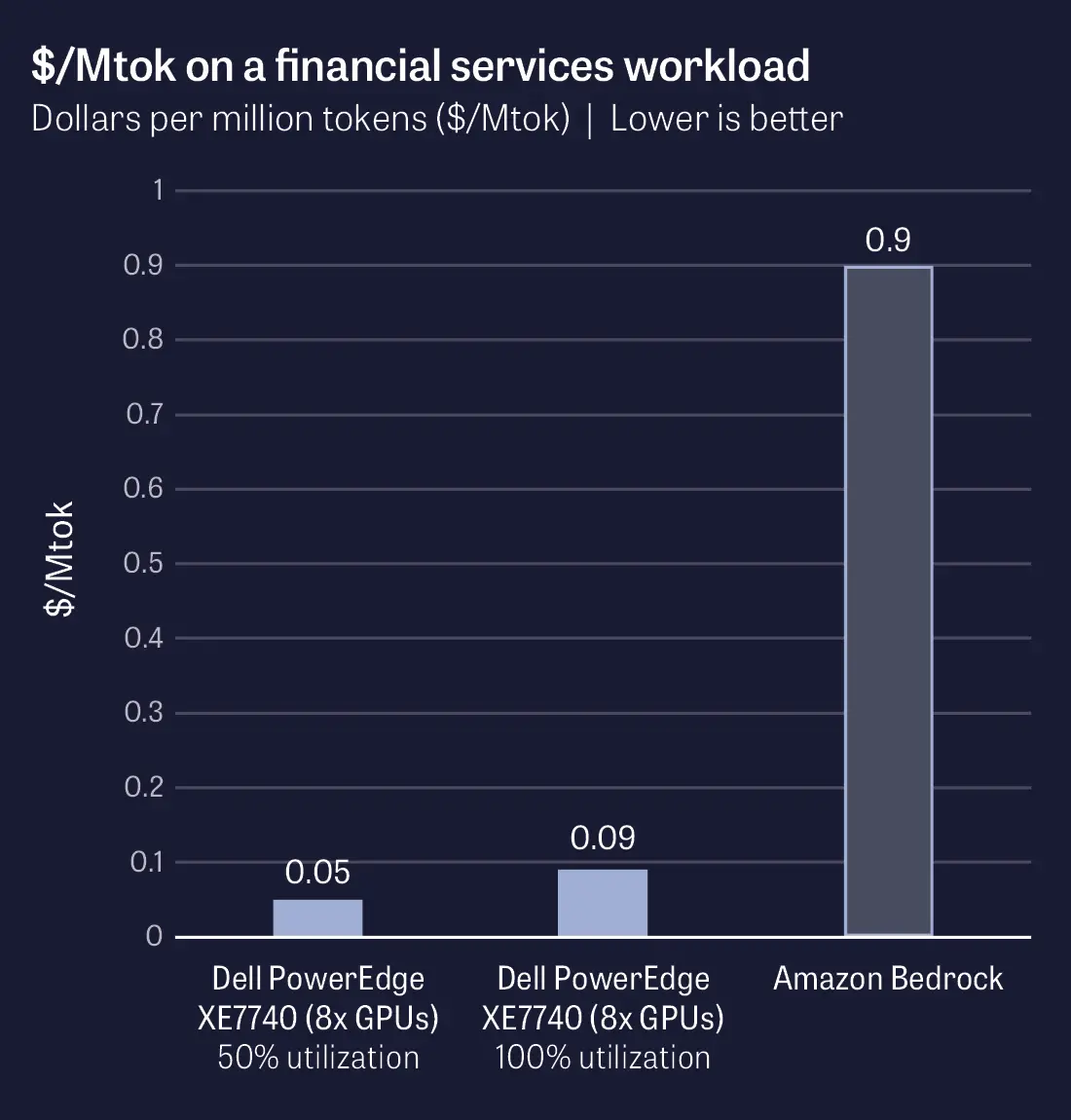
The cost per million tokens ($/Mtok) for the 8-GPU configuration of the PowerEdge XE7740 solution while running our financial services workload compared to the $/Mtok available via Amazon Bedrock. Lower is better. Source: PT.
“For a cloud platform, you’d need to pay per token; for an on-prem platform, you pay once.”
As one example of what the tokenomics might look like on a Dell PowerEdge XE7740 server, we looked at the cost to run our financial services workload at the 8-GPU configuration—the most expensive, and also the highest-performing. For the cost of the server, we used $263,446, a price Dell provided us on 6/23/26. (Your price may vary depending on your configuration, your seller, and other factors.) We calculated energy costs based on the average price of electricity for U.S. commercial customers, which was $0.1385 per kWh as of the most recent available data at the time of this report.7 We did not consider costs for cooling, manageability, networking, storage, software licenses, or data center space.
As a comparison point, we also looked at the cost per million tokens, or $/Mtok, to run the same model we used (Llama 3.1) on a representative cloud service. We chose Amazon Bedrock, an AWS service, which at the time of writing this report is $0.90 for both input and output tokens.8
For our financial services workload, as Figure 5 shows, the PowerEdge XE7740 delivered dramatically lower $/Mtok, meaning much better value.
"
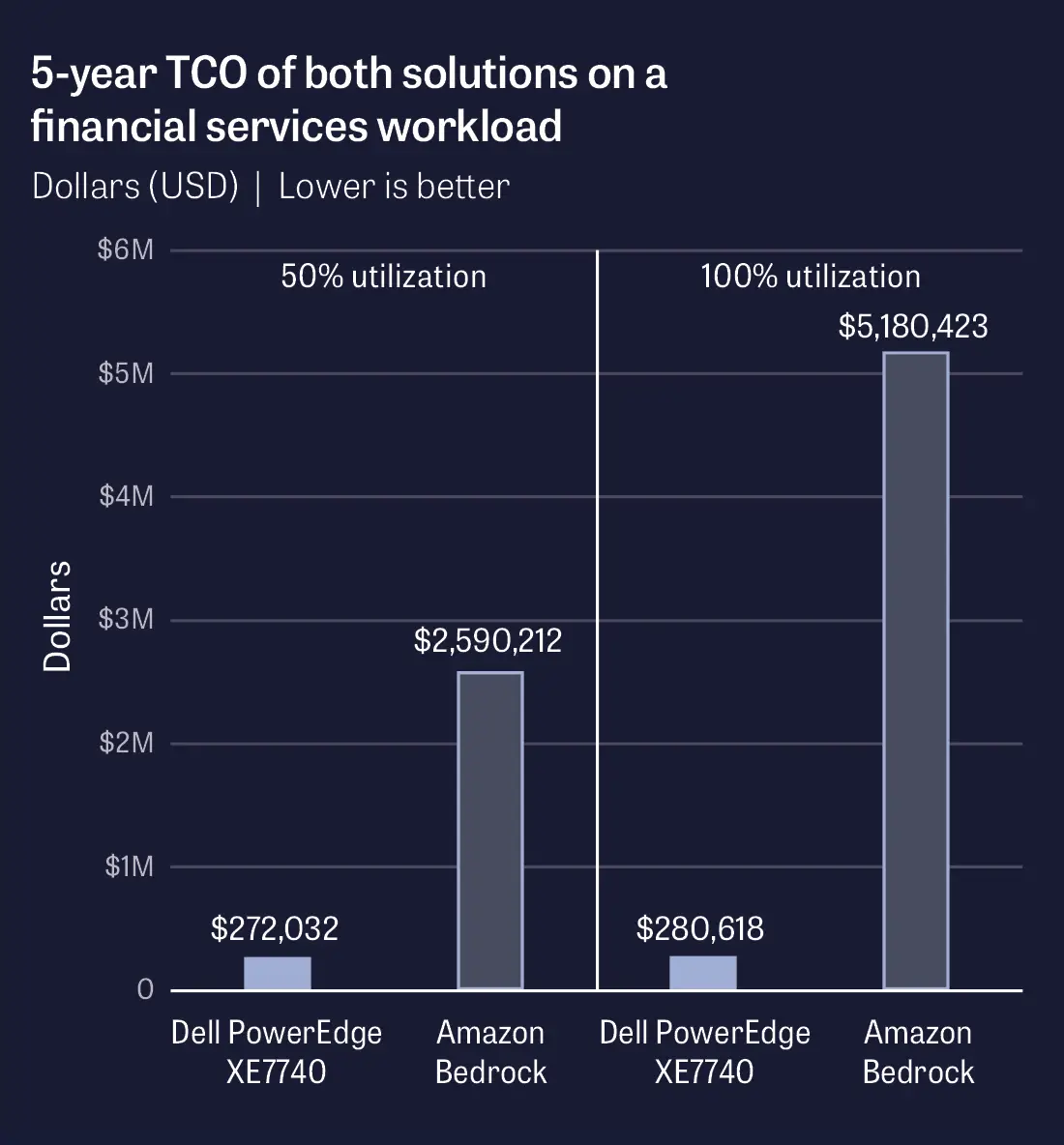
In Figure 6, we also looked at the five-year costs for each solution, covering hardware and energy costs for the on-prem system and cloud costs for the AWS instance. (We amortized the cost of the Dell solution over 5 years, and as we mentioned earlier, we did not include costs for management, cooling, data center space, or other costs.)
First, we looked at the five-year costs if you assume 50% utilization: a steady production load minus weekend and off-hours idle. This makes sense if you’re running a system during business hours. Under this workload, the PowerEdge XE7740 would cost 10.5% of the AWS system over five years.
It’s important to remember, though, that you can run AI agents full-time, including nights and weekends. If we assume 100% utilization, the savings change. The cost of the Dell solution would increase slightly due to its increased power consumption, but the cost of the Amazon Bedrock solution would increase dramatically. Over 5 years at 100% utilization, the Dell solution would cost just 5.4% of the AWS solution.
The five-year cost for the 8-GPU configuration of the PowerEdge XE7740 solution while running our financial services workload compared to the five-year cost of Amazon Bedrock, at both 50% utilization and 100% utilization. On-prem cost includes purchase price and power but excludes cooling, data center space, and manageability costs. Amazon Bedrock cost is $0.90/Mtok and excludes all other costs. Lower is better. Source: PT.
“Over 5 years at 100% utilization, the Dell solution would cost just 5.4% of the AWS solution.”
Our calculations are just one example. Your agentic AI workloads will be different from ours, you may run at varying levels of utilization, and your costs for items we excluded in this report (management, cooling, etc.) may vary. What is clear, however, is that the lower initial cost of the cloud doesn’t necessarily translate into savings over time. Running agentic AI workloads on-prem with the Dell PowerEdge XE7740 gives your organization significant potential for savings over time.
The roles of CPUs vs. GPUs in agentic AI
In any AI server, both the CPU and the GPU play critical roles. For traditional chatbot interactions, however, the GPU does most of the work. A user sends a prompt, the GPU runs the model, and the response comes back.
Agentic AI breaks that pattern. Because an AI agent works through a multi-step loop of planning, acting, checking results, and deciding what to do next, the workload is more distributed between the CPU and the GPU. Think of the GPU as a strategist locked in a room and the CPU as its staff. The GPU can think and write plans, but it can’t pick up a phone or open a file cabinet. The CPU does the legwork outside the room, then slides the results back under the door so the strategist can decide the next move.
Beyond manufacturing and financial services
The workflows we ran for this study focused on two specific verticals, but organizations across industries of all types have the potential for enormous transformation due to agentic AI. Agents in healthcare organizations can handle records, insurance challenges, and prior authorizations; law firms can review contracts, flag non-standard clauses, and draft edits. Customer service and IT teams can grow dramatically more efficient, regardless of the customers and stakeholders they’re serving. What’s next for your business?
To get more technical, the CPU is responsible for orchestration and control flow, deciding what the agent does next, when to call which tool, and how to handle the results. When the agent reaches outside the model to query a database, hit an API, run a piece of code, or read a file, those tool calls and the surrounding I/O run on the CPU. As context accumulates across the agent’s session, the host CPU also orchestrates KV cache offloading—directing inactive cache out of GPU memory into system memory to free high-bandwidth memory (HBM) capacity for active inference—and triggering its reload when the session resumes. Plus, when an agent fans out work to multiple sub-agents running in parallel, the CPU tracks the dependencies between them, schedules their inference calls, and assembles their outputs.
In our testing, CPU usage levels varied significantly depending on what part of the workflow was running, from 7% in times when the agents were largely waiting on the GPUs, to over 99% in times when the agents were actively working or coordinating tasks. The CPU tended to be saturated in the start of a run, where the CPU is doing all of the task assignment and agent orchestration work. (This was especially true for the financial services workload, which starts with a highly CPU-intensive workflow.) The variance in CPU utilization reflects the fact that agentic workflows are made up of many different actions, some of which tax the CPU more than others.
The workload also thoroughly stressed the GPUs. In our financial services testing, the GPUs were consistently saturated, meaning that performance was gated on the GPU. In the manufacturing workflows, the story was similar though more complex due to the nature of the workload. Here, the GPUs burst to near-saturation (approximately 90% utilization) for the first minute of the run, then hovered around 50% utilization. This is because in the manufacturing testing, we split the GPUs between the LLM and the VLM (vision language model), and not all workloads use the VLM. In some cases, therefore, the GPU might reach 50% utilization and be fully subscribed to the work it was allowed to do: either just the LLM, or just the VLM.
Both GPU and CPU performance are vital factors for overall agentic AI throughput. Every time the AI agent calls the model, whether to plan a step, reason about a tool result, or generate a final response, the GPU is running the model that produces the agent’s decisions. In a single agent task, that may happen many times. It can also mean, however, that the GPU spends a meaningful share of the workload waiting on the CPU to feed it the next inference call.
If GPUs can’t run the models quickly enough, users won’t get the outcomes they need. And if the CPU can’t keep up with orchestration, tool execution, and cache management, expensive, difficult-to-access GPUs sit idle.
“Both GPU and CPU performance are vital factors for overall agentic AI throughput.”
Conclusion
You may already be considering how your organization can benefit from agentic AI. As AI capabilities continue to increase, the sky’s the limit. Agentic AI has the potential to enhance some types of work and open up brand-new avenues for productivity and innovation. But to take best advantage of these new technologies, you need a computing solution that can support your ambitions both today and tomorrow.
We found that the Dell PowerEdge XE7740 server, featuring Intel Xeon 6 processors and NVIDIA RTX PRO 6000 Blackwell Server Edition GPUs, can meet businesses’ real-world agentic needs. On our financial services and manufacturing workloads, it sustained from 8 up to 74 simultaneous AI agents and required substantially lower costs per million tokens than the costs for the same LLM on Amazon Bedrock. Your specific agentic AI plans will determine whether the four-GPU, six-GPU, or eight-GPU configuration is the best fit for you. But one thing is for sure: The Dell PowerEdge XE7740 is ready for agentic AI.
Amazon Bedrock Pricing, accessed June 12, 2026, https://aws.amazon.com/bedrock/pricing/. We looked at the price per 1M input tokens and price per 1M output tokens under Llama 3.1 On-Demand and Batch pricing. We compared against Llama 3.1 Instruct (70B) (w/ latency optimized inference) because, given that we were testing against an on-premises system, it was the closest comparison to the workloads we were running. Notably, even if we had compared against the non-latency-optimized Llama 3.1 Instruct (70B) instance at a cost of $0.36/Mtok, the $/Mtok of the PowerEdge XE7740 would still have been significantly lower. For region, we selected US East (N. Virginia), the region physically closest to where we completed testing in Durham, North Carolina.
Commissioned by Dell Technologies
July 2026
Primary contributors
Tech:Warren S., Chris B.
Writing: Sarah Van Name
Design: Jared White
PM: Sarah Van Name
Developer: Michelle Hall
How we created this report
A PT team, which includes the contributors we’ve listed and others, created this report and performed the technical work behind it. In addition to our use of AI in testing, we used AI to draft and proofread sections of this report.
Principled Technologies is a registered trademark of Principled Technologies, Inc. All other product names are the trademarks of their respective owners.
Principled Technologies disclaimer
Principled Technologies is a registered trademark of Principled Technologies, Inc. All other product names are the trademarks of their respective owners.
DISCLAIMER OF WARRANTIES; LIMITATION OF LIABILITY: Principled Technologies, Inc. has made reasonable efforts to ensure the accuracy and validity of its testing, however, Principled Technologies, Inc. specifically disclaims any warranty, expressed or implied, relating to the test results and analysis, their accuracy, completeness or quality, including any implied warranty of fitness for any particular purpose. All persons or entities relying on the results of any testing do so at their own risk, and agree that Principled Technologies, Inc., its employees and its subcontractors shall have no liability whatsoever from any claim of loss or damage on account of any alleged error or defect in any testing procedure or result.
In no event shall Principled Technologies, Inc. be liable for indirect, special, incidental, or consequential damages in connection with its testing, even if advised of the possibility of such damages. In no event shall Principled Technologies, Inc.’s liability, including for direct damages, exceed the amounts paid in connection with Principled Technologies, Inc.’s testing. Customer’s sole and exclusive remedies are as set forth herein.



 LinkedIn
 Facebook
 X
X Email
Email