A Principled Technologies report: Hands-on testing. Real-world results.
Expedite complex workflows with an HP ZBook 8 G1a Mobile Workstation
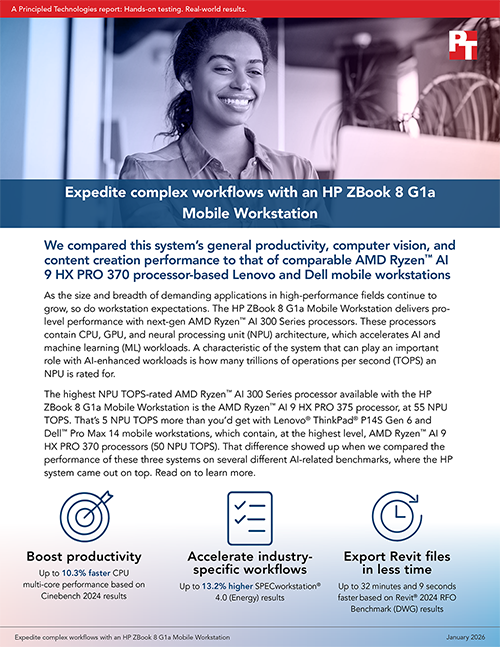
We compared this system’s general productivity, computer vision, and content creation performance to that of comparable AMD Ryzen™ AI 9 HX PRO 370 processor-based Lenovo and Dell mobile workstations
As the size and breadth of demanding applications in high-performance fields continue to grow, so do workstation expectations. The HP ZBook 8 G1a Mobile Workstation delivers pro-level performance with next-gen AMD Ryzen™ AI 300 Series processors. These processors contain CPU, GPU, and neural processing unit (NPU) architecture, which accelerates AI and machine learning (ML) workloads. A characteristic of the system that can play an important role with AI-enhanced workloads is how many trillions of operations per second (TOPS) an NPU is rated for.
The highest NPU TOPS-rated AMD Ryzen™ AI 300 Series processor available with the HP ZBook 8 G1a Mobile Workstation is the AMD Ryzen™ AI 9 HX PRO 375 processor, at 55 NPU TOPS. That’s 5 NPU TOPS more than you’d get with Lenovo® ThinkPad® P14S Gen 6 and Dell™ Pro Max 14 mobile workstations, which contain, at the highest level, AMD Ryzen™ AI 9 HX PRO 370 processors (50 NPU TOPS). That difference showed up when we compared the performance of these three systems on several different AI-related benchmarks, where the HP system came out on top. Read on to learn more.
What and how we tested
We equipped these 14-inch Windows 11 Pro mobile workstations with the best AMD Ryzen™ AI 300 Series processor available for each model, integrated AMD Radeon™ 890M graphics, 64 GB of memory, and 1 TB of storage:
HP ZBook 8 G1a Mobile Workstation
AMD Ryzen™ AI 9 HX PRO 375 processor (up to 85 system TOPS/55 NPU TOPS) 62-Whr battery
Lenovo ThinkPad P14s Gen 6 Mobile Workstation
AMD Ryzen™ AI 9 HX PRO 370 processor (up to 80 system TOPS/50 NPU TOPS) 57-Whr battery
Dell Pro Max 14 Mobile Workstation
AMD Ryzen™ AI 9 HX PRO 370 processor (up to 80 system TOPS/50 NPU TOPS) 72-Whr battery
The results we report reflect the specific configurations we tested. Any difference in the configurations—as well as screen brightness, network traffic, and software additions—can affect these results. For a deeper dive into our testing parameters and procedures, see the science behind the report.
We compared general productivity, computer vision, and content creation performance using these benchmarks:
Cadalyst System Benchmark 2015
Cinebench 2024
Geekbench 6
Maxon RedShift Benchmark
Procyon® AI Computer Vision Benchmark
Revit 2024 RFO Benchmark
SPECworkstation 4.0
About the AMD processors
The AMD Ryzen™ AI 9 HX PRO 370 and 375 processors are both designed for premium AI PCs. They have 12 cores and 24 threads, run at a base clock of 2.0 GHz, and can turbo up to 5.1 GHz while keeping power consumption flexible (15 to 54 W depending on load). Both processors include integrated Radeon™ 890M graphics and support fast DDR5-5600 or LPDDR5x-8000 memory.1,2
A critical difference between these two processors is in the TOPS they can support. The AMD Ryzen™ AI 9 HX PRO 370 processor is capable of up to 80 system TOPS and up to 50 NPU TOPS,3 and the AMD Ryzen™ AI 9 HX PRO 375 processor offers just a little more power—up to 85 system TOPS and up to 55 NPU TOPS.4 In an environment where every business is racing for every possible advantage, a little more power can have a big impact.
About the mobile workstations
The HP ZBook 8 G1a is powered by AMD Ryzen™ AI PRO 300 Series processors. It comes with a 14-inch diagonal WUXGA display, integrated AMD Radeon™ 890M graphics, audio by Poly Studio, dual stereo speakers, HP World Facing Microphone dual array digital microphones, HD audio, and a 5 MP IR AI camera.5 It supports up to four displays, and can be equipped with up to 64 GB of DDR5-5600 SO-DIMM memory, and up to 2 TB of PCIe® NVMe® storage.6
The Lenovo ThinkPad P14s Gen 6 is powered by AMD Ryzen™ AI PRO 300 Series processors. It comes with a 14-inch WUXGA display, integrated AMD Radeon™ 890M graphics, a 5 MP RGB+IR camera with a microphone and privacy shutter, up to 64 GB of DDR5-5600 SO-DIMM memory, and up to 2 TB of PCIe Gen 4 SSD storage.7
The Dell Pro Max 14 is powered by AMD Ryzen™ AI PRO 300 Series processors. It comes with a 14-inch FHD or QHD+ LCD display, integrated AMD Radeon™ 890M graphics, an FHD HDR RGB camera with a microphone and privacy shutter, up to 64 GB of LPDDR5x memory, and up to 2 TB of SSD storage.8
Note: The graphs in this report use different scales to keep a consistent size. Please be mindful of each graph’s data range as you compare.
General productivity performance
When you and your team are spending your days tackling time-sensitive tasks, even small performance bumps based on real-world usage can make a difference.
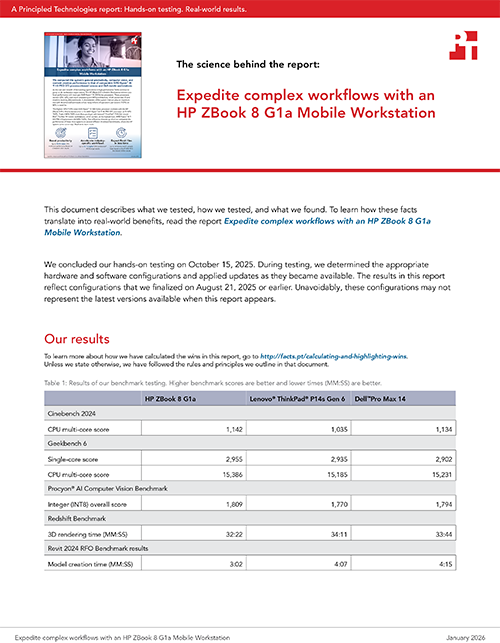
To reflect the experience of business professionals, we ran two CPU-intensive benchmarks. The Cinebench 2024 benchmark renders a 3D scene with Redshift for Cinema 4D software,9 and the Geekbench 6 benchmark executes multiple CPU-intensive tasks simultaneously.10 Strong CPU multi-core performance enables users to run multiple applications at once and allows background processes to run without slowing down everything else. Strong single-core performance may translate to, among other things, a smoother single application user interface.
Cinebench 2024 CPU multi-core scores. Source: PT.
Geekbench 6 results. Source: PT.
AI inference performance
Being able to run computer vision applications on device instead of in the cloud is a game-changer for many organizations. Keeping sensitive data local reduces the risk of data breaches and can even help with compliance efforts.
To measure performance with INT8 (8-bit integer) precision—a level of precision that optimizes for inference times—we ran the UL Procyon AI Computer Vision Benchmark.11 The benchmark measures NPU performance using the following AI inference engines:
DeepLabv3 for semantic image segmentation tasks.12
YOLOv3 is used for real-time object detection and quality inspection within visual data.16
While the HP ZBook 8 G1a edged out the competitor systems in overall performance, it also scored 4.0 percent higher in DeepLabv3 and 3.7 percent higher in the ResNet-50 models. For all of the Procyon AI Computer Vision Benchmark sub-scores, see the science behind the report.
Procyon AI Computer Vision Benchmark overall scores. Source: PT.
Content creation performance
Managing increasingly complex projects with multiple contributors, resource-intensive applications, and tight deadlines are just a few pain points that the right technology can help alleviate. By reducing scene rendering, model creation, and collateral export times, your creative team has more time to iterate on new ideas, and you can get projects out the door faster. Plus, smoother navigation enables computer-aided design (CAD) and Revit professionals to immerse themselves within complex 2D and 3D models.
Complete 3D rendering tasks in less time
To reflect the experience of professionals who handle resource-intensive architectural visualization, animation, visual effects, and product design workloads, we rendered a 3D scene using the Maxon Redshift Benchmark command-line tool. These results exclude “certain CPU operations such as loading the scene or textures from disk.”17
Create models in less time
For architects, engineers, and construction professionals, we ran the Revit 2024 RFO Benchmark, which uses the Redshift rendering engine to perform model creation and view export tasks.18
Redshift Benchmark 3D rendering results. Source: PT.
Revit 2024 RFO model creation benchmark results. Source: PT.
Export files in less time
Just as design professionals need to export work for many different use cases and review stages, the Revit 2024 RFO Benchmark exports different file formats. Its CAD use cases include:
Design Web Format (DWF) for sharing CAD drawings and design data with stakeholders who may not have CAD software.
Drawing (DWG) for sharing and collaborating on CAD files with other designers.
Portable Document Format (PDF) for sharing, printing, and archiving documents that are openable and viewable on almost any device.
Portable Network Graphics (PNG) for web graphics, digital art, and screenshots where image clarity is crucial.
In these tasks, the HP ZBook 8 G1a provided a clear time advantage. Significantly faster exports mean CAD users can get collateral into review faster, complete projects in less time, and handle more work.
Revit 2024 RFO export benchmark results. Source: PT.
Complete drafting and design tasks in less time
To reflect the experience of master builders, planners, and designers, we ran Cadalyst System Benchmark 2015, which measures 3D graphics, 2D graphics, disk, and CPU performance and produces a total index score.19
Cadalyst Systems Benchmark 2015 results. Source: PT
Accelerate industry-specific workflows
Finally, we ran the SPECworkstation 4.0 benchmark. This benchmark measures AI accelerator, CPU, graphics, and storage performance from many perspectives.20 The higher the industry vertical score, the faster you would expect that workstation to perform during real-world usage in that area.
SPECworkstation 4.0 benchmark results. Source: PT.
Conclusion
Our hands-on testing shows that investing in the HP ZBook 8 G1a Mobile Workstation powered by an AMD Ryzen™ AI 9 HX PRO 375 processor brings real-world gains. Across a variety of benchmarks, the 14-inch HP ZBook 8 G1a consistently finished ahead of comparable Lenovo ThinkPad P14s Gen 6 and Dell Pro Max 14 mobile workstations powered by AMD Ryzen™ AI 9 HX PRO 370 processors. And, while some of the wins were small, others were significant. For example, based on the Revit 2024 RFO Benchmark results, you could save between 3 minutes and over half an hour, per export, depending on the file format. When you spend your days tackling time-sensitive tasks, any advantage, especially those based on real-world usage, can make a big difference.
Principled Technologies is a registered trademark of Principled Technologies, Inc.
All other product names are the trademarks of their respective owners.
Principled Technologies disclaimer
Principled Technologies is a registered trademark of Principled Technologies, Inc. All other product names are the trademarks of their respective owners.
DISCLAIMER OF WARRANTIES; LIMITATION OF LIABILITY: Principled Technologies, Inc. has made reasonable efforts to ensure the accuracy and validity of its testing, however, Principled Technologies, Inc. specifically disclaims any warranty, expressed or implied, relating to the test results and analysis, their accuracy, completeness or quality, including any implied warranty of fitness for any particular purpose. All persons or entities relying on the results of any testing do so at their own risk, and agree that Principled Technologies, Inc., its employees and its subcontractors shall have no liability whatsoever from any claim of loss or damage on account of any alleged error or defect in any testing procedure or result.
In no event shall Principled Technologies, Inc. be liable for indirect, special, incidental, or consequential damages in connection with its testing, even if advised of the possibility of such damages. In no event shall Principled Technologies, Inc.’s liability, including for direct damages, exceed the amounts paid in connection with Principled Technologies, Inc.’s testing. Customer’s sole and exclusive remedies are as set forth herein.



 Twitter
 Facebook
 LinkedIn
 Email
Email