A Principled Technologies report: Hands-on testing. Real-world results.
Accelerate AI time to value with Dell Services
Dell Services streamlines AI Factory deployment with pre-validated rack and expert-led processes, saving over 47 hours compared to in-house methods
Deploying AI infrastructure in-house can place a substantial burden on IT staff. AI deployments introduce new infrastructure requirements and demand validation across the full AI stack, including storage, compute, data pipelines, networking, and security. Combined with complex software implementation, this makes AI environments significantly more intricate than traditional infrastructure.
Dell Services accelerates AI infrastructure deployment while reducing that operational load. Through ProDeploy Rack Integration services, Dell designs, configures, assembles AI infrastructure, including rack layouts and cabling, at the factory to meet each customer’s specific requirements, then validates the complete platform before shipping it ready for data center deployment. On site, Dell Services technicians complete the remaining installation steps and configurations, including inter-rack cabling and cluster deployment, delivering a fast, seamless, and worry-free experience for the customer.
To quantify the IT time savings delivered by Dell Services, the Principled Technologies team performed a side-by-side AI infrastructure deployment. Experienced PT engineers deployed a Dell AI Factory solution and measured the time and effort required. We then compared those results to a deployment performed by a Dell Services technician performing the same deployment using Dell ProDeploy Services.
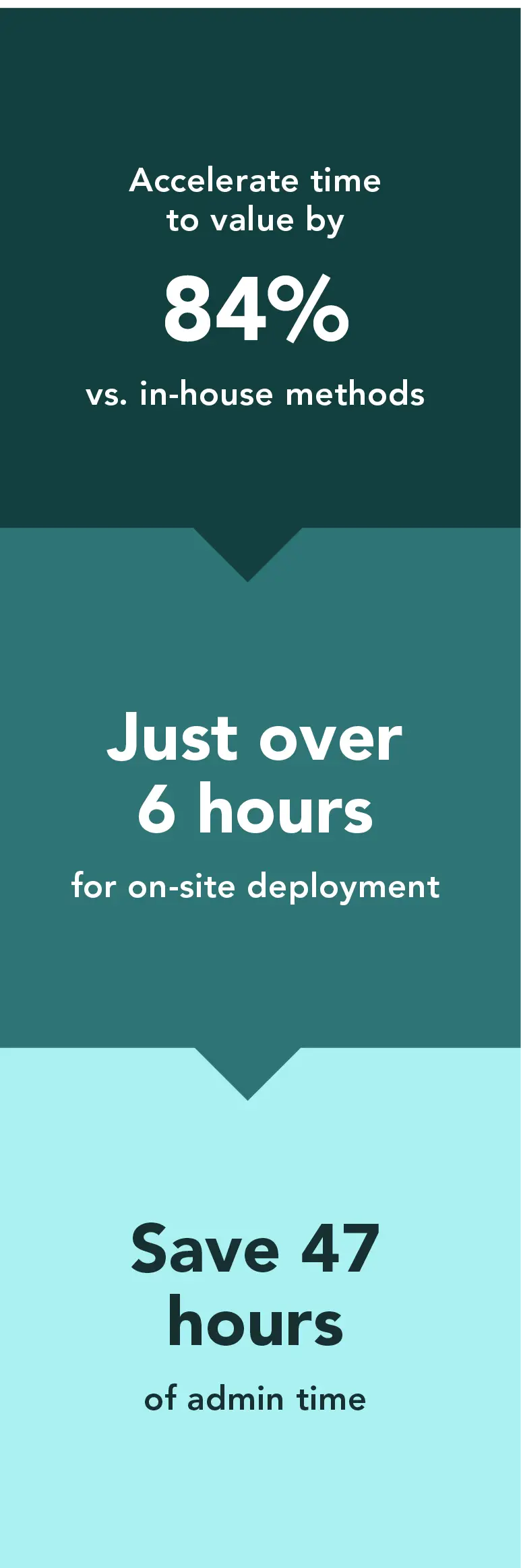
We found that Dell ProDeploy Services reduced overall installation time by more than 47 hours (84%), equivalent to a full workweek, and reduced on-site time to just over 6 hours. These time savings allow admins to focus on high-value AI initiates such as data readiness, system validation, and preparing workloads for production.
Key findings
Dell Services delivered the pre-racked and pre-configured Dell AI Factory solution to our site, where a Dell Services technician completed the engagement in a single day. In contrast, experienced PT engineers spent extensive time on pre-engagement planning, pre-deployment preparation, and four full days of hands-on work to achieve the same outcome. ProDeploy services, which included factory Rack Integration and on-site services, delivered this result far more efficiently. We also present concluding insights at the end of this study that extend to larger-scale AI deployments.
Table 1: Time, in hours and minutes (HH:MM) to complete AI deployment tasks. The Dell AI Factory solution we used for this comparison consisted of two Dell PowerEdge™ R660 (head node and Kubernetes node) servers, two PowerEdge XE9680 (GPU-scale-out) servers, an NVIDIA® InfiniBand® Quantum-2 QM9700 NDR switch, and Dell PowerSwitch S4148T-ON and S5248F-ON ToR management switches.
Deployment task
Dell Services
Do-it-yourself, in-house manual deployment
Off-site pre-engagement
2:00
21:30
On-site pre-deployment
1:00
3:45
Racking and cabling*
0:10
3:03
Network initialization
0:10
0:40
Head node installation and configuration
0:57
7:22
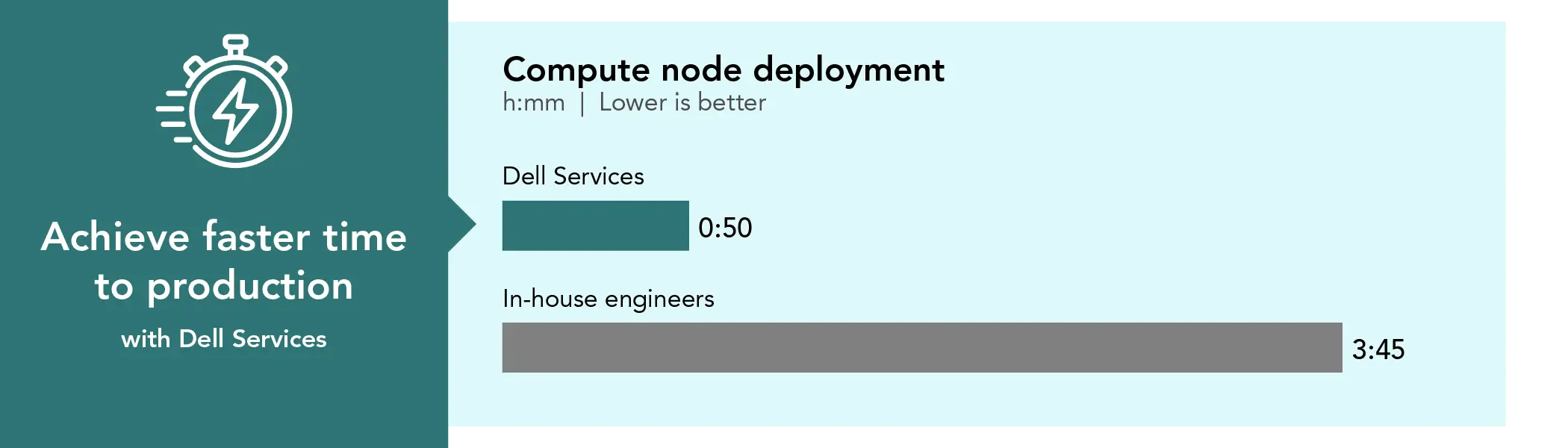
Compute node deployment
0:50
3:45
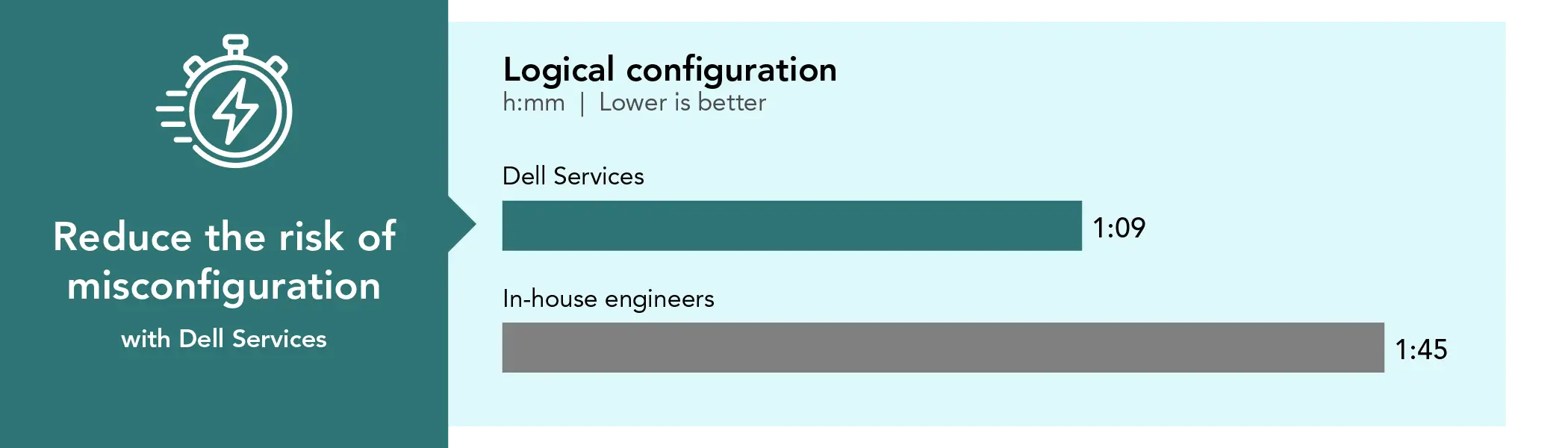
Logical configuration
1:09
1:45
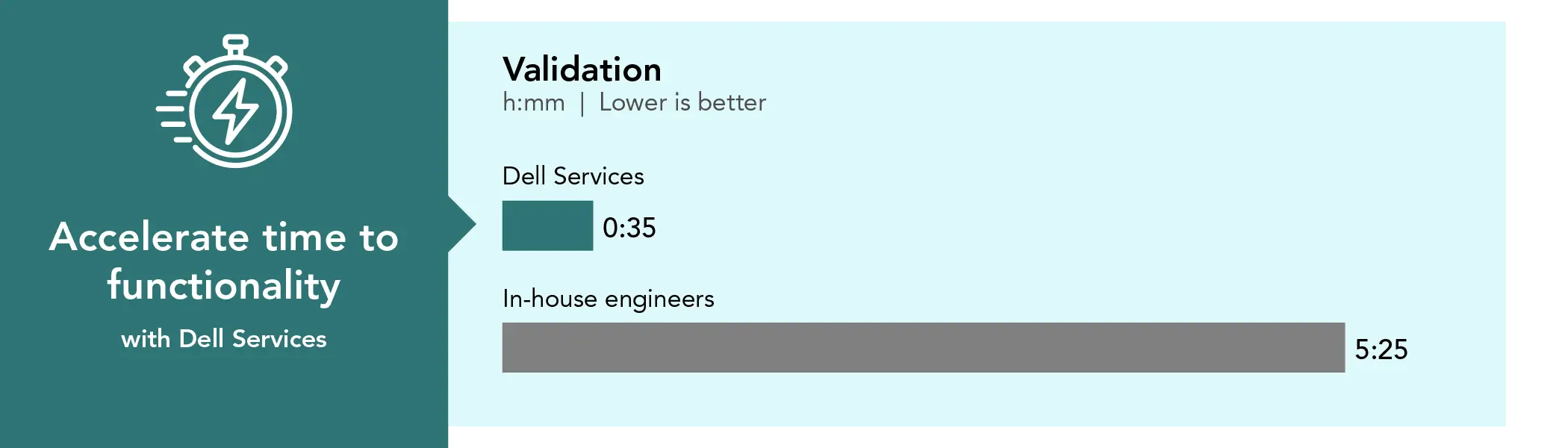
Validation
0:35
5:25
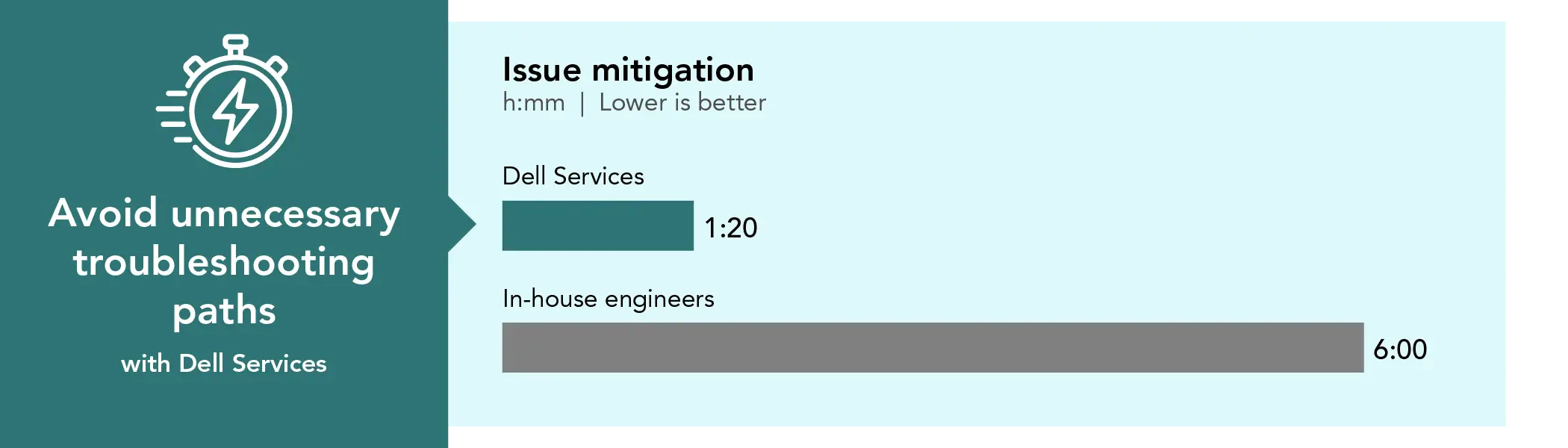
Issue mitigation
1:20
6:00
Total time spent deploying the Dell AI Factory solution
8:11
53:15
*Only cabling for Dell Services
The common phrase “time is money” applies here. Admin time savings can translate directly to cost savings—by giving your administrators a valuable workweek back, they can use their valuable time to focus on other AI-related projects. Beyond the time savings outlined above, the following day-by-day breakdown highlights the additional benefits of engaging Dell Services for AI deployments, most notably the value of experienced, best-practice-driven staff who help reduce complexity and risk. While the PT in-house engineers have extensive experience with server deployment, networking, and using Linux operating systems, this was their first AI deployment.
The breakdown: Dell Services vs. in-house engineers
AI workloads require far more than standard deployments. IT teams must actively design, deploy, and manage environments that include GPUs, high-speed networking, storage, and tightly integrated software stacks. Because these components must operate in precise coordination,they significantly increase planning and configuration effort.
Table 2: Dell AI Factory platform.
Part
Category
Component
Qty
Description
Dell PowerEdge R660 server
Software/Head node
NVIDIA Base Command Manager (BCM)
1
Head node hosting BCM for cluster provisioning and management
Dell PowerEdge R660 server
Control plane node
Kubernetes control plane
1
Dedicated node running Kubernetes control plane services
Dell XE 9680 server
Compute nodes
GPU compute nodes
2
Each node equipped with 8 NVIDIA H200 GPUs
Dell PowerSwitch S4148T-ON switch
10-GbE switch
Networking (Mgmt)
1
Provides management network and cluster services connectivity
NVIDIA InfiniBand Quantum-2 QM9700 NDR switch
400Gbps InfiniBand switch
Networking (Fabric)
1
High-bandwidth, low-latency RDMA interconnect for GPU nodes
To test and validate the deployment, the PT team used NVIDIA Base Command Manager (BCM) to provision the infrastructure, integrate Kubernetes, configure GPU resources, and manage cluster health and lifecycle operations. Both InfiniBand and BCM introduce additional complexity and require specialized expertise for fabric configuration, performance tuning, and troubleshooting, particularly in on-premises environments, underscoring the importance of experienced platform engineering during initial deployment. While the PT engineers have extensive experience deploying Docker, Kubernetes, and XE9680 servers, many organization may deploy BCM only once and then leave it untouched for extended periods, As a result, reacquiring familiarity with BCM workflows and troubleshooting practices can introduce additional ramp-up time when changes or issues arise.
By contrast, the Dell Services rack integration team built, configured, and tested the same Dell AI Factory platform and shipped the fully populated rack to the PT facility. Dell then dispatched a Dell Services technician to complete the on-site deployment.
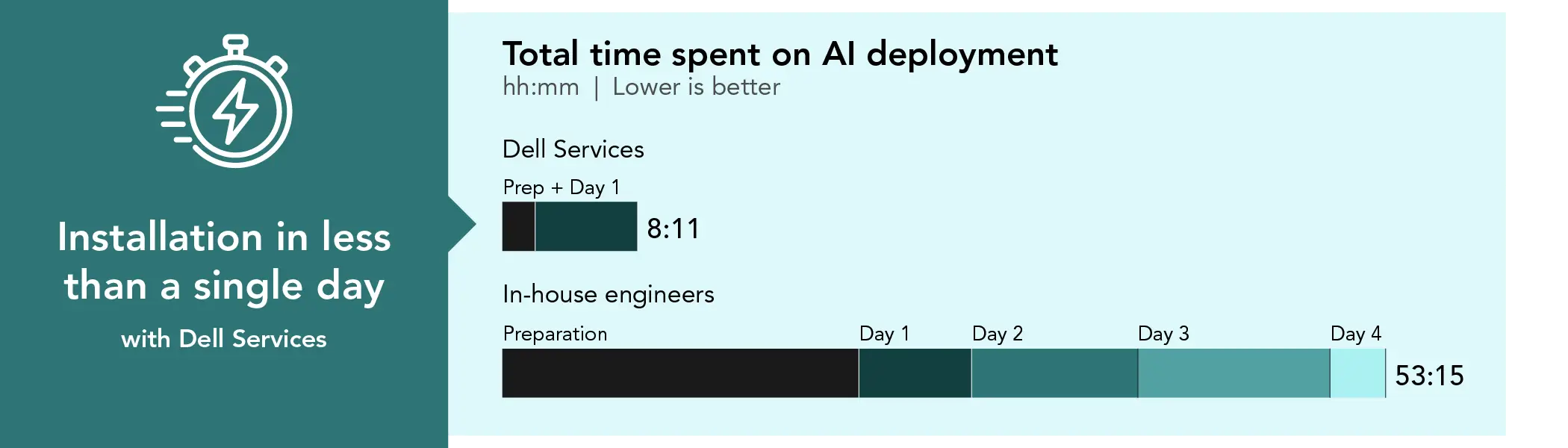
Although Dell Services typically allocates up to 3 days for a standard engagement, the Dell Services technician completed the installation in less than a single day. The PT in-house engineers invested several days in study and preparation, followed by 4 days to complete the installation.
Total time spent on deployment. Source: PT.
Pre-engagement activities
Although the PT engineers are highly experienced in traditional data center infrastructure, container platforms, and Dell GPU servers, GPU-dense AI platforms introduce new architectural dependencies across networking, firmware, orchestration, and workload performance. As a result, the internal preparation phase for manual deployment spanned multiple days and focused on risk reduction rather than simple installation. This effort included in-depth evaluation of BCM workflows, InfiniBand fabric considerations, NVIDIA reference architectures, and cross-team planning to identify prerequisites and potential failure points.1,2,3While this upfront investment reduces manual deployment risk, shortens troubleshooting cycles, and improves long-term operational stability, it also requires temporarily diverting highly skilled engineers from their core operational responsibilities.
The PT in-house engineer timings reflect admins who deploy solutions regularly for testing. Many admins don’t do large deployments frequently, so their skills deploying new solutions may be out of date, requiring them additional time to refamiliarize themselves with the process, which can be time consuming and fraught with error. Plus, after out-of-practice admins spend time re-learning, they may run into problems that require engaging with Dell Services to fix their issues.
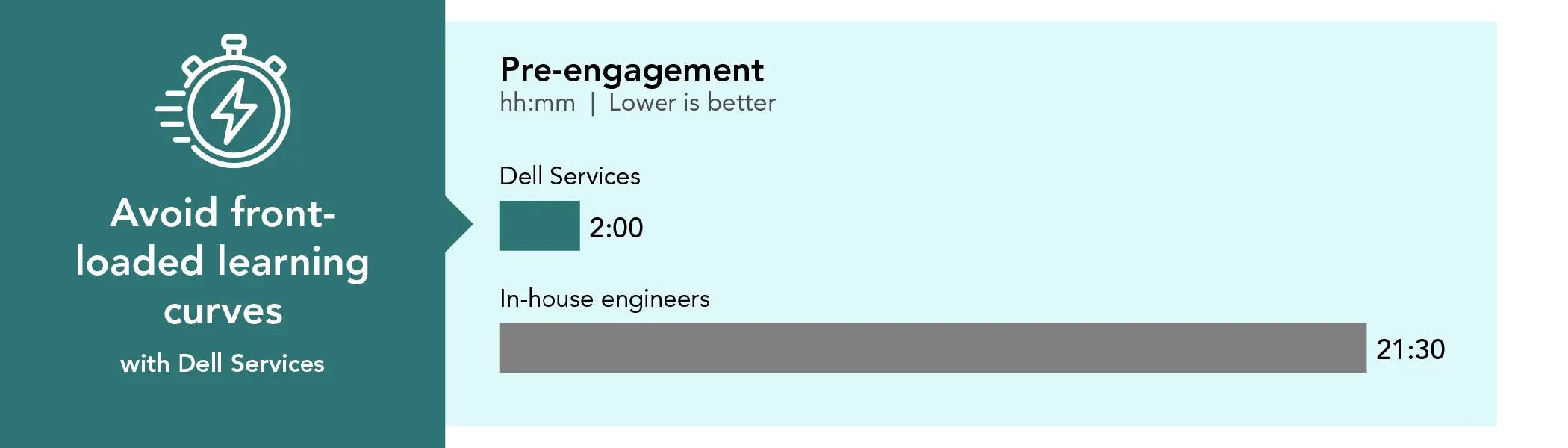
By contrast, Dell Services streamlined the implementation planning process through two focused one-hour sessions with our team. Leveraging their deep experience with AI Factory deployments and validated reference architectures, Dell Services efficiently gathered the required deployment details, assessed the existing environment, and reduced the planning burden on internal staff. For pre-engagement activities, we therefore account only for the limited time our internal team spent participating in these Dell-guided planning discussions, demonstrating the efficiency and value of Dell Services’ structured approach.
Pre-engagement time investment in hours and minutes. Source: PT.
Key takeaway
Deploying GPU-dense AI platforms manually is complex and time-intensive, even for experienced engineers. Dell Services significantly reduces planning effort and internal disruption through a structured, expert-led approach.
Pre-deployment activities
To support the implementation performed by our in-house engineers, Dell provided comprehensive site documentation, architectural diagrams for the Dell AI Factory server solution, and detailed guidance on required infrastructure resources. The PT team reviewed this material thoroughly and collaborated closely with their Dell contact to clarify questions, assumptions, and environmental considerations as needed. The documentation package, comprising 20 pages of detailed text and diagrams, served as a solid technical foundation. After validating its accuracy and relevance to the environment, the team reorganized portions of the content into a format that was more easily consumable for internal planning and execution purposes.
In parallel with this review, the PT engineers downloaded the NVIDIA installer image and created a bootable USB installer to support deployment of the head node.
In-house pre-deployment and planning steps included:
Downloading the image and creating a bootable USB installer
Verifying infrastructure addresses
Inspecting cabinets and cabling for site readiness
Planning and sequencing deployment tasks
Mapping and validating network and power cabling
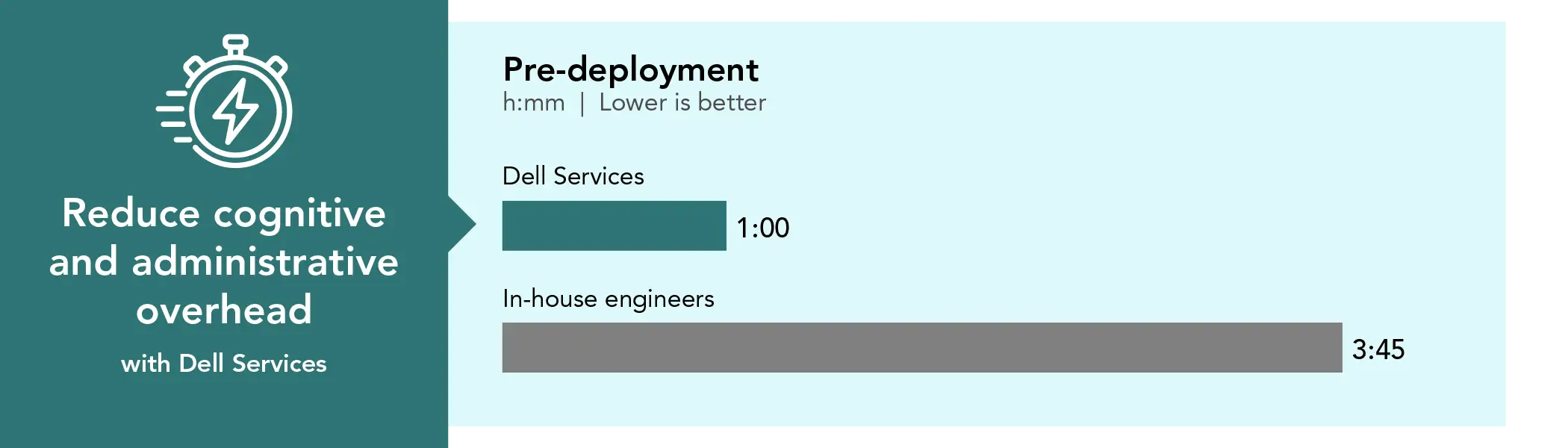
Because Dell Services delivered the system pre-racked and pre-configured, the on-site Dell Services technician completed these tasks in an hour.
Pre-deployment time investment in hours and minutes. Source: PT.
Key takeaway
Dell Services substantially reduces time, effort, and risk for the customer by shifting complex, execution-heavy preparation work away from internal teams.
Racking and cabling
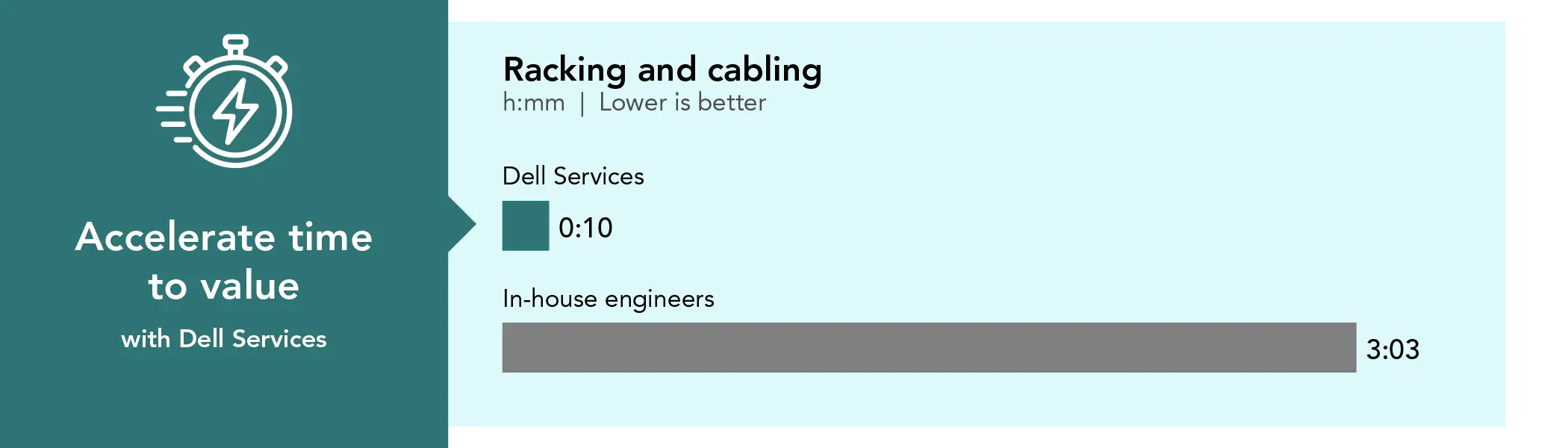
The IT experts from the PT team powered on all systems, configured the iDRAC interfaces for each node (two control nodes and two compute nodes), and collected the MAC addresses of the first embedded NIC in each system to support PXE booting and image deployment from the control node. This process took over 3 hours.
It is also worth noting that the compute nodes for the Dell AI Factory solution are large, heavy systems that required the use of a powered lift to position them within the rack. Our team installed and extended the rail kits, then carefully adjusted the compute node alignment to ensure proper seating onto the extended rails. Once both compute nodes were fully secured, our engineers installed the InfiniBand cabling, connecting each port to the switch for a total of eight InfiniBand connections per system.
In-house racking and cabling steps included:
Compute node considerations:
Use of a mechanical/hydraulic lift for safe positioning
Careful handling of InfiniBand cabling
Strict adherence to bend-radius requirements to avoid damage to the internal fiber or copper strands
Racking and cabling:
Two 2U Dell PowerEdge servers
Four 1U switches (Top-of-Rack, two 10G switches, and one InfiniBand switch)
Power-on verification, iDRAC configuration, and MAC address collection
Because Dell ProDeploy Rack Integration Services delivered the system pre-racked and pre-configured, the on-site deployment was much shorter and Dell’s technician completed the entire set of tasks in 10 minutes.
Racking and cabling time investment in hours and minutes. Source: PT.
Network initialization
The PT engineers determined that the NVIDIA documentation provided a solid overview of the InfiniBand switch architecture and configuration approach, but they needed additional details to complete the initial switch configuration with confidence. While the guide clearly explained the high-level concepts, the team supplemented them with additional NVIDIA and community resources to identify and validate the appropriate configuration parameters for this specific environment. Given that InfiniBand configurations can have a direct impact on performance, stability, and long-term functionality, the team took a deliberate approach to ensure they configured the fabric correctly from the outset, reducing the likelihood of issues later in the deployment.
In-house network initialization steps included:
Locating and connecting the console cable between the laptop and InfiniBand switch
Logging into the switch console
Completing the initial configuration wizard
Executing required commands at the CLI prompt
Verifying configuration status
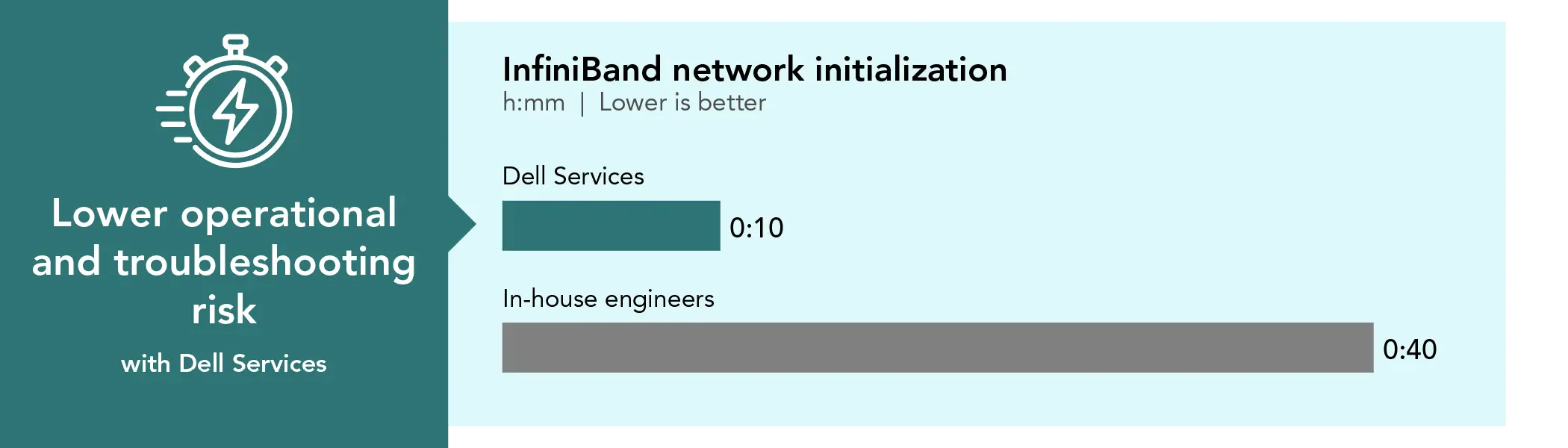
Because Dell Services delivered the system pre-racked and pre-configured, the on-site Dell technician initialized the network in 10 minutes.
InfiniBand network initialization time investment in hours and minutes. Source: PT.
Key takeaway
Dell Services engineers have the experience to properly configure InfiniBand networking to optimize performance and stability to ensure long-term functionality of networked solutions.
Head node installation and configuration
Head node installation and configuration proved to be the most iterative phase of the deployment for the PT engineers. On Day 2, the PT team began deploying the head node, which serves as the central controller for the solution and the primary configuration point for all other nodes. Following NVIDIA guidance, the PT team encountered several configuration decision points that required restarting the deployment to apply adjustments. One key learning was that the disk layout on the head node is fixed at deployment and cannot be modified afterward, making it important to validate storage choices early in the process. These iterations provided valuable insight into the deployment workflow and helped ensure the PT team configured the head node correctly for subsequent cluster operations.
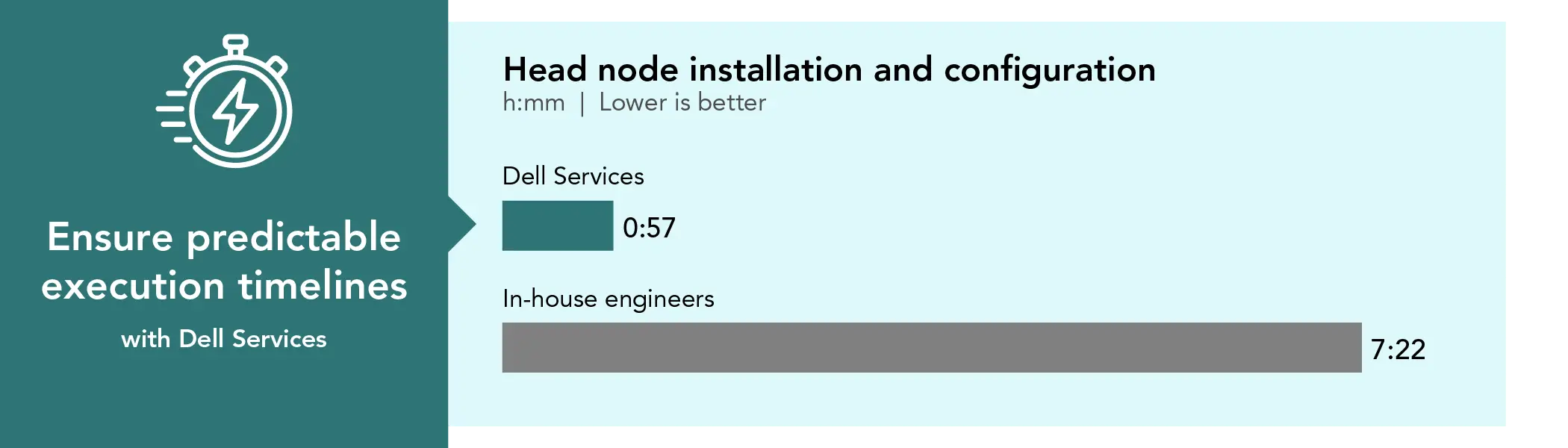
Deploying the head node took the PT team 1 hour and 15 minutes, although the process required some trial and error to achieve a working setup. Rebuilding the boot installer added another 40 minutes. Bringing up the compute node cluster spanned two working days and totaled 5 hours and 27 minutes.
When the PT team deployed the head node the first time, the Boot from USB Installer failed.
The PT team had to create a new boot installer USB because they used the wrong image creation type in Rufus.
After the PT team switched the installer USB from ISO mode (the default recommendation) to DD write mode, they completed a successful run.
The PT team booted from the USB installer, followed the installation wizard, and provided the deployment data they had captured earlier.
When the PT team used the software installed on the head note to configure the compute node cluster, they encountered problems that required 2 hours of workaround research.
The hands-on phase involved initializing the compute cluster from the head node using command-line tools and the cluster management shell (cmsh). Activities included defining cluster parameters, configuring node networking and boot behaviors, and verifying system readiness for deployment.
Although the PT team followed the guidance provided in the NVIDIA documentation, the manual deployment effort required additional time due to the inherent complexity of the environment. Several factors, including site-specific constraints, hardware platform considerations, and configuration nuances that typically emerge during hands-on implementation, necessitated deeper analysis and iterative validation. These challenges are common in deployments of advanced AI platforms and are best addressed through experience and careful coordination during implementation.
The PT team performed all cluster initialization tasks from the head node terminal and included:
Defining cluster parameters using cmsh
Configuring node network interfaces and PXE boot behavior
Defining node boot actions and deployment workflows
Validating InfiniBand adapter naming for use with NVIDIA Base Command Manager (BCM)
Patching and updating the license
Head node installation and configuration time investment. Time in hours and minutes. Source: PT.
Early in the head node installation and configuration process, the PT team had to stop everything and launch a test deployment to surface InfiniBand NIC names that were not visible until they deployed an image and PXE services were functioning correctly.
Key takeaway
Dell Services insights meant they knew to validate storage choices early in the head node configuration process, saving hours of research and troubleshooting.
Environmental readiness challenges the PT team encountered during the first day of compute cluster initialization:
OOB management via the head node failed because the PT team didn’t make sure Dell OpenManage tools were installed in the base image.
The PT team was unable to install OpenManage using standard Linux package tools (apt-get) failed because the system could not resolve the required Dell package repositories due to DNS or firewall restrictions.
As a workaround, the PT team manually downloaded packages, transferred them via USB, and installed them locally.
Ultimately, the PT team had to manually power on the compute nodes using front-panel buttons
PXE boot failures and hardware-specific configuration issues the PT team encountered during compute cluster initialization:
Multiple PXE boot failures occurred, each requiring investigation and reconfiguration.
Broadcom-embedded NICs required TFTP, not HTTPS as the boot protocol. The PT team had to reconfigure each node in cmsh to use TFTP as the bootloader.
PXE boot failures persisted until the PT team discovered that MAC addresses must be declared at general node interface and specific NIC interface levels.
Documentation-related problems the PT team encountered during compute cluster initialization:
The NVIDIA guide instructs users to run apt update and apt upgrade after installing the head node.
Following this guidance introduced broken dependencies that later required a rebuild of the head node image.
Several configuration requirements (PXE boot protocol, MAC declaration behavior, InfiniBand adapter discovery) were not documented, increasing troubleshooting time.
Overall, this day was marked by numerous small but compounding issues. Some stemmed from gaps or ambiguities in the documentation, while others were hardware-specific behaviors that experienced AI deployment teams would recognize quickly but that less experienced installers would reasonably struggle to diagnose and resolve.
As a result, the PT team spent 2 hours researching workarounds and corrective actions. By the end of the workday, all hardware was fully online and successfully communicating with the head node.
In contrast, the Dell Services technician completed this phase in under an hour—no restarts, rebuild, or extended troubleshooting. This is a good example of how ProDeploy shifts AI infrastructure deployment from a trial-and-error engineering exercise into a predictable, low-risk operational outcome.
On the second day of bringing up the compute node cluster, the third day of installation, the PT team encountered their primary challenges while integrating Dell hardware components into the modified compute node images. These issues stemmed mainly from:
apt-get failures when running within the cmsh context
User errors, particularly failing to commit changes before switching contexts
In cmsh, changes must be committed before switching contexts; otherwise, the system does not write them to the managed systems. Because the PT team did not commit changes before moving to another context, cmsh left those changes in a pending state, leading to confusion and additional rework.
This phase of bringing up the cluster included:
Creating and patching a new compute node image
Cloning the default image using cmsh
Adding missing Dell components to the new image
Assigning the updated image to the compute category
Creating a Kubernetes image
Assigning the Kubernetes image to the control plane category
Node provisioning
Rebooting all systems to ensure the new Dell images were applied
Compute node deployment time investment. Time in hours and minutes. Source: PT.
Key takeaway
Dell Services gets you to a working system faster and with far less risk.
Container runtime environment configuration
During the second part of the third day, the PT team began configuring the virtualization environment. They made steady progress until they encountered significant obstacles during Docker validation and NVIDIA Collective Communications Library (NCCL) benchmarking.
Our engineers initially pulled NVIDIA containers that required manual compilation and did not operate as self-contained packages. Missing dependencies and unresolved library requirements prevented the team from successfully running these containers. To address this, they spent additional time searching for NCCL container images that were already compiled and fully self-contained. Our team also dedicated an extra 3 hours to researching potential workarounds and troubleshooting the issues they encountered.
Logical configuration and validation activities included:
Configuring the Kubernetes control plane server
Installing Docker on the compute nodes
Validating Docker on each node
Validating the HPL benchmark on each node
Validating the Stream benchmark on each node
Benchmarking and validating NCCL
Deploying and configuring Kubernetes
Deploying and validating the DeepSeek model
On the second day of container runtime environment configuration, Day 4 of the installation, the PT engineers resumed work by continuing the search for self-contained, precompiled NCCL containers. The team identified several promising options and achieved its first success using a container from CoreWeave. The team also validated a second working NCCL container provided by NVIDIA.
After completing all required validations, the PT engineers installed Kubernetes from the head node. During the installation, the system reported insufficient storage, which initially appeared to block progress. The PT team later confirmed that the alert was a false positive. However, before reaching that conclusion, the PT team selected Abort instead of Skip, which triggered a partial Kubernetes installation. This action left Kubernetes in an unstable state and forced the team to remove the installed packages and perform a full re-installation. This error resulted in 1 hour of lost time. This example highlights how manual Kubernetes deployments can include ambiguous decision points and error recovery steps that increase deployment time, challenges that are typically avoided when you engage Dell Services.
Following the Kubernetes re-installation, the PT team conducted a comprehensive validation pass to confirm end-to-end functionality and system readiness. This included verifying node health an status within the Kubernetes cluster, validating GPU visibility and allocation across all compute nodes, confirming proper InfiniBand communication for distributed workloads, and re-running critical container, benchmark, and model tests. These validation steps ensured that the environment was not only operational, but correctly configured to support sustained AI and HPC workloads before proceeding to final use-case execution— loading in an AI workload and running it. The AI successfully processed end-user prompts, returned accurate responses, and demonstrated the expected reasoning behavior, confirming the environment was fully functional.
Logical configuration time investment. Time in hours and minutes. Source: PT.
Validation time investment. Time in hours and minutes. Source: PT.
The lowdown: Dell Services vs. in-house engineers
After Dell ProDeploy Services delivered the pre-racked and pre-cabled system to the PT testing site, a Dell Services technician finished the deployment in a single day, resolving issues quickly and decisively. By contrast, the in-house engineers faced challenges that Dell Services are specifically designed to eliminate, such as additional troubleshooting, issues, and unexpected research to develop workarounds. These avoidable activities extended the team effort by 6 hours, adding a day to an already demanding process. ProDeploy services, which include factory rack integration services and on-site deployment, streamlined troubleshooting by addressing integration issues upfront and ensuring expert, accountable resolution when issues arose.
Issue mitigation time investment. Time in hours and minutes. Source: PT.
Throughout the process, the PT team encountered several challenges that Dell Services are designed to prevent:
The team lacked visibility into unknown risks and dependencies.
The team relied heavily on trial and error to make progress.
Despite having access to NVIDIA documentation, the team still had to conduct significant research.
The team repeatedly had to reconfigure components to resolve issues.
The team spent substantial time troubleshooting and mitigating avoidable problems.
Execution challenges by day included:
Day 2
The team encountered a faulty installer, implemented network workarounds, and addressed documentation gaps.
Day 3
The team continued troubleshooting documentation issues and resolved benchmark container execution problems.
Day 4
The team rolled back and reinstalled Kubernetes due to user error.
Conclusion
We found that engaging Dell Services to deploy the Dell AI Factory with NVIDIA solution significantly accelerated time to production compared to using in-house engineers. This finding extends to AI infrastructure deployments more broadly, as Dell Services reduced deployment complexity by eliminating much of the trial and error the PT team encountered during manual implementation. By leveraging ProDeploy Rack Integration and on-site services, delivering pre-racked, pre-cabled hardware and using Dell-validated deployment processes, Dell Services reduced installation time by more than 47 hours—approximately 1 full workweek—while requiring minimal customer involvement. Your administrators’ time is valuable, and minimizing the time and therefore person costs of the AI deployment process delivers value to your business, while also freeing up administrators to focus on other vital AI initiatives.
We evaluated a small 16-GPU AI Factory solution, and expect similar, or greater, deployment efficiencies with the full PowerRack Integrated Rack Scalable System. Combined with Dell ProDeploy services, this integrated approach accelerates time to value, reduce risk, and provide a repeatable blueprint for scaling across racks and sites.
Today, deploying AI infrastructure quickly and correctly is critical to business success. As demonstrated in this 16-GPU AI deployment, do-it-yourself approaches can face significant headwinds; the benefits of Dell Services become even more pronounced as deployment scale and complexity increase.
From a risk and planning perspective, Dell Services delivered predictable timelines through defined deployment windows and expert implementation by a Dell Services technician. The Dell Services team validated and tested the Dell AI Factory solution and the large language model (LLM) functionality prior to handoff, ensuring that the infrastructure was production-ready at delivery and significantly reducing operational risk compared to the internal deployment approach.
This project was commissioned by Dell Technologies.
May 2026
Primary contributors
Tech: Craig B., Aaron W.
Writing: Ticia I.
Design: Jared White
PM: Greg Carrero
Developer: Scott V.
How we created this report
A PT team, which includes the contributors we’ve listed and others, created this report and performed the technical work behind it. We used AI to develop the report outline and edit portions of the text.
Principled Technologies is a registered trademark of Principled Technologies, Inc. All other product names are the trademarks of their respective owners.
Principled Technologies disclaimer
Principled Technologies is a registered trademark of Principled Technologies, Inc. All other product names are the trademarks of their respective owners.
DISCLAIMER OF WARRANTIES; LIMITATION OF LIABILITY: Principled Technologies, Inc. has made reasonable efforts to ensure the accuracy and validity of its testing, however, Principled Technologies, Inc. specifically disclaims any warranty, expressed or implied, relating to the test results and analysis, their accuracy, completeness or quality, including any implied warranty of fitness for any particular purpose. All persons or entities relying on the results of any testing do so at their own risk, and agree that Principled Technologies, Inc., its employees and its subcontractors shall have no liability whatsoever from any claim of loss or damage on account of any alleged error or defect in any testing procedure or result.
In no event shall Principled Technologies, Inc. be liable for indirect, special, incidental, or consequential damages in connection with its testing, even if advised of the possibility of such damages. In no event shall Principled Technologies, Inc.’s liability, including for direct damages, exceed the amounts paid in connection with Principled Technologies, Inc.’s testing. Customer’s sole and exclusive remedies are as set forth herein.



 LinkedIn
 Facebook
 X
X Email
Email