A Principled Technologies report: Hands-on testing. Real-world results.
Reduce daily frictions and increase productivity with the Dell Pro 14
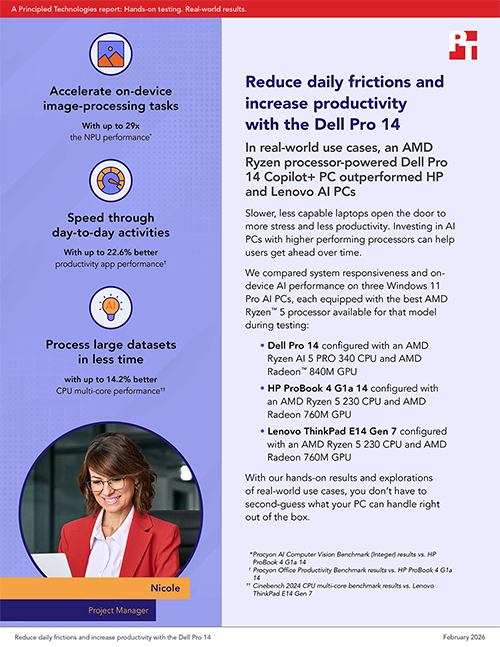
In real-world use cases, an AMD Ryzen processor-powered Dell Pro 14 Copilot+ PC outperformed HP and Lenovo AI PCs
Slower, less capable laptops open the door to more stress and less productivity. Investing in AI PCs with higher performing processors can help users get ahead over time.
We compared system responsiveness and on-device AI performance on three Windows 11 Pro AI PCs, each equipped with the best AMD Ryzen™ 5 processor available for that model during testing:
Dell Pro 14 configured with an AMD Ryzen AI 5 PRO 340 CPU and AMD Radeon™ 840M GPU
HP ProBook 4 G1a 14 configured with an AMD Ryzen 5 230 CPU and AMD Radeon 760M GPU
Lenovo ThinkPad E14 Gen 7 configured with an AMD Ryzen 5 230 CPU and AMD Radeon 760M GPU
With our hands-on results and explorations of real-world use cases, you don’t have to second-guess what your PC can handle right out of the box.
A day in the life of Nicole
To explore how better system responsiveness and on-device AI performance could improve productivity in a real-world scenario, we’ve created Nicole. Through the lens of her hypothetical day, we’ll illustrate the business value you could gain by investing in AMD Ryzen AI 5 PRO 340 processor-powered Dell Pro 14 PCs.
Nicole is a project manager at a leading consulting firm, responsible for delivering high-impact projects while ensuring alignment with business objectives and stakeholder expectations. Her employer is leveraging AI tools to accelerate everyday activities and her key responsibilities, which include:
Data collection and preparation, trend analysis, presenting key metrics for stakeholders, and providing actionable recommendations for marketing, pricing, and inventory strategies
Driving stakeholder satisfaction through clear communication and proactive problem-solving
Analyzing client data to uncover trends, build models, and prepare persuasive presentations
Tracking team progress, drafting status reports, checking performance metrics, and creating tailored updates for diverse audiences
For Nicole, constant client interaction is central to success. She invests significant time analyzing data to build compelling cases and actionable insights, then translating those insights into business strategies. Her ultimate goal is to connect day-to-day project execution to client business value and the firm’s strategic objectives.
How a Dell Pro 14 can help Nicole get more done
We compared system responsiveness and on-device AI performance on three AI PCs with built-in neural processing unit (NPU) architecture. Each were running Windows 11 Pro and equipped with 16 GB of DDR5-5600 memory and 256 GB of SSD storage:
Dell Pro 14 Copilot+ PC
“Zen 5” AMD Ryzen AI 5 PRO 340 processor
XDNA™ 2 NPU architecture
AMD Radeon 840M graphics
1,920 x 1,200 resolution, non-touch display
HP ProBook 4 G1a 14 AI PC
“Zen 4” AMD Ryzen 5 230 processor
XDNA NPU architecture
AMD Radeon 760M graphics
1,920 x 1,200 resolution, non-touch display
Lenovo ThinkPad E14 Gen 7 AI PC
“Zen 4” AMD Ryzen 5 230 processor
XDNA NPU architecture
AMD Radeon 760M graphics
1,920 x 1,200 resolution, non-touch display
On each system, we ran industry-standard benchmarks that measure performance during essential activities:
Completing day-to-day activities, including project management, data collection and processing, and presentation preparation
Running document summarization tasks on device
Running image classification, object detection, natural language, and super-resolution AI models on device
The results we report reflect the specific configurations we tested. Any difference in the configurations you test, as well as screen brightness, network traffic, or software additions, can affect these results. For a deeper dive into our testing parameters and procedures, see the science behind the report.
About the AMD Ryzen processors
AMD Ryzen AI PRO 300 Series mobile processors are built on “Zen 5” CPU microarchitecture with integrated next-gen AMD Radeon 840M GPU and XDNA 2 NPU architecture for enhanced AI capabilities. The 6-core, 12-thread AMD Ryzen AI 5 PRO 340 (2 GHz to 4.8 GHz) in the Dell Pro 14 we tested can handle up to 50 trillion operations per second (TOPS) of NPU performance.1 According to AMD, these processors deliver “exceptional AI compute and productivity capabilities for the modern business.”2 At the time of testing, neither HP or Lenovo AI PCs we tested offered AMD Ryzen AI PRO 300 Series mobile processors.
This is a big step up in capability from the mainstream AMD Ryzen 5 230 processors powering the HP and Lenovo AI PCs we tested. These 6-core, 12-thread “Zen 4” AMD Ryzen 200 Series processors integrate previous-gen AMD Radeon 760M GPU and XDNA NPU architecture and can only handle up to 16 TOPS of NPU performance.3 According to AMD, this processor delivers “everyday speed and performance with great battery life for powerful laptops on-the-go.”4
Dell Pro 14 battery life
Because Nicole is always on the move, we measured battery duration with the Windows 11 Pro power mode switched to best power efficiency.
The MobileMark 30 benchmark, which is an updated version of the less resource-intensive MobileMark 25 benchmark, uses Microsoft 365 and Adobe Photoshop applications to predict battery duration in modern, resource-intensive scenarios.5 In best power efficiency mode, the Dell Pro 14, powered by an 45-wh battery, delivered a full workday of battery life (8 hours and 4 minutes) in the MobileMark 30 benchmark. This means Nicole can focus on the job at hand instead of worrying about whether there’s a nearby outlet as the day progresses. Note: You can also purchase the AMD Ryzen AI 5 PRO 340 processor-powered Dell Pro 14 with a larger, 55-Wh, battery.6
AI-powered communication enhancements
For Nicole, communication is the backbone of project success. With access to AI enhancements, Nicole can unlock new capabilities in familiar tools.
Windows 11 PC users can access Microsoft 365 Copilot, an AI assistant that can help them draft documents, summarize email threads, and organize and analyze content.7 With the Dell Pro 14 Copilot+ PC, Nicole can also access advanced AI features including Recall, Cocreator in Microsoft Paint, and Windows Studio Effects.8,9,10
Video-conferencing apps, such as Zoom and Microsoft Teams, run AI features locally to filter out distracting background noise, blur or replace backgrounds, add filters, and even provide meeting summaries and transcriptions.11 Nicole spends a good portion of her days in team and client meetings—so she uses these a lot.
Note: The graphs in this report use different scales. Please be mindful of each graph’s data range as you compare.
Complete day-to-day activities in less time with the Dell Pro 14
Nicole is leading a global transformation project. Throughout the day, she’s on Teams calls with the client’s leadership, responding to Slack messages from her analysts, and reviewing documents in SharePoint. Nicole’s also multitasking among email, chat, and project dashboards to keep initiatives on track.
Cinebench 2024 CPU single-core benchmark results. Higher scores are better. Source: PT.
Better CPU single-core performance translates to faster business application performance. Many of the project management tools, productivity apps, and communication platforms Nicole utilizes rely on single-threaded performance. She will also find multitasking while performing everyday scheduling, reporting, and document-editing tasks to be smoother on the Dell Pro 14 than the HP and Lenovo AI PCs we tested.
Cinebench 2024 CPU multi-core benchmark results. Higher scores are better. Source: PT.
Better CPU multi-core performance on the Dell Pro 14 translates to faster processing of large datasets than on the HP and Lenovo AI PCs we tested. The complex financial models, data analytics dashboards, and operational simulations Nicole completes are resource-heavy processes. AI-driven analytics, predictive modeling, and automation scripts may also require parallel processing, which benefits from strong multi-core performance.
Procyon Office Productivity Benchmark results. Higher ratings are better. Source: PT.
Procyon Office Productivity Benchmark utilizes Microsoft 365 apps to measure real-world performance while performing document editing, spreadsheet manipulation, presentation modification, and multitasking workflows.12 On the Dell Pro 14, significantly better productivity app performance is crucial for Nicole. She works heavily with complex Excel models and creates engaging data visualizations for use during meetings and live presentations. She’ll also notice a better collaboration experience on the Dell Pro 14, with faster syncing with cloud-based storage services and real-time co-authoring in Word or PowerPoint than the HP and Lenovo AI PCs we tested.
Help keep sensitive data safer with the Dell Pro 14
Some companies choose to deploy language models directly on a user’s device rather than relying solely on cloud-based AI services. Let’s imagine that the consulting firm where Nicole works is one of them.
After a full day of meetings, Nicole feeds her notes through an on-device AI assistant powered by a model similar to Phi-3.5. Because this model runs locally, her sensitive information stays on her machine, and she gets fast, reliable summaries and actionable next steps. This saves her hours of manual review while giving her the speed, security, and focus she needs to transform insights into business strategies.
MLPerf Client (TTFT) benchmark results. Less time is better. Source: PT.
Phi-3.5 models power virtual assistants, AI agents, chatbots, and on-device AI.13 With lower MLPerf time to first token (TTFT) results, Nicole can expect her AI assistant to start generating a response to her query in less time. Running these models locally on the Dell Pro 14 can also help Nicole keep sensitive client data safer. This helps with data residency and compliance requirements, and it means she can work even when there’s spotty connectivity or she’s offline.
Wait less when processing large datasets with the Dell Pro 14
While monitoring the project dashboard in Smartsheet, Nicole receives urgent emails about a timeline shift and updated cost projections. She needs to pivot quickly, update dependencies, and communicate changes across stakeholders—all without losing momentum.
Geekbench AI CPU (Quantized) results. Higher scores are better. Source: PT.
Quantized AI models slightly reduce numeric precision during computation to improve speed and minimize memory usage. On the Dell Pro 14, higher CPU Quantized results mean Nicole can start generating summaries of long documents, analyzing large datasets, or building client-ready projections with noticeably shorter wait times. It also means that AI-driven modeling and risk-analysis tools that run locally for privacy or offline work will start delivering results faster.
Reduce turnaround time with the Dell Pro 14
Nicole is preparing for a client workshop and needs to analyze and present insights from visual datasets, including product images, marketing campaign visuals, and store layout photos. Running these tasks on device helps keep sensitive data safer and allows her to solve problems in real time during breakout discussions.
NPU offloading
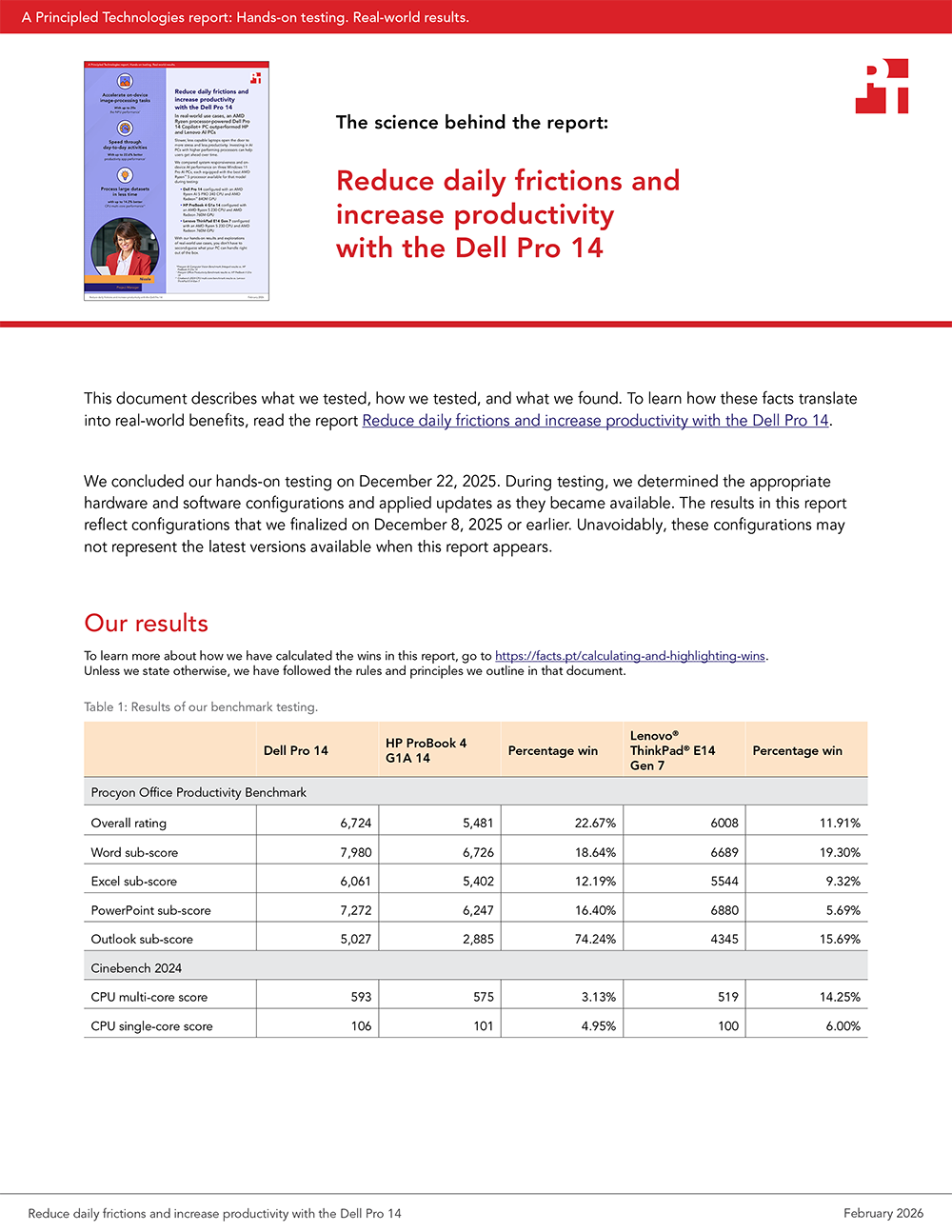
NPUs run on-device AI tasks more efficiently than CPUs or GPUs.14 But all NPUs are not created equal. While all three devices we tested contain NPUs, only the next-gen AMD Ryzen AI 5 PRO 340 processor in the Dell Pro 14 contained an AMD XDNA 2 NPU. This high-performance NPU supports NPU offloading, so the Dell Pro 14 ran these machine learning workloads on the NPU instead of the GPU. While NPU offloading is still in its infancy, the 29x higher Procyon AI Computer Vision Benchmark score on the Dell Pro 14 translates to faster image and video processing, better multitasking capabilities, and longer device relevance as AI features become more ubiquitous and NPU offloading matures.
Procyon AI Computer Vision benchmark (Integer) overall scores. Higher scores are better. Source: PT.
The superior NPU performance on the Dell Pro 14, compared to the HP and Lenovo AI PCs we tested, means Nicole can rethink a lot of the time-intensive tasks she’s tackled manually in the past. She might want to employ AI tools for faster image and text analysis from scanned documents. Or she might research AI applications that will help her and her clients extract text from images, identify patterns in visual datasets, or validate compliance in visual assets remotely.
Specific to the above-mentioned use case, whether Nicole’s using AI tools to create presentations for client workshops or presenting key metrics to management and decision-makers, she can expect those processes to go much quicker on AMD Ryzen AI 5 PRO 240 processor-powered Dell Pro 14 PCs than on AMD Ryzen 5 230 processor-powered HP ProBook 4 G1a 14 and Lenovo ThinkPad E14 Gen 7 AI PCs.
Procyon AI Computer Vision DeepLab V3 (Integer) results. Less time is better. Source: PT.
With faster responsiveness for pixel-level image editing tasks on the Dell Pro 14, Nicole will find it easier to turn images into quantifiable insights, whether that’s improving clarity before OCR or inclusion in a presentation; identifying and masking faces, badges, or license plates for compliance-ready decks and reports; or enhancing and isolating key product, logo, or chart elements for polished deliverables without pixel-by-pixel editing.
Procyon AI Computer Vision Inception V4, MobileNet V3, and ResNet50 (Integer) benchmark results. Less time is better. Source: PT.
With faster responsiveness for image classification tasks on the Dell Pro 14, Nicole will find AI apps run more smoothly when categorizing marketing materials or analyzing large sets of images. This makes it easier for her to provide actionable recommendations based on real-time data.
Procyon AI Computer Vision Real-ESGRAN (Integer) results. Less time is better. Source: PT.
Nicole will also find that it’s faster to upscale low-quality images to high resolution, so she can make reports and decks look polished and professional. This reduces the time she, or someone else on her team, needs to spend on manual image editing.
Procyon AI Computer Vision DeepLab V3 (Integer) results. Less time is better. Source: PT.
With faster responsiveness for object detection tasks on the Dell Pro 14, Nicole can streamline project timelines involving retail audits, supply chain analysis, or facility inspections where identifying objects in images is crucial.
Conclusion
We found that a Dell Pro 14 Copilot+ PC powered by an AMD Ryzen AI 5 PRO 340 processor and AMD Radeon 840M graphics delivered a full workday of battery life (8 hours and 4 minutes). We also found that it outperformed HP ProBook and Lenovo ThinkPad AI PCs powered by AMD Ryzen 5 230 processors and AMD Radeon 760M graphics when performing essential activities. Based on these results, we explored how faster system responsiveness and better on-device AI performance could help Nicole, our hypothetical project manager, get more done. The superior on-device AI performance from the Dell Pro 14 system also has the potential to empower emerging on-device AI tasks as AI features become more universal and NPU offloading evolves. While our focus was on high-producers like Nicole, our findings could impact any employee’s productivity.
This project was commissioned by Dell Technologies.
February 2026
Primary contributors
Tech: Jon D.
Writing: Ticia I.
Design: Laura K.
PM: Trent W.
Developer: Scott V.
How we created this report
A PT team, which includes the contributors
we’ve listed and others, created this report and
performed the technical work behind it. We
used AI to draft an outline of the report.
Principled Technologies is a registered trademark of Principled Technologies, Inc. All other product names are the trademarks of their respective owners.
Principled Technologies disclaimer
Principled Technologies is a registered trademark of Principled Technologies, Inc. All other product names are the trademarks of their respective owners.
DISCLAIMER OF WARRANTIES; LIMITATION OF LIABILITY: Principled Technologies, Inc. has made reasonable efforts to ensure the accuracy and validity of its testing, however, Principled Technologies, Inc. specifically disclaims any warranty, expressed or implied, relating to the test results and analysis, their accuracy, completeness or quality, including any implied warranty of fitness for any particular purpose. All persons or entities relying on the results of any testing do so at their own risk, and agree that Principled Technologies, Inc., its employees and its subcontractors shall have no liability whatsoever from any claim of loss or damage on account of any alleged error or defect in any testing procedure or result.
In no event shall Principled Technologies, Inc. be liable for indirect, special, incidental, or consequential damages in connection with its testing, even if advised of the possibility of such damages. In no event shall Principled Technologies, Inc.’s liability, including for direct damages, exceed the amounts paid in connection with Principled Technologies, Inc.’s testing. Customer’s sole and exclusive remedies are as set forth herein.



 Twitter
 Facebook
 LinkedIn
 Email
Email