A Principled Technologies report: Hands-on testing. Real-world results.
Improve user experience with a modern Dell laptop and peripherals setup
A Dell Pro 13 Premium and new Dell peripherals were faster, richer in features, and more power efficient than a comparable five-year-old setup
Hybrid work, increased collaboration, and more demanding workloads—including emerging AI-assisted tasks—are placing greater expectations on users’ computing setups, from laptops to peripherals and beyond. These demands affect the entire user environment, not just individual components. Relying on aging setups can contribute to inconsistent user experiences across fleets, management complexity, lifecycle misalignment, and compatibility challenges. Upgrading users’ complete setups can help you address these issues while better aligning them with modern work patterns.
We evaluated two Dell complete work setups, each consisting of a laptop and key peripherals: a Dell Pro 13 Premium laptop paired with the latest Dell peripherals and a 2020-era Dell Latitude 9410 laptop paired with earlier-generation Dell peripherals. We combined basic productivity and AI testing, analysis of publicly available peripheral specifications, power management testing, and a juried evaluation in which participants compared the two setups during a Microsoft Teams call. Overall, the latest Dell laptop and peripherals outperformed the older setup; offered stronger connectivity; supported more usability, manageability, and security options; and showed more effective power management. Together, the results demonstrate that upgrading to the latest Dell setups now can help improve the user experience of your users while reducing operational and compatibility challenges from using older devices.
What we tested
Dell Latitude 9410 (2020-era laptop)
Intel® Core™ i7 10610U with 4 cores
Intel UHD Graphics
No NPU
16 GB of DDR4 memory
512 GB of storage
Support for Wi-Fi 6 and Bluetooth 5.1
52 Whr battery
Microsoft Windows 10 Pro
14-inch 1,920 x 1,080 display
3 lbs.
Dell Pro 13 Premium
Intel Core Ultra 5 Processor 236V with 8 cores
Integrated Intel Arc™ 130V GPU
Integrated NPU rated at 40 TOPS
16 GB of LPDDR5 memory
1 TB of storage
Support for Wi-Fi 7 and Bluetooth 5.4
60 Whr battery
Microsoft Windows 11 Pro
13.3-inch 1,920 x 1,200 display
2.65 lbs.
Compared to the six-year-old system, the Dell Pro 13 Premium laptop we tested had a newer processor with more cores, a newer GPU, and an NPU, denoting greater ability to run on-device AI. It also featured faster memory, more storage, and a battery with a higher watt-hour rating. It supported faster Wi-Fi and Bluetooth connectivity and ran Windows 11. It weighed less and had a slightly smaller display, but with slightly higher resolution, than the older laptop.
Earlier-gen Dell peripherals
Dell UltraSharp 32 Video Conferencing Monitor U3223QZ
Dell Pro Thunderbolt 4 Smart Dock WD25TB4
Dell Premier Wireless Active Noise Cancellation (ANC) Headset WL7022
Dell Pro Keyboard KB500
Latest-gen Dell peripherals
Dell UltraSharp 32 6K Monitor U3224KB
Dell Pro Thunderbolt 4 Smart Dock SD25TB4
Dell Pro Plus Wireless ANC Headset WL5024
Dell Pro Keyboard KM726
Key takeaways for the Dell Pro 13 Premium and paired peripherals
Compared to the legacy setup, the newer Dell setup delivered:
Better all-around productivity performance, including 24% less time to open large files
Faster Copilot AI processing, including 17% less time to summarize an email thread
Better power efficiency, including 22% less power consumption
A more ergonomic external monitor design to meet user needs
Support for modern high-speed wireless and Bluetooth connectivity
Modern management and security features to protect users and data
How we tested
We tested the laptops and peripherals in four phases:
1. Hands-on basic performance testing with Microsoft PowerPoint, Cinebench 2024, and Copilot features 2. Detailed peripheral comparisons, including additional display, audio, keyboard/mouse, dock features, and OEM-reported power3. Microsoft Teams juried usability testing of the two whole setups 4. Hands-on measurement of power consumption with an additional energy-efficiency pixels-per-watt metric for external monitors
Our testing aimed to evaluate the practical impact of modern, current-gen Dell setups compared to legacy, earlier-gen setups using an approach that reflects how they’re used in real-world enterprise environments. This report shows how generational improvements in complete work setups could translate into productivity, usability, and manageability benefits.
About the Dell Pro 13 Premium
The Dell Pro 13 Premium is a compact, 13-inch business laptop that can help modern workforces stay productive. As part of the Dell Pro portfolio with a focus on mobility, durability, and everyday performance, it blends hardware advancements over previous-gen Dell laptops with a design and feature set that aligns with today’s enterprise needs, such as AI.
The Dell Pro 13 Premium PA13250 pairs Intel Core Ultra processors with Windows 11 Pro and Copilot+ PC integration. Depending on configuration, the system supports up to the Intel Core Ultra 7 series processors, up to 32 GB of LPDDR5x memory, and a fast NVMe SSD.1 Learn more about Dell Pro PCs and accessories.
What we found
Boost productivity performance
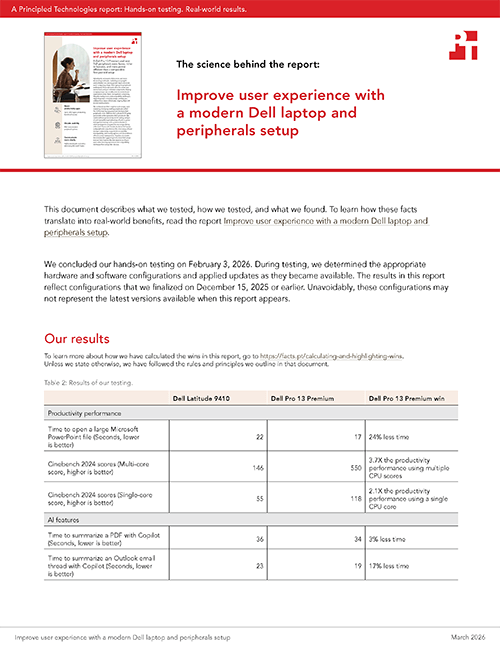
Opening large files can strain a system’s compute and memory resources. Shorter file-open times can indicate a system’s ability to handle data-intensive tasks more efficiently, which may help users begin reviewing, editing, or collaborating on content sooner. Figure 1 shows our findings.
Time to open a large PowerPoint file. Source: PT.
To assess processor performance for resource-intensive tasks, we used the Cinebench 2024 benchmarking tool. Cinebench 2024 renders a 3D scene with CPU-intensive Redshift for Cinema 4D software.2 We report both multi- and single-core scores to provide insight into how the processors perform under different CPU utilization scenarios (see Figure 2).
Cinebench 2024 scores achieved by the two laptops. Source: PT.
Improve speed for helpful AI features
As AI-assisted features become more common in everyday workflows, organizations are exploring how they can support productivity and efficiency. As shown in Figures 3 and 4, the Dell Pro 13 Premium completed two Copilot tasks more quickly than the legacy Dell laptop, potentially saving time for users completing AI-enabled tasks.
Time to summarize a PDF with Copilot. Source: PT.
Time to summarize an Outlook email thread with Copilot. Source: PT.
Offer more usability, connectivity, manageability, and security options with newer Dell peripherals
Using Dell documentation, we compared the specifications of the newer and legacy peripherals to understand how the two solutions differ at a feature level. We identified several improvements for the current-gen Dell devices and grouped these differences into five helpful categories for enterprises:
Better resolution (6,144 x 3,456 vs. 3,840 x 2,160 for the older 4K monitor)
59% more pixels per inch (PPI)
More versatile adjustment options
Newer I/O connectivity
.25 and .26 reported watts consumed in Off and Standby modes vs. .3 reported watts consumed for the older 4K monitor in both modes
Supports picture in picture (PIP)
Brighter (by 50 nits) and better visibility for well-lit environments or when near a window
Dell Pro Thunderbolt 4 Smart Dock
Newer HDMI connectivity
Support for 6K and 8K displays
An additional USB 3.2 Gen 2 Type A ports for storage devices
Support for faster Dell and non-Dell Ethernet connectivity
Support for MacOS and Red Hat Enterprise Linux operating systems
Remote management for Intel vPro PCs via Intel Active Management Technology (AMT)
Port disablement security to block access at the firmware or OS level
Support for Dell Device Management Console Configuration Policy
Dell Pro Plus Wireless Active Noise Cancellation (ANC) Headset
Using ANC: Up to 2x the OEM-reported talk time and 4.1x the OEM-reported listening time
Without ANC: Up to 2.8x the OEM-reported talk time and 5.2x the OEM-reported listening time
Includes Sleep mode to conserve power during inactivity
Offers a Fast Charging mode in which 15 minutes of charging could deliver approximately 12 hours of listening without ANC
Can be connected to two hosts at once
Dell Pro Keyboard KM726
Includes mouse
Includes Copilot button
Support for newer Bluetooth wireless connectivity
1 year more of reported battery life for the keyboard
10 additional programmable keys and buttons
Communicate more clearly in Microsoft Teams
Because user experience can shape collaboration, we conducted a Microsoft Teams–based juried evaluation of the two desktop setups to assess real-world collaboration experiences. Jurors rated visual and audio aspects of each setup on a scale of 1 (very poor) to 5 (excellent) during a live Teams video call. Overall, jurors rated the Teams call quality with the newer Dell setup higher than with the legacy setup (4.4 average rating versus 3.6) and reported significantly greater satisfaction with the overall Teams call experience (4.8 versus 3.0).
Jurors also rated headset audio quality higher with the newer setup (4.4 versus 3.0) and found the ANC capabilities of the newer headphones substantially more effective at reducing environmental noise (4.8 versus 2.6). Jurors indicated that the newer headphones also helped them stay more focused on the call, reflected in average ratings of 4.6 versus 2.4. Jurors also noted that the new Dell headset microphone sounded richer than the old one.
Together, the improved average ratings in Table 1 suggest that upgrading Dell peripherals—particularly headsets—could translate into more focused Teams meetings, clearer communication, and a better overall collaboration experience.
Table 1: Average ratings of setup audio and video quality during a Teams video call. Ratings are on a scale of 1 (very poor) to 5 (excellent). Source: PT.
Dell Latitude 9410
Dell Pro 13 Premium
Call quality & clarity
Overall call quality
3.6
4.4
Consistency of call quality throughout the Teams call
4
4.6
Smoothness of the video throughout the Teams call
4.4
4.4
Ease of understanding speech without repetition
4
4.6
Microphone & voice capture
Clarity of the other participant’s voice
3.2
4.2
Microphone effectiveness at reducing background noise
3.6
4.6
Headset & ANC
Effectiveness of ANC in reducing surrounding noise
2.6
4.8
Impact of ANC on your ability to focus during the call
2.4
4.6
Naturalness of audio when ANC is enabled
3.4
4.6
Overall headset audio quality
3
4.4
Overall headset comfort
3
4.8
Noise, stability, & artifacts
Presence of echo, distortion, or audio artifacts
3.2
4.4
Stability of the audio (i.e., no dropouts or interruptions)
3.8
4.6
Overall impression
Suitability of this setup for professional calls via Teams
3
4.8
Overall satisfaction with the Teams calls experience
3
4.8
Manage power more efficiently across each setup
Devices that draw higher levels of power can increase energy costs for organizations, particularly when multiplied across large fleets, and for users working from home. We averaged the power draw of external monitor-less setups (i.e., laptop and the accompanying dock, headset, keyboard, and mouse) as reported by Extech 380803 power analyzers, over 15 minutes. We found that while idle and running a Teams call, the Dell Pro 13 Premium used less power on average than the Dell Latitude 9410 laptop (see Figure 5). By drawing less power under certain conditions, newer setups can help organizations reduce ongoing energy consumption while meeting modern performance and collaboration needs.
Average consumed watts while idle and during a Teams call. Source: PT.
Deliver more pixels per watt with modern displays
Monitors, due to their size and resolution, can use significantly more power than laptops or other peripherals. As such, we evaluated the monitors independently from the rest of our setups. As Figure 7 shows, the new Dell UltraSharp 32 6K Monitor delivered more pixels per consumed watt of energy than the legacy Dell monitor, indicating improved display efficiency.
Together with the laptop and peripheral power measurements, the pixels-per-watt performance metric of the monitors highlight how improvements in power efficiency across individual components could improve power management for each user.
Average pixels per consumed watt consumed by the monitors. Source: PT.
Conclusion
Evolving workloads, collaboration tools, and hybrid work models are raising expectations for modern endpoints. Aging laptops and peripherals can struggle to keep pace with these demands and can add to the ongoing maintenance and support burdens facing your IT teams. In our testing, the latest Dell Pro 13 Premium outperformed a legacy Dell laptop by 32 percent in productivity tasks and offered a broader set of usability, connectivity, manageability, and security-related options. Together, these improvements indicate that upgrading aging laptops and peripherals as part of a solution-level modernization effort could help organizations deliver more consistent user experiences, better align device lifecycles, and support integration with modern collaboration platforms and workflows.
This project was commissioned by Dell Technologies.
March 2026
Primary contributors
Tech: Naveed M.
Writing: Nathan P.
Design: Jacqueline H.
PM: Peter H.
Developer: Scott V.
How we created this report
A PT team, which includes the contributors we’ve listed and others, created this report and performed the technical work behind it. We used AI to draft an outline for the report and edit text.
Principled Technologies is a registered trademark of Principled Technologies, Inc. All other product names are the trademarks of their respective owners.
Principled Technologies disclaimer
Principled Technologies is a registered trademark of Principled Technologies, Inc. All other product names are the trademarks of their respective owners.
DISCLAIMER OF WARRANTIES; LIMITATION OF LIABILITY: Principled Technologies, Inc. has made reasonable efforts to ensure the accuracy and validity of its testing, however, Principled Technologies, Inc. specifically disclaims any warranty, expressed or implied, relating to the test results and analysis, their accuracy, completeness or quality, including any implied warranty of fitness for any particular purpose. All persons or entities relying on the results of any testing do so at their own risk, and agree that Principled Technologies, Inc., its employees and its subcontractors shall have no liability whatsoever from any claim of loss or damage on account of any alleged error or defect in any testing procedure or result.
In no event shall Principled Technologies, Inc. be liable for indirect, special, incidental, or consequential damages in connection with its testing, even if advised of the possibility of such damages. In no event shall Principled Technologies, Inc.’s liability, including for direct damages, exceed the amounts paid in connection with Principled Technologies, Inc.’s testing. Customer’s sole and exclusive remedies are as set forth herein.



 Twitter
 Facebook
 LinkedIn
 Email
Email