A Principled Technologies report: Hands-on testing. Real-world results.
Increase performance, lower latency, and store data more efficiently with the Dell PowerStore 9500 array
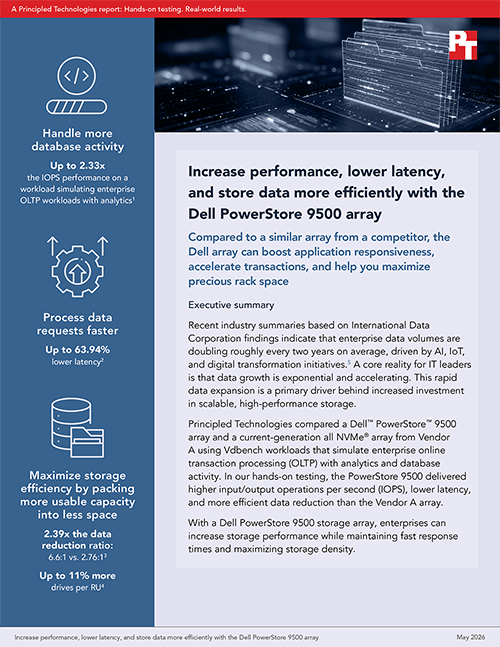
Compared to a similar array from a competitor, the Dell array can boost application responsiveness, accelerate transactions, and help you maximize precious rack space
Executive summary
Recent industry summaries based on International Data Corporation findings indicate that enterprise data volumes are doubling roughly every two years on average, driven by AI, IoT, and digital transformation initiatives.1 A core reality for IT leaders is that data growth is exponential and accelerating. This rapid data expansion is a primary driver behind increased investment in scalable, high-performance storage.
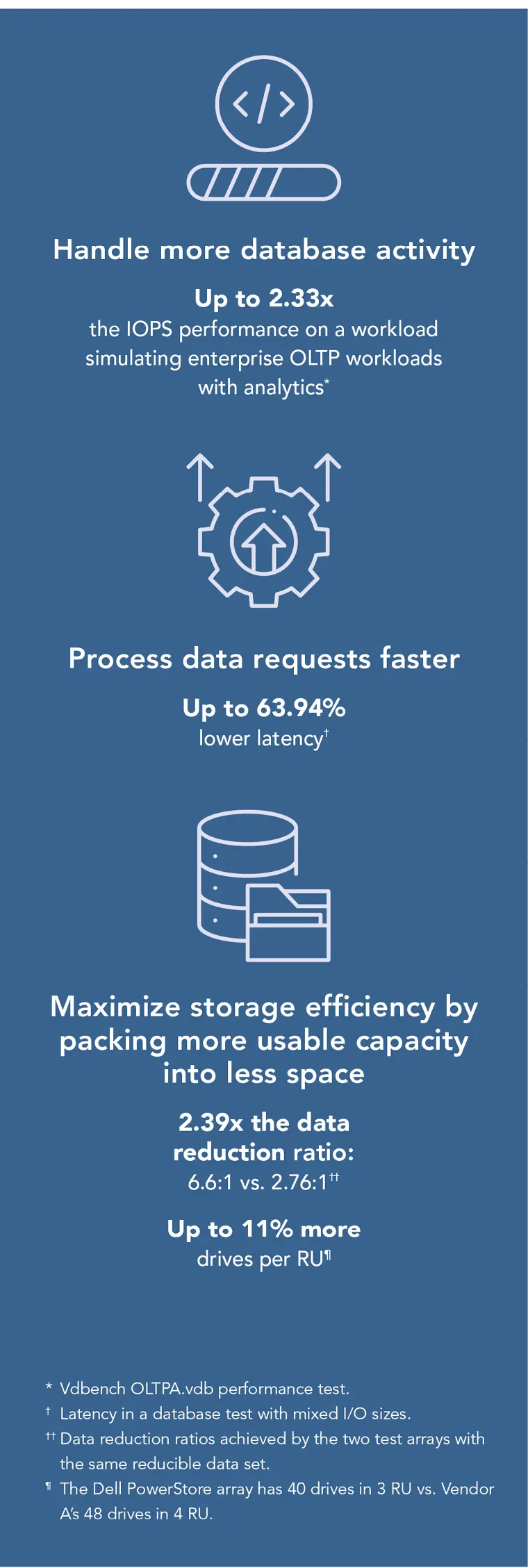
Principled Technologies compared a Dell™ PowerStore™ 9500 array and a current-generation all NVMe® array from Vendor A using Vdbench workloads that simulate enterprise online transaction processing (OLTP) with analytics and database activity. In our hands-on testing, the PowerStore 9500 delivered higher input/output operations per second (IOPS), lower latency, and more efficient data reduction than the Vendor A array.
With a Dell PowerStore 9500 storage array, enterprises can increase storage performance while maintaining fast response times and maximizing storage density.
Why does storage performance matter?
Strong performance in enterprise storage arrays improves application responsiveness, user experience, and overall productivity. High-throughput, low-latency storage ensures that databases, analytics platforms, and other mission-critical workloads operate efficiently even under heavy demand. This translates to faster decision-making, reduced wait times for employees and customers, and the ability to handle peak loads without degradation. In competitive industries, these performance gains can differentiate customer experiences and support revenue growth by enabling real-time services and insights.
High-performance storage also improves infrastructure efficiency and cost optimization. Faster arrays can consolidate workloads that would otherwise require multiple systems, reducing hardware footprint, power consumption, and management complexity. They also utilize compute resources better by eliminating storage bottlenecks, ensuring that expensive CPUs and memory are not left idle waiting for data.
Enhanced resilience and future readiness are additional benefits of strong storage performance. Modern enterprises increasingly rely on data-intensive technologies such as AI, machine learning, and large-scale analytics, all of which demand rapid data access and movement. A high-performance storage foundation enables organizations to adopt these innovations without costly rearchitecture. It also supports faster backup, recovery, and replication processes, reducing downtime and strengthening business continuity.
Why does storage density matter?
High storage density in enterprise arrays maximizes the amount of data stored within a given physical footprint. There are two primary ways to achieve greater density: by increasing the raw physical storage capacity per rack unit and by using data reduction techniques to more efficiently utilize the raw storage you have. By choosing a storage array that offers advantages in both of these areas, companies win twice.
By packing more usable capacity into fewer rack units, organizations can reduce their need for data center space, an increasingly scarce and expensive resource. This is especially important in colocation facilities or urban data centers where floor space comes at a premium. Higher storage density lets businesses scale capacity without expanding their physical infrastructure, enabling more efficient growth and better utilization of existing facilities.
Increasing storage density through more compact architecture and stronger data reduction also drives meaningful reductions in operational costs. You can buy fewer drives both initially and over time as data volumes increase, which translates to lower power and cooling requirements, reduced cabling complexity, and less hardware to maintain. These efficiencies translate into ongoing savings in energy consumption and administrative overhead, while also supporting corporate sustainability goals. In addition, denser systems can simplify procurement and deployment, enabling IT teams to choose the most efficient expansion model for their environment—whether that’s granular, single-drive growth or periodic larger-scale expansions.
Another advantage of a system that provides more room for storage expansion without adding additional appliances is that it simplifies lifecycle management.
How the Dell PowerStore 9500 supports your business goals
The Dell PowerStore 9500, part of the next generation of PowerStore hardware, is a high-performance, high-density enterprise storage platform that revolutionizes capacity and lifecycle economics in a compact 3U chassis.2
Performance. Noteworthy features driving performance include next-generation Intel® CPUs, DDR5 memory, PCIe 5.0, end-to-end NVMe, and software-driven performance optimization.
Storage density. For significant rack space consolidation and future-proof density, the array:
Supports up to 40 drive slots in just 3U, leveraging industry-standard high-performance EDSFF E3.S NVMe SSDs
Supports single-drive expansion
Supports always-on data reduction across the entire array, supports up to 5.8 PBe of data per appliance at a data reduction ratio of 6:1, and comes with the Dell data reduction guarantee
Modular, flexible architecture. Organizations can scale performance and capacity independently without downtime, and adapt to changing workloads with support for both traditional and modern applications in a unified storage platform.3
Why this matters for CIOs
Generation 3 of PowerStore hardware is suited for consolidation of mixed workloads (streaming, backup, ETL, VM mobility) where density, performance scalability, and long-term upgradability are priorities.4 Benefits include:
Lower TCO and footprint. Significantly higher performance density and efficiency than prior generations, enabling consolidation of workloads onto fewer systems, which can reduce power, cooling, and operational overhead.5The ability to fit 40 drives in only 3U means greater I/O density.
Keep pace with ongoing technology and growing storage requirements. Supports data-in-place upgrades and flexible scale-out with mix-and-match clustering across all PowerStore models and generations.
Protect your investment. Optional Lifecycle Extension program, a separate add-on, entitles customers to a flexible technology upgrade (higher model, next gen, or scale-out credit) as well as additional benefits including a 25 percent capacity discount and annual modernization consultations.6
Enjoy flexible performance and media choices. The Dell PowerStore 9500 supports QLC and TLC E3 flash (multiple capacities) with SED/FIPS options, and broad I/O network headroom (OCP 3.0 and NVMe-oF) to accommodate evolving workloads.
How did we approach testing?
We ran identical Vdbench block tests on the Dell PowerStore 9500 and Vendor A arrays to compare:
IOPS on a simulated OLTP workload
Latency at matched target IOPS
Data reduction with a controlled dataset
Storage array hardware configuration
Table 1: Key configuration details of the arrays we tested.
PowerStore 9500
Vendor A array
24 x 3.5TB drives
32 x 3.5TB drives
2 x storage nodes
2 x storage nodes
16 x 64Gb Fibre Channel ports (8 on each node)
16 x 64Gb Fibre Channel ports (8 on each node)
2 TB total RAM
2 TB total RAM
Test environment
4 x ESXi hosts, each with 4 x Linux VMs and 4 x 32Gb ports
16 x Fibre Channel ports from the hosts and 16 x Fibre Channel ports from the storage array connected to a 32Gb Fibre Channel switch
Vdbench as the workload generator
Median results from three runs per test phase reported
What did our testing reveal?
Higher OLTP + analytics throughput
The workload we used quantifies a storage system’s ability to handle highly transactional, small-block, random I/O patterns typical of real-world OLTP databases and to sustain demanding workloads efficiently, helping organizations scale operations while maintaining responsiveness and reliability. Ideally, a system delivers high levels of IOPS, low latency, and consistent performance during peak demand, which is critical for applications such as financial systems, order processing, and ERP platforms. Higher throughput and lower latency for this workload also reduce contention within the database, enabling more concurrent users and transactions without degradation. In virtualized environments, this means greater VM density and fewer performance bottlenecks. For database administrators, it allows tighter service-level objectives and improved user experience.
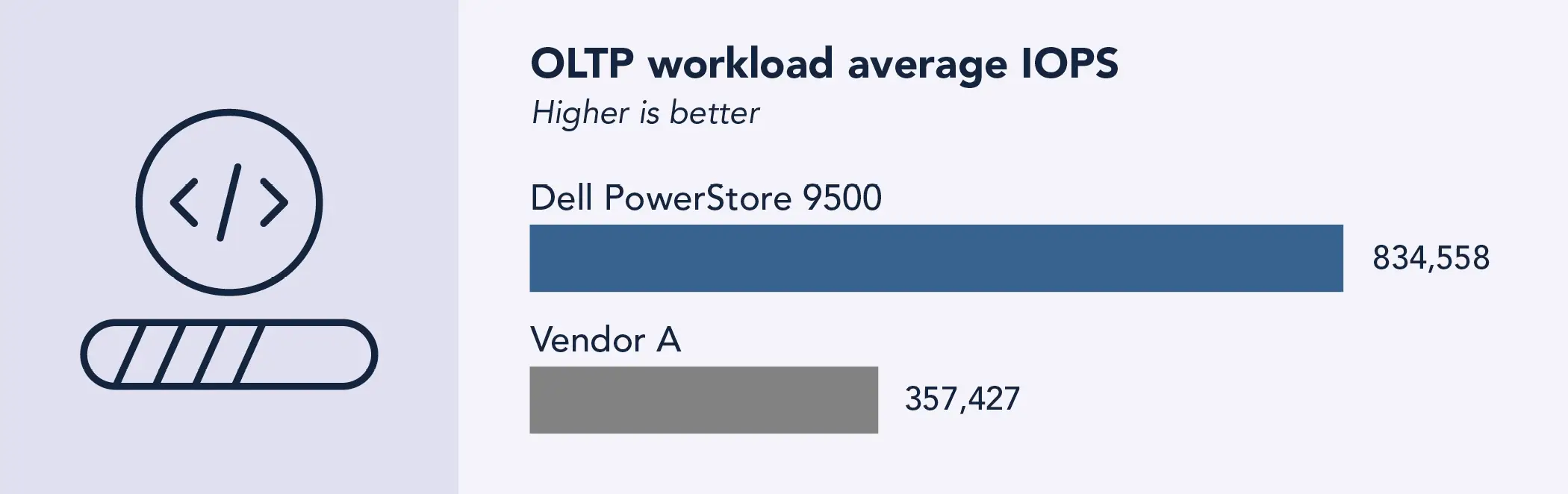
As Figure 1 shows, the Dell PowerStore 9500 array delivered 2.33 times the performance of Vendor A.
Vdbench OLTPA.vdb performance of the two test arrays. Higher numbers are better. Source: PT.
Testing details
Read-heavy, 8KB mixed I/Os with 128KB sequential large reads and writes to mimic index/table scans, batch queries, and background analytics
Random reads/writes: 65%/15%
Sequential reads/writes: 10%/10%
Average weighted I/O size: 32 KB
Runtime: 5 minutes (including 30-second warmup) for each thread setting
Key takeaway
The Dell PowerStore 9500 array delivered 2.33 times the performance of Vendor A on the Vdbench OLTP with analytics workload.
Lower latency at target IOPS
Lower latency in enterprise storage significantly improves overall system performance by reducing the time it takes to process each data request. This leads to faster application response times, which is especially critical for latency-sensitive workloads such as databases, virtualization platforms, and real-time analytics. With quicker I/O completion, systems can handle more operations per second, increasing throughput without requiring additional hardware. Lower latency also minimizes bottlenecks, allowing CPUs and GPUs to operate more efficiently rather than waiting on storage, and enables higher virtual machine density in consolidated environments.
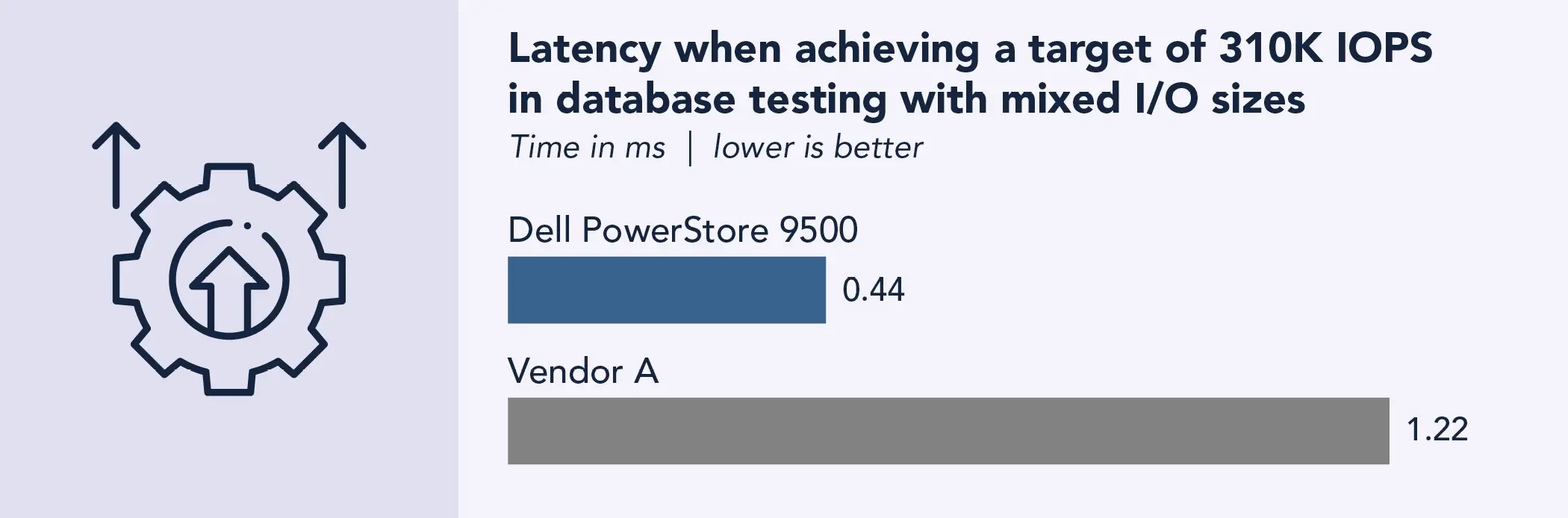
To compare the latency of our two test arrays, we conducted a different database test with mixed I/O sizes and set a target of 310,000 IOPS. We ran the test for 5 minutes. As Figure 2 shows, the Dell PowerStore 9500 array reduced latency by 63.9 percent compared to Vendor A.
Latency of the two test arrays with a target of 310,000 IOPS in a database test with mixed I/O sizes. Lower numbers are better. Source: PT.
Key takeaway
The Dell PowerStore 9500 array reduced latency by 63.94 percent compared to Vendor A with a target of 310,000 IOPS in a database test with mixed I/O sizes.
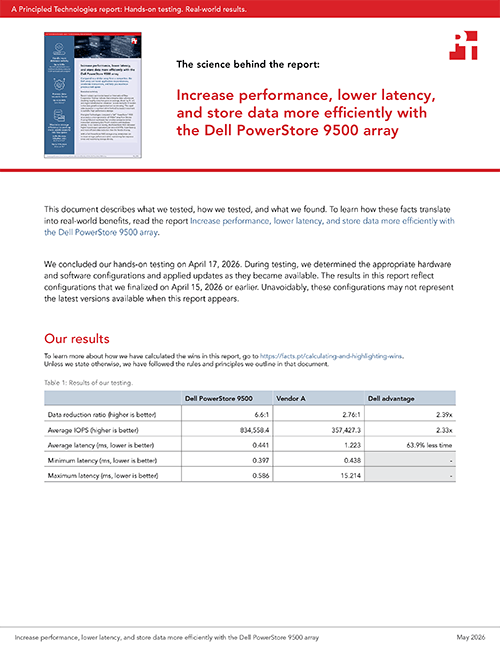
The latency of the Dell PowerStore 9500 array was not only lower, on average, than that of the Vendor A array, but was also much more consistent. While Vendor A delivered an average latency of 1.223 ms, results ranged from a minimum of 0.438 ms to a maximum of 15.214 ms. In contrast, latency on the Dell PowerStore 9500 array ranged from 0.397 ms to 0.586 ms, with an average of 0.441 ms. (See complete test results in the science behind the report.)
Low variability in storage array latency ensures more predictable and consistent performance, which is critical for applications that depend on steady response times, such as databases and real-time systems. It also reduces the risk of performance bottlenecks and improves overall system reliability under varying workloads.
How do data reduction capabilities maximize effective capacity and reduce footprint?
Data reduction technologies—including compression and deduplication—are critical in reducing storage requirements and associated costs and delaying the need for costly capacity upgrades. This leads to better system performance and minimizes downtime in critical operations. Dell PowerStore arrays use always-on data reduction to automatically eliminate redundant data as it’s written, maximizing storage efficiency without requiring manual configuration. This inline, real-time process reduces capacity needs and lowers costs while maintaining consistent performance.7
How did we measure data reduction?
To measure the data reduction capabilities of the two arrays, we used Vdbench single thread, 256KB sequential write to pre-fill the 64 logical unit numbers (LUNs) with 2:1 compression, 2.5:1 deduplication, and an 8KB deduplication unit. We used the graphical user interface to check the data reduction after the pre-fill and again after 1 hour.
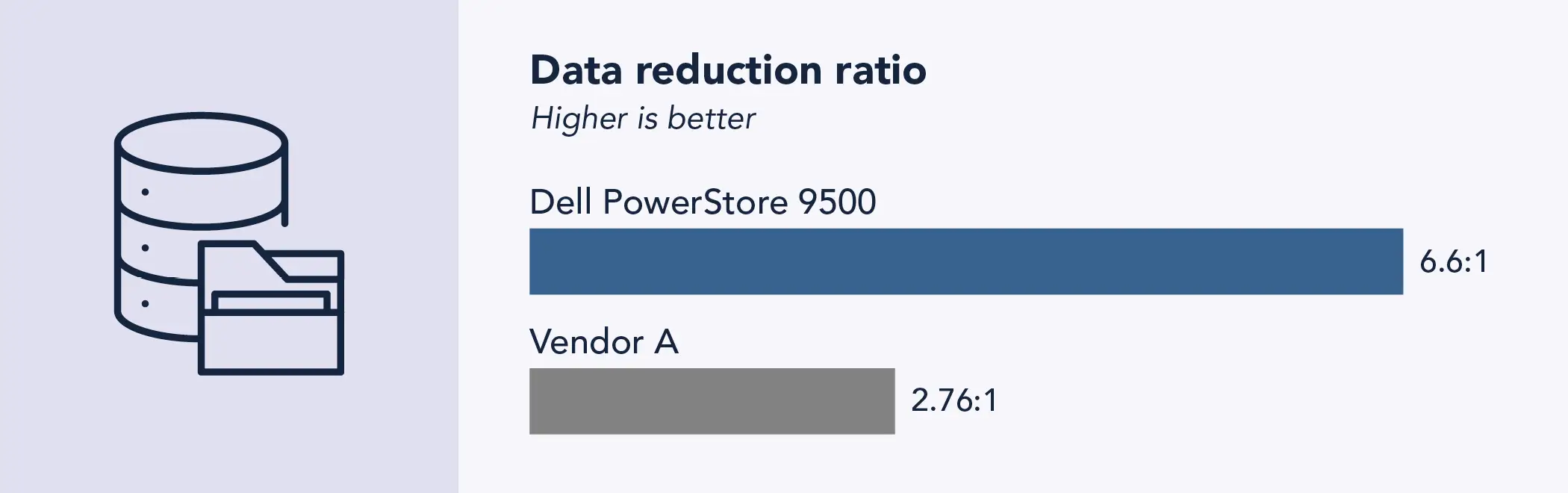
As Figure 3 shows, the Dell PowerStore 9500 achieved a data reduction ratio of 6.6:1, 2.39 times that of the 2.76:1 ratio achieved by the Vendor A array. In addition to a higher DDR, the Dell PowerStore array also has 11 percent more drives per rack unit (40 drives in 3 RU vs. Vendor A’s 48 drives in 4 RU).
Data reduction ratios achieved by the two test arrays with a dataset with 2:1 compression, 2.5:1 deduplication, and an 8KB deduplication unit after 1 hour. Higher numbers are better. Source: PT.
Key takeaway
The Dell PowerStore 9500 achieved a data reduction ratio of 6.6:1, 2.39 times that of the 2.76:1 ratio achieved by the Vendor A array.
The Dell data reduction guarantee
Understanding the customer value of data compression and deduplication technologies, Dell Technologies™ set out to develop the best data reduction capabilities in the industry. PowerStore data reduction is always on across the entire array, which means administrators don’t need to toggle it on or manage it on a per-workload basis. Dell is so confident in its already industry-leading data reduction capabilities and commitment that it now guarantees that customers purchasing any Generation 3 Dell PowerStore model will experience a 6:1 data reduction ratio on reducible data.8 Dell includes this guarantee automatically and requires no signature or assessment.
Conclusion
The Dell PowerStore 9500 delivers a compelling combination of strong performance, low latency, and high data density that addresses the demands of modern, data-intensive enterprises. Based on the Vdbench comparisons in this report, the Dell PowerStore array consistently outperformed Vendor A across OLTP with analytics workload profiles, while also reducing response times and requiring less physical capacity to store equivalent data. These advantages translate into tangible benefits for IT organizations: faster transaction processing and improved user experience, higher VM and database consolidation ratios, reduced rack footprint and operational overhead, and greater flexibility to support emerging workloads such as analytics and AI.
Choosing the Dell PowerStore 9500, part of the Dell PowerStore Gen 3 platform, can help your organization lower total cost of ownership and simplify infrastructure while delivering the performance and scalability needed to keep pace with accelerating data growth and business demands.
FAQ
What tests did Principled Technologies run to compare the arrays?
We ran identical Vdbench block tests on both arrays, measuring:
IOPS on an OLTP with analytics workload profile (OLTPA.vdb)
Latency at matched target IOPS
Data reduction using a controlled dataset
What workloads did Principled Technologies use and why?
We tested with two workloads:
OLTPA.vdb: Mixed small-block random I/O plus large sequential reads/writes to simulate OLTP with analytics (batch/scan activity)
Database test with mixed I/O sizes: Used to set target IOPS and compare latency
What were the key performance results?
Compared to the Vendor A array, the PowerStore 9500 array delivered 2.33 times the performance on the OLTPA.vdb workload. It reduced latency by 63.94 percent on the same database set with matched target IOPS.
Are these performance results transferable to other workloads?
Strong I/O performance on an OLTP benchmark can suggest a system is optimized for handling high-throughput, latency-sensitive operations, which may translate to solid performance on other workloads. However, this is not guaranteed, as different workloads can stress entirely different subsystems, access patterns, and resource bottlenecks.
How did Principled Technologies measure data reduction and what were the results?
We pre-filled 64 LUNs using Vdbench single-thread 256KB sequential writes with dataset characteristics (2:1 compression, 2.5:1 deduplication, and an 8KB deduplication unit), then checked each array’s data reduction after a defined interval.
The Dell PowerStore array achieved a data reduction ratio of 6.6:1, compared to a ratio of 2.76:1 for Vendor A.
Does Dell guarantee data reduction?
Yes. Dell guarantees a 6:1 data reduction ratio on reducible data for any new Dell PowerStore Gen 3 model; the guarantee is included with the array and requires no signature or assessment.
What are the primary hardware and density differences between the two test arrays?
The Dell PowerStore 9500 has a compact 3U chassis that fits 40 E3 drives (E3.S NVMe SSDs), supports up to 5.8 PBe per appliance at 6:1 DRR, and offers always-on data reduction and modular, non-disruptive upgrades.
The Vendor A appliance includes 32 x 3.5TB drives (~90 TiB available), 16 x 64Gb Fibre Channel ports, and PCIe Gen 5 slots.
Based on these comparative results, what operational and business benefits can the Dell PowerStore 9500 provide?
Key potential benefits include:
Improved application responsiveness and higher throughput
Lower latency for latency-sensitive workloads
Higher storage density (more drives/hosts per U) and lower rack footprint
Lower TCO via consolidation, reduced power/cooling, and lifecycle upgradeability
Programs from Dell that can provide non-disruptive controller upgrades and discounted capacity expansion, which may improve lifecycle economics compared to traditional refresh cycles
A PT team, which includes the contributors we’ve listed and others, created this report and performed the technical work behind it. We used AI to conduct research and some of the stock images are AI-generated.
This project was commissioned by Dell Technologies.
May 2026
Principled Technologies is a registered trademark of Principled Technologies, Inc. All other product names are the trademarks of their respective owners.
Principled Technologies disclaimer
Principled Technologies is a registered trademark of Principled Technologies, Inc. All other product names are the trademarks of their respective owners.
DISCLAIMER OF WARRANTIES; LIMITATION OF LIABILITY: Principled Technologies, Inc. has made reasonable efforts to ensure the accuracy and validity of its testing, however, Principled Technologies, Inc. specifically disclaims any warranty, expressed or implied, relating to the test results and analysis, their accuracy, completeness or quality, including any implied warranty of fitness for any particular purpose. All persons or entities relying on the results of any testing do so at their own risk, and agree that Principled Technologies, Inc., its employees and its subcontractors shall have no liability whatsoever from any claim of loss or damage on account of any alleged error or defect in any testing procedure or result.
In no event shall Principled Technologies, Inc. be liable for indirect, special, incidental, or consequential damages in connection with its testing, even if advised of the possibility of such damages. In no event shall Principled Technologies, Inc.’s liability, including for direct damages, exceed the amounts paid in connection with Principled Technologies, Inc.’s testing. Customer’s sole and exclusive remedies are as set forth herein.



 LinkedIn
 Facebook
 X
X Email
Email