A Principled Technologies report: Hands-on testing. Real-world results.
Empower your IT team with cloud-based PC management using Dell Management Portal and Microsoft Intune
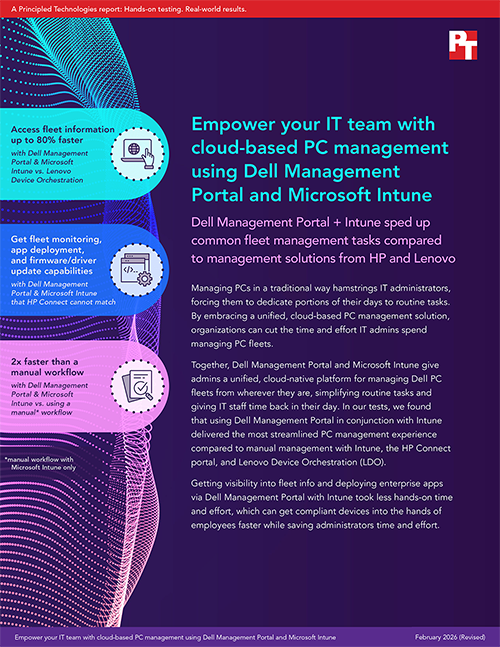
Dell Management Portal + Intune sped up common fleet management tasks compared to management solutions from HP and Lenovo
Managing PCs in a traditional way hamstrings IT administrators, forcing them to dedicate portions of their days to routine tasks. By embracing a unified, cloud-based PC management solution, organizations can cut the time and effort IT admins spend managing PC fleets.
Together, Dell Management Portal and Microsoft Intune give admins a unified, cloud-native platform for managing Dell PC fleets from wherever they are, simplifying routine tasks and giving IT staff time back in their day. In our tests, we found that using Dell Management Portal in conjunction with Intune delivered the most streamlined PC management experience compared to manual management with Intune, the HP Connect portal, and Lenovo Device Orchestration (LDO).
Getting visibility into fleet info and deploying enterprise apps via Dell Management Portal with Intune took less hands-on time and effort, which can get compliant devices into the hands of employees faster while saving administrators time and effort.
The importance of adopting modern, cloud-based PC management with Microsoft Intune
Traditional on-premises management tools rely on manual processes and rigid infrastructure. In other words, these tools just can’t keep up with today’s distributed workforces and dynamic device environments. Modern, cloud-based PC management platforms automate processes to streamline deployment, strengthen security, and ensure compliance. By shifting to a unified endpoint management (UEM) platform such as Microsoft Intune, organizations gain the agility, visibility, and scalability to support users anywhere—and return valuable time to IT teams.
We compared the following solutions to manage a Microsoft Intune environment:
Dell Management Portal
A partner portal integrated with Intune for simplified management of devices
HP Connect
A partner portal for Intune to manage HP devices
Manual management of Microsoft Intune
Using traditional management methods through Intune itself
Lenovo Device Orchestration
A subscription-based stand-alone management portal that can connect with Intune
Our hands-on tests quantified the time and steps each solution required to complete management tasks on a single device.1 Then, we used those findings to extrapolate the time and effort to complete each task for 1,000 devices. For these calculations, we measured the time and steps necessary to add one subsequent device, and then we multiplied those numbers by 999. We added that time and step count to the initial device’s time and step count to arrive at our 1,000-device fleet estimations. For more information, see the science behind the report.
About Microsoft Intune
Microsoft Intune is a cloud-based unified endpoint management platform that enables organizations to manage and secure their devices, applications, and data. IT admins can use Intune to configure policies, distribute apps, and ensure compliance across Windows, macOS, iOS, and Android platforms. According to Microsoft, Intune allows organizations to:
“Unify all your endpoint management tools into one solution and consolidate your endpoint management and security solutions.
Strengthen endpoint security with capabilities that help you protect your corporate data and maintain device compliance.
Accelerate business outcomes by optimizing device performance and streamlining operations.”2
IT admins need the ability to quickly obtain critical information about the devices in their fleet. For our first use case, we compared the time and effort to access OS version, storage details, assigned user, and service tag information on fleet members across management solutions. For the manual approach with only Intune, we drilled into the devices and clicked through to gather the information. For the Dell and Lenovo solutions, we found this information within their respective portals. HP Connect didn’t offer this functionality in its portal, leaving administrators to navigate to Intune itself.
While each environment required three steps to complete this use case, the time to gather critical system information varied. As Figure 1 shows, using Dell Management Portal with Microsoft Intune for this task took 4 seconds less than using Lenovo Device Orchestration (80 percent faster) and took 11 seconds less than completing the process manually.
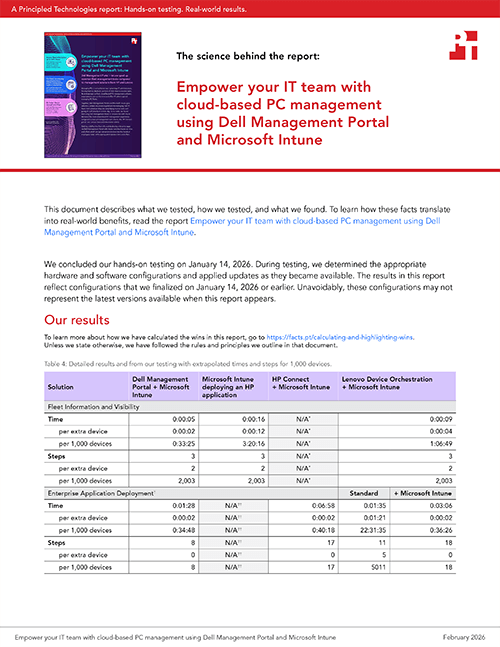
Time and steps to access PC fleet information using various management solutions. Source: PT.
About Dell Management Portal
“With Dell and Microsoft Intune working together, your IT admin just got a whole lot easier,” according to Dell.3 Integrating directly with Microsoft Intune, Dell Management Portal is a cloud-based app designed to enhance the management of PC fleets, streamlining and accelerating common administrative tasks. Dell Management Portal enables IT administrators to quickly gather critical system information and push updates across the fleet.
Dell Management Portal saved admin time for a single device—but what could that look like across an organization? Table 1 shows an example extrapolation of our results to a fleet of 1,000 PCs. After accessing fleet information on a single device, subsequent devices require less time and fewer steps (see the science behind the report to learn more). While the three solutions would require the same number of steps in our estimation, Dell Management Portal with Intune can reduce the time to complete the task. Its single pane of glass displays system information in one place, saving admins time they would otherwise spend scrolling, switching tabs, and hunting for information in a manual Intune environment or Lenovo Device Orchestration.
Based on these calculations, we estimate that Dell Management Portal with Microsoft Intune could save anywhere from half an hour to nearly 3 hours of admin time. That’s time better spent furthering projects to completion and providing more strategic support—not to mention far less hassle.
Table 1: Estimated time and steps to access fleet information on 1,000 devices. See the science behind the report for more details.
Task
Dell Management Portal + Microsoft Intune
Manual Microsoft Intune environment
HP Connect + Microsoft Intune
Lenovo Device Orchestration
Time (hh:mm:ss)
0:33:25
3:20:16
N/A
1:06:49
Steps
2,003
2,003
N/A
2,003
Keep compliant with corporate policy through easier app deployment
When PCs are in employee hands—or when you’re refreshing your fleet and delivering new devices—it can be a burden to schedule time with each individual and deploy a new app that the team needs. Robust cloud-based management tools let admins deploy enterprise apps to systems in their fleet, no matter where they’re located. Endpoint management with Microsoft Intune through Dell Management Portal can give admins a leg up when completing this task.
For this use case, we deployed the Dell ProAI Studio application package from Dell Management Portal to a specific user group within Microsoft Intune. We also deployed the app to target devices using solutions from the other vendors, and used traditional software distribution methods to deploy the app for the manual Intune solution. Using Dell Management Portal to deploy this app was quick and easy, requiring only eight steps and 1 minute, 28 seconds for a single device. It enabled us to complete the process in as much as 78 percent less time compared to using Intune on HP devices, as HP Connect has no deployment feature in their partner portal.
For the Lenovo solution, we tested two approaches: the standard deployment method and Intune deployment method. While Dell Management Portal is an Intune Partner Portal, Lenovo Device Orchestration (LDO) is a subscription-based stand-alone portal for device management that offers some manual integrations to exchange information between the Intune environment and LDO. Whichever method an IT team might select for an LDO environment, we found that both took more time and steps than the approach with Dell Management Portal integrated with Microsoft Intune.
Administrator time and steps to deploy enterprise apps onto PCs using various management solutions. Source: PT.
What do these per-device time savings mean for IT admins? As the fleet grows, so too can the time savings, giving admins significant time back in their workday for innovation.
Table 2 shows our results extrapolated to 1,000 devices (actual times may vary). Dell Management Portal and Microsoft Intune would require the same eight steps and a few additional seconds per device to deploy to 1 or 1,000 devices, making the process easy no matter the size of the fleet. In comparison, the standard deployment method within Lenovo Device Orchestration (without Intune) would target devices individually, requiring over 22 hours of admin time. To see our calculations in detail, see the science behind the report.
Dell Management Portal can make these tasks a snap, even saving time and effort compared to the other solutions with Intune we tested. By easily streamlining application management, IT teams can ensure that their entire fleet remains secure and compliant with corporate policies, reducing organizational risk.
Table 2: Estimated time and steps to deploy an app on 1,000 devices. See the science behind the report for more details.
Task
Dell Management Portal + Microsoft Intune
HP Connect + Microsoft Intune
Microsoft Intune deploying an HP application
Lenovo Device Orchestration (standard)
Lenovo Device Orchestration + Microsoft Intune
Time (hh:mm:ss)
0:34:48
N/A
0:40:18
22:31:35
0:36:26
Steps
8
N/A
17
5,011
18
Enjoy simple administration with Dell Management Portal + Microsoft Intune
After measuring time and steps for those use cases, we looked at the different features that each management platform offers to simplify administration. As Table 3 shows, Dell Management Portal offers more fleet-wide management capabilities contained within the Microsoft Intune environment.
Table 3: Feature matrix for availability within the management portal for managing a Microsoft Intune environment.
Feature
Dell Management Portal
HP Connect
Lenovo Device Orchestration
Fleet information and visibility
Yes
No
Yes
Enterprise application deployment
Yes
No
Yes
Advanced BIOS configuration and deployment
Yes
Yes
Per-device*
Manage driver/firmware updates
Yes
No
Yes
Manage below-OS security
Yes
Yes
Yes
*This feature is available for individual devices rather than across the fleet. For more details on our experience using this feature across a fleet, see our December 2025 report.
Of the solutions we looked at, only Dell Management Portal combined with Intune offers the ability to retrieve fleet information, deploy enterprise apps, configure and deploy advanced BIOS settings, manage driver/firmware updates, and manage below-OS security.
By offering a unified, intuitive pane of glass for fleet management, Dell Management Portal makes it easier for administrators to complete routine tasks. Other offerings that we assessed required multiple tools or portals to complete routine management tasks: HP Connect lacked the capabilities to complete our use cases, and the stand-alone nature of LDO—even with Intune integrations—could add significant time and steps to deploy enterprise apps. These extra burdens can create new headaches for admins trying to manage PC fleets large and small.
Conclusion
Selecting a modern, cloud-based PC management solution can help your IT team meet the challenges of a workforce that needs to work from anywhere. In our hands-on comparison of endpoint management solutions from leading vendors, we found that Dell Management Portal together with Microsoft Intune offered the most intuitive, feature-rich way to simplify routine fleet management tasks.
Dell Management Portal and Microsoft Intune reduced the time to get vital PC information by as much as 68 percent vs. using a manual workflow. Accessing fleet information with Dell Management Portal and Microsoft Intune was 80 percent faster than using Lenovo Device Orchestration. We also found that Dell Management Portal offered more monitoring, app deployment, and firmware/driver update capabilities within an Intune environment than HP Connect did.
In large fleets, these time saving could dramatically reduce administrative hours and allow IT teams to focus on strategic initiatives rather than routine maintenance. Plus, for organizations investing in new laptops, Dell Management Portal and Microsoft Intune can accelerate the process of large laptop deployments to get users up and running on their new devices sooner.
On the day this paper was published, Lenovo released a partner portal connection from within Intune. At the time of this edit, none of the items we tested were affected by the new integration.
This project was commissioned by Dell Technologies.
February 2026
Primary contributors
Tech: Craig Boyd
Writing: Jennifer Varghese
Design: Laura K., Jared W.
PM: Claire Ackerman
Developer: Michelle Hall
How we created this report
A PT team, which includes the contributors we’ve listed and others, created this report and performed the technical work behind it. We used AI to draft some sections of this report.
Principled Technologies is a registered trademark of Principled Technologies, Inc. All other product names are the trademarks of their respective owners.
Principled Technologies disclaimer
Principled Technologies is a registered trademark of Principled Technologies, Inc. All other product names are the trademarks of their respective owners.
DISCLAIMER OF WARRANTIES; LIMITATION OF LIABILITY: Principled Technologies, Inc. has made reasonable efforts to ensure the accuracy and validity of its testing, however, Principled Technologies, Inc. specifically disclaims any warranty, expressed or implied, relating to the test results and analysis, their accuracy, completeness or quality, including any implied warranty of fitness for any particular purpose. All persons or entities relying on the results of any testing do so at their own risk, and agree that Principled Technologies, Inc., its employees and its subcontractors shall have no liability whatsoever from any claim of loss or damage on account of any alleged error or defect in any testing procedure or result.
In no event shall Principled Technologies, Inc. be liable for indirect, special, incidental, or consequential damages in connection with its testing, even if advised of the possibility of such damages. In no event shall Principled Technologies, Inc.’s liability, including for direct damages, exceed the amounts paid in connection with Principled Technologies, Inc.’s testing. Customer’s sole and exclusive remedies are as set forth herein.



 Twitter
 Facebook
 LinkedIn
 Email
Email